
erweiterbarer Karten
Ein Schiebekarten-Widget für Flutter

- Sterne
- 110
- Forks
- 15
- Letzter Push (UTC)
- 27.11.2019
- Projektstatus
- Aktiv
Original-README
Englischer Projektschnappschuss. Aktuelle Inhalte auf GitHub.
Expandable Card
This is a Flutter Widget that makes it easy to build a page with a bottom Card that can be expanded on user drag.
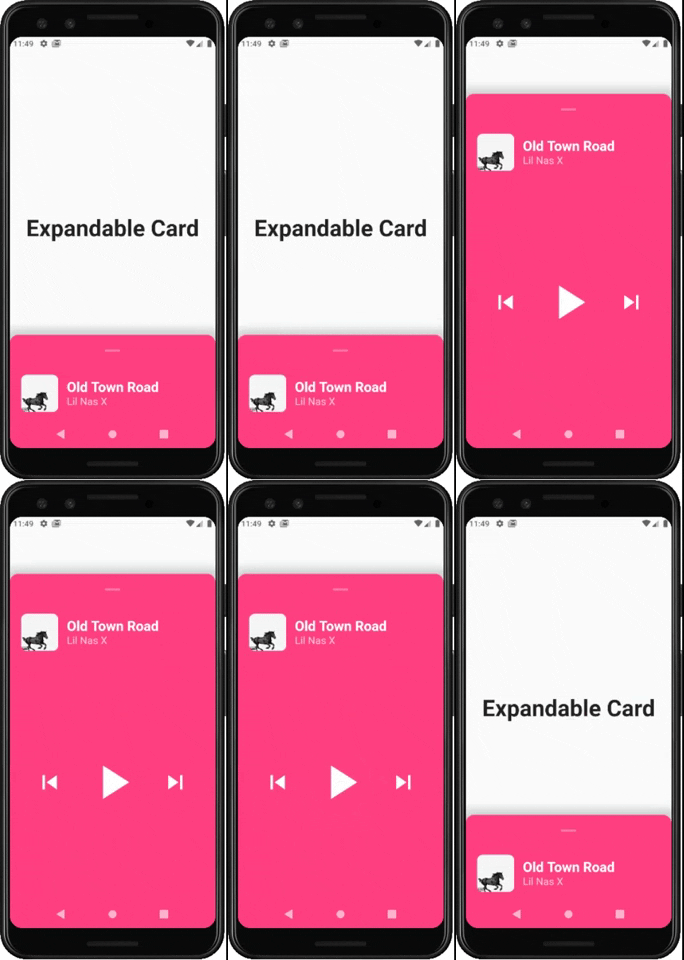
How to use it
Use ExpandableCardPage for the body of your Scaffold. This widget will take two attributes:
Widget page: which is the default page in the backgroundExpandableCard expandableCard: which is the bottom card itself. You can call theExpandableCardconstructor to build one.
ExpandableCard constructor has a few attributes:
EdgeInsetsGeometry padding: padding inside the card. Default value isEdgeInsets.all(15)double minHeight: default height of the card when it's not expanded. Default value is200double maxHeight: height of the card when it's fully expanded. Default value is500bool hasShadow: determines whether the card has box shadow or not. Default istrueColor backgroundColor: background color of the card. Default isColors.blueGreybool hasRoundedCorners: determines whether the card has rounded corners or not. Default isfalsebool hasHandle: will add a little handle icon. Default istrueList<Widget> Children: Widgets that make the actual content of the card
Future Implementations:
AnimatedExpandableCard: will allow animation between closed state and expanded state.- Add suport for scrolling card when its fully expanded

GitHub-Autor
Lucas Bernardi ↗
SprachenDartObjective-CJava
Verwendete Abhängigkeiten
Abhängigkeiten 3 Einträge
- flutter
{"sdk":"flutter"} - cupertino_icons
^0.1.2 - flutter_testEntwicklung
{"sdk":"flutter"}
Wie wähle ich ein passendes Repository?
Nach Anwendungsfall filtern, Aktivität vergleichen und vor der Nutzung das Originalprojekt prüfen.
- Nach Name, Autor oder Beschreibung suchen und nach Thema eingrenzen.
- Sterne, Forks und letzte Pushes vergleichen. Sterne zeigen Interesse, garantieren aber keine Qualität.
- Vor der Nutzung README, Lizenz und Issues auf GitHub prüfen.
Quellen und Pflege
“A repository is the most basic element of GitHub.”
GitHub Docs — About repositories ↗
- Bernardi23/expandable_card · GitHub ↗
- GitHub Docs — Saving repositories with stars ↗
- Verzeichnis gepflegt von Ducafecat ↗