

v11.2.0
auto_route
AutoRoute ist eine deklarative Routing-Lösung, bei der alles, was für die Navigation benötigt wird, automatisch für Sie generiert wird.
3410Likes 421.00030-Tage-Downloads160Pub-Punkte
AndroidiOSWebmacOSWindowsLinux
Richten Sie Ihr Flutter-Projekt mit der Architektur Modell-Ansicht-ViewModel (MVVM) ein

Englischer Projektschnappschuss. Aktuelle Inhalte auf GitHub.
Model–View–ViewModel (MVVM) is a very established architectural pattern when it's come to software development. Here I have tried to put MVVM in simple example which will help you to implement in any project.
This sample demonstrates how one can
Apart from the basic architecture setup, this sample also demonstrates
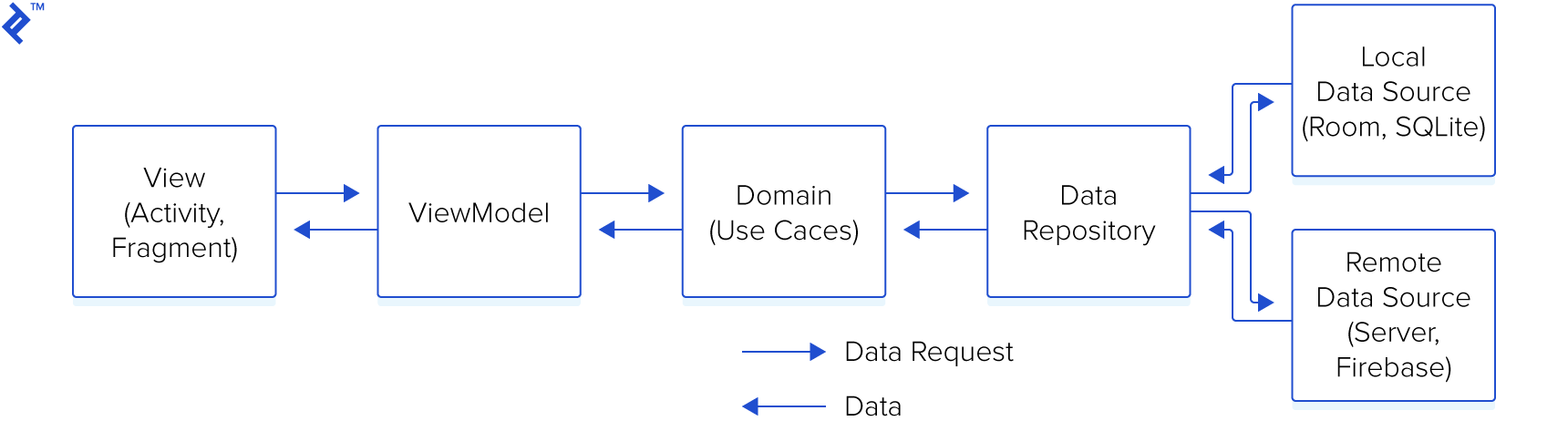
There are 3 main modules to help separate the code. They are Data, Domain, and Application.
Data contains Local Storage, APIs, Data objects (Request/Response object, DB objects), and the repository implementation.
Domain contains UseCases, Domain Objects/Models, and Repository Interfaces
Application contains UI, View Objects, Widgets, etc. Can be split into separate modules itself if needed. For example, we could have a module called Device handling things like camera, location, etc.

One can download the code in zip format or take checkout from the git repository.
You need to run build_runner command for code generation everytime when you make changes in your original file.
AutoRoute ist eine deklarative Routing-Lösung, bei der alles, was für die Navigation benötigt wird, automatisch für Sie generiert wird.
AutoRoute ist eine deklarative Routing-Lösung, bei der alles, was für die Navigation benötigt wird, automatisch für Sie generiert wird.
retrofit.dart ist ein dio-Client-Generator, der source_gen verwendet und von Chopper und Retrofit inspiriert ist.
retrofit generator ist ein dio-Client-Generator, der source_gen verwendet und von Chopper und Retrofit inspiriert ist.
Das Framework zum Erstellen testbarer, skalierbarer und wartbarer Flutter-Anwendungen
Injectable ist ein praktischer Codegenerator für get_it. Inspiriert von Angular DI, Guice DI und inject.dart.
Injectable ist ein praktischer Codegenerator für get_it. Inspiriert von Angular DI, Guice DI und inject.dart.
Pretty Dio Logger ist ein Dio-Interceptor, der Netzwerkaufrufe in einem ansprechenden, leicht lesbaren Format protokolliert.
Abhängigkeiten 19 Einträge
{"sdk":"flutter"}^1.0.2^4.0.6^3.0.1+1^4.6.0^1.2.0-beta-1^7.2.0^1.5.3^2.3.15^4.2.1^1.0.2{"sdk":"flutter"}^2.0.0^4.0.3^2.2.0^6.3.1^1.5.4^4.2.1^5.3.0Nach Anwendungsfall filtern, Aktivität vergleichen und vor der Nutzung das Originalprojekt prüfen.
“A repository is the most basic element of GitHub.”
GitHub Docs — About repositories ↗