

v0.2.2
your_splash
Eine Flutter-Implementierung des Splash-Screens. Unterstützt Android und iOS.
7Likes 2830-Tage-Downloads40Pub-Punkte
Keine Plattformdaten
Eine Flutter-Implementierung des Splash-Screens. Unterstützt Android und iOS.

Englischer Projektschnappschuss. Aktuelle Inhalte auf GitHub.


A Flutter implementation of splash screen. Supports Android and IOS.
To use this library, add your_splash as a dependency in your pubspec.yaml file:
dependencies:
  ...
  your_splash:
In your library add the following import:
import 'package:your_splash/your_splash.dart';
This package comes with 2 kinds of splash screen actions:
FuturedSplashScreenTimedSplashScreenYou can create a splash screen in two different ways:
FuturedSplashScreen or TimedSplashScreen constructor and passing required arguments.SplashScreen.futured or SplashScreen.timed constructor respectively.A FuturedSplashScreen requires next arguments:
| Parameter | Description |
|---|---|
future |
This is your Future callback for delay |
route |
This is a dynamic argument. Can be String name of route or PageRoute instance |
body |
This is a body of your splash screen |
A TimedSplashScreen requires next arguments:
| Parameter | Description |
|---|---|
seconds |
This is a duration in seconds for how long your splash screen will be displayed |
route |
This is a dynamic argument. Can be String name of route or PageRoute instance |
body |
This is a body of your splash screen |
Quick start example:
import 'package:flutter/material.dart';
import 'package:your_splash/your_splash.dart';

void main() {
  runApp(MyApp());
}

class MyApp extends StatelessWidget {
  @override
  Widget build(BuildContext context) {
    return MaterialApp(
      debugShowCheckedModeBanner: false,
      home: SplashScreen.timed(
        seconds: 3,
        route: MaterialPageRoute(builder: (_) => Home()),
        body: Scaffold(
          body: InkWell(
            child: Container(
              decoration: const BoxDecoration(
                image: DecorationImage(
                  fit: BoxFit.cover,
                  image: NetworkImage('https://bit.ly/3hD5Tj8'),
                ),
              ),
            ),
          ),
        ),
      ),
    );
  }
}

class Home extends StatelessWidget {
  @override
  Widget build(BuildContext context) {
    return Scaffold(
      appBar: AppBar(
        title: Text("Home screen!"),
      ),
      body: Center(
        child: Text(
          "Welcome!",
          style: TextStyle(fontWeight: FontWeight.bold, fontSize: 40.0),
        ),
      ),
    );
  }
}
How can I animate transition between the splash screen and navigation page?
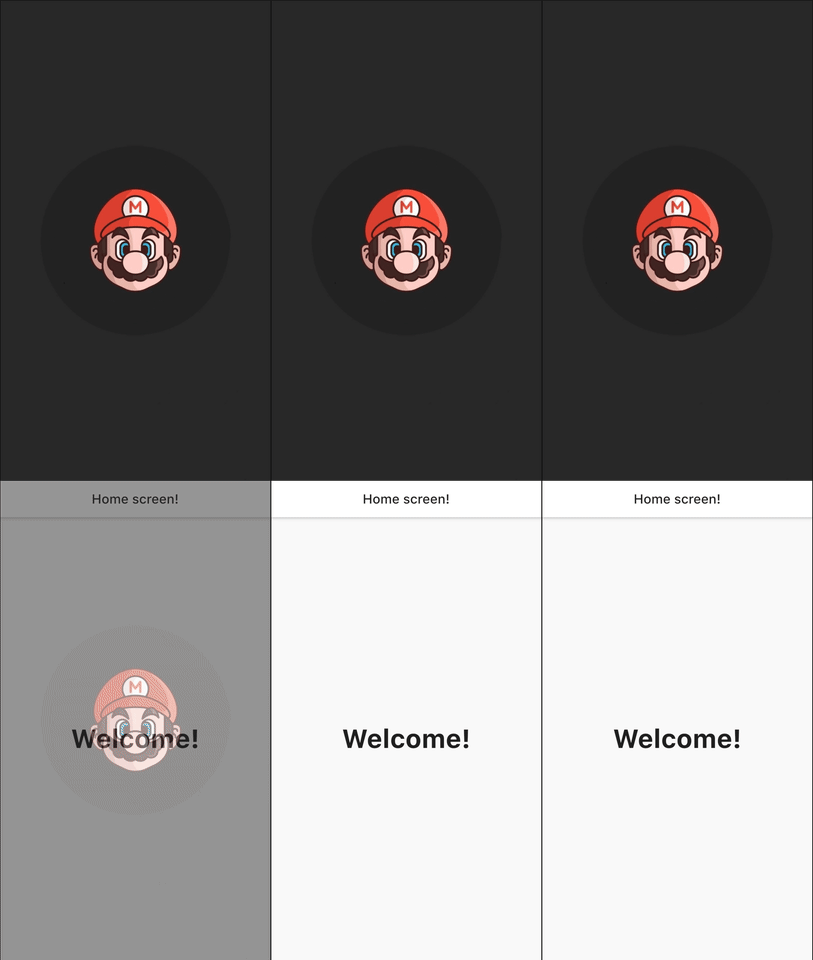
route: PageRouteBuilder(
  pageBuilder: (context, animation, secondaryAnimation) => Home(),
  transitionDuration: Duration(seconds: 1),
  transitionsBuilder: (_, animation, secAnim, child) {
    var tween = Tween(begin: 0.0, end: 1.0).chain(
      CurveTween(curve: Curves.easeInOutCirc),
    );
    return FadeTransition(
        opacity: animation.drive(tween), child: child);
  },
You can see all examples here
Abhängigkeiten 2 Einträge
{"sdk":"flutter"}{"sdk":"flutter"}Nach Anwendungsfall filtern, Aktivität vergleichen und vor der Nutzung das Originalprojekt prüfen.
“A repository is the most basic element of GitHub.”
GitHub Docs — About repositories ↗