v4.1.0
brick_build
Bibliothek und Schnittstelle zur Codegenerierung für Brick-Komponenten. Nützlich zum Erstellen von SerDes-Generatoren für Adapter.
1Likes 387030-Tage-Downloads140Pub-Punkte
AndroidiOSmacOSWindowsLinux
Eine intuitive Möglichkeit, mit persistente Daten in Dart zu arbeiten

Englischer Projektschnappschuss. Aktuelle Inhalte auf GitHub.

An intuitive way to work with persistent data in Dart.
Brick is an extensible query interface for Dart applications. It's an all-in-one solution responsible for representing business data in the application, regardless of where your data comes from. Using Brick, developers can focus on implementing the application, without concern for where the data lives. Brick was inspired by the need for applications to work offline first, even if an API represents your source of truth.
Add the packages:
dependencies:
  # Or brick_offline_first_with_graphql
  # Or brick_offline_first_with_supabase
  brick_offline_first_with_rest:
  sqflite: # optional
dev_dependencies:
  # Or brick_offline_first_with_graphql_build: any
  # Or brick_offline_first_with_supabase_build: any
  brick_offline_first_with_rest_build:
  build_runner:
Configure your app directory structure to match Brick's expectations:
mkdir -p lib/brick/adapters lib/brick/db;
Add models that contain your app logic. Models must be saved with the .model.dart suffix (i.e. lib/brick/models/person.model.dart).
Run dart run build_runner build to generate your models and sometimes migrations. Rerun after every new model change or dart run build_runner watch for automatic generations. You'll need to run this again after your first migration.
Extend an existing repository or create your own (Supabase has some exceptions):
// lib/brick/repository.dart
import 'package:brick_offline_first_with_rest/brick_offline_first_with_rest.dart';
import 'package:brick_rest/brick_rest.dart';
import 'package:brick_sqlite/brick_sqlite.dart';
import 'package:my_app/brick/brick.g.dart';
import 'package:sqflite/sqflite.dart' show databaseFactory;
import 'package:my_app/brick/db/schema.g.dart';
export 'package:brick_core/query.dart' show And, Or, Query, QueryAction, Where, WherePhrase;

class Repository extends OfflineFirstWithRestRepository {
  Repository()
      : super(
          migrations: migrations,
          restProvider: RestProvider(
            'http://0.0.0.0:3000',
            modelDictionary: restModelDictionary,
          ),
          sqliteProvider: SqliteProvider(
            _DB_NAME,
            databaseFactory: databaseFactory,
            modelDictionary: sqliteModelDictionary,
          ),
          offlineQueueManager: RestRequestSqliteCacheManager(
            'brick_offline_queue.sqlite',
            databaseFactory: databaseFactory,
          ),
        );
}
Profit.
Create a model as the app's business logic:
// brick/models/user.dart
@ConnectOfflineFirstWithRest()
class User extends OfflineFirstWithRestModel {}
And generate (de)serializing code to fetch to and from multiple providers:
$ (flutter) pub run build_runner build
A repository fetches and returns data across multiple providers. It's the single access point for data in your app:
class MyRepository extends OfflineFirstWithRestRepository {
  MyRepository();
}

final repository = MyRepository();

// Now the models can be queried:
final users = await repository.get<User>();
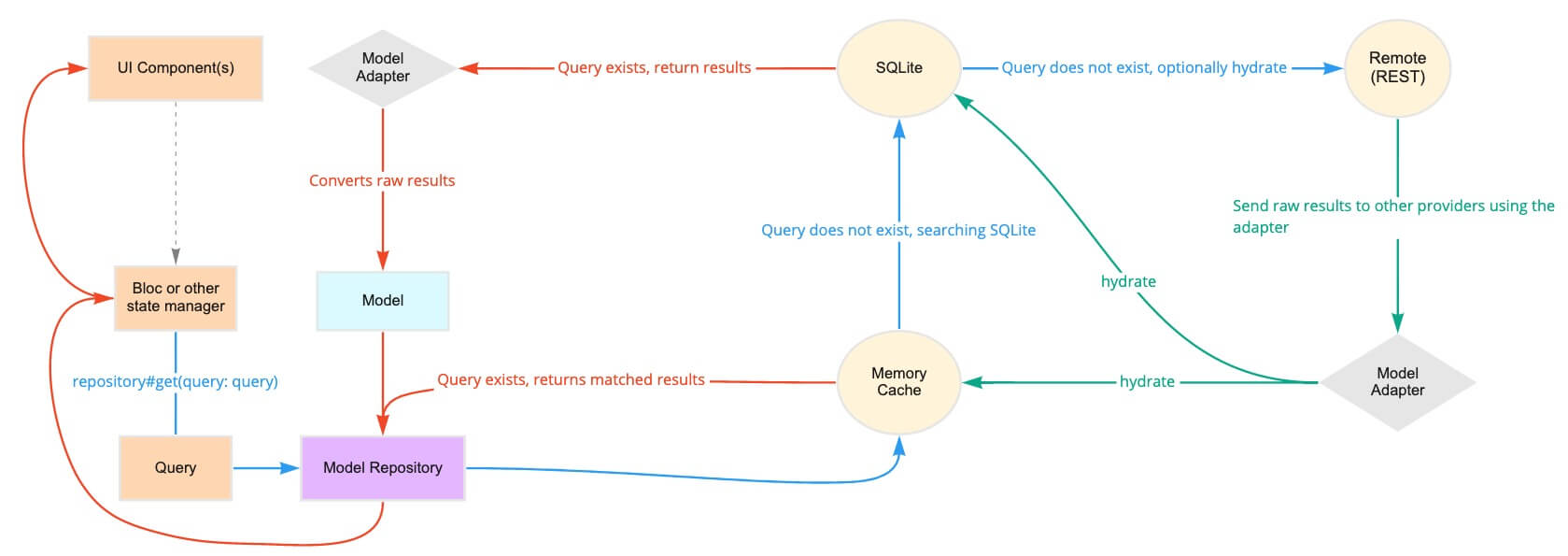
Behind the scenes, this repository could poll a memory cache, then SQLite, then a REST API. The repository intelligently determines how and when to use each of the providers to return the fastest, most reliable data.
// Queries can be general:
final query = Query(where: [Where('lastName').contains('Muster')]);
final users = await repository.get<User>(query: query);

// Or singular:
final query = Query.where('email', 'user@example.com', limit1: true);
final user = await repository.get<User>(query: query);
Queries can also receive reactive updates. The subscribed stream receives all models from its query whenever the local copy is updated (e.g. when the data is hydrated in another part of the app):
final users = repository.subscribe<User>().listen((users) {})
Once a model has been created, it's sent to the repository and back out to each provider:
final user = User();
await repository.upsert<User>(user);
Repositories can support associations and automatic (de)serialization of child models.
class Hat extends OfflineFirstWithRestModel {
  final String color;
  Hat({this.color});
}
class User extends OfflineFirstWithRestModel {
  // user has many hats
  final List<Hat> hats;
}

final query = Query.where('hats', Where('color').isExactly('brown'));
final usersWithBrownHats = repository.get<User>(query: query);
Brick natively serializes primitives, associations, and more.
If it's still murky, check out Learn for videos, tutorials, and examples that break down Brick.
Bibliothek und Schnittstelle zur Codegenerierung für Brick-Komponenten. Nützlich zum Erstellen von SerDes-Generatoren für Adapter.
GraphQL-Connector für Brick, eine Bibliothek zur Datenpersistenz. Enthält Anmerkungen, Adapter, Modelle und Provider.
Codegenerierungsbibliothek für GraphQL-Anbieter, Modelle und Adapter in Brick
Codegenerierungsbibliothek für JSON-ähnliche Anbieter, Modelle und Adapter in Brick
Ein Brick-Domain, der Datenabrufe über lokale Anbieter vor den Remote-Anbietern routet.
Codegenerierungsbibliothek für den Brick Offline-First-Domain
Ein Brick-Domain, der Datenabrufe über lokale Anbieter vor einem GraphQL-Anbieter weiterleitet.
Codegenerierungsbibliothek für das Brick Offline First Domain mit GraphQL
Ein Brick-Domain, der Datenabrufe über lokale Anbieter vor REST-Anbietern weiterleitet.
Codegenerierungsbibliothek für das Brick Offline First Domain mit REST
Ein Brick-Domain, der die Datenabrufverarbeitung über lokale Anbieter vor einem Supabase-Anbieter leitet.
RESTful-API-Connector für Brick, eine Bibliothek zur Datenpersistenz. Enthält Anmerkungen, Adapter, Modell und Provider.
Nach Anwendungsfall filtern, Aktivität vergleichen und vor der Nutzung das Originalprojekt prüfen.
“A repository is the most basic element of GitHub.”
GitHub Docs — About repositories ↗