
 v1.1.0
dynamic_themes
Ermöglicht die Angabe einer Anzahl von Farbthemen, aus denen der Benutzer wählen kann. Behält das ausgewählte Thema über Neustarts der App hinweg bei.
43Likes 334030-Tage-Downloads150Pub-Punkte
AndroidiOSWebmacOSWindowsLinux
Ein Flutter-Paket, das es Ihnen ermöglicht, eine Anzahl von Farbthemen für die Benutzerwahl anzugeben. Behält das ausgewählte Thema über App-Neustarts hinweg bei.

Abhängigkeiten 3 Einträge
{"sdk":"flutter"}^2.0.5{"sdk":"flutter"}Englischer Projektschnappschuss. Aktuelle Inhalte auf GitHub.
This package allows you to specify multiple themes for the user to choose from. The theme can be updated dynamically during runtime. The package persits the selected theme across app restarts.
image
Follow the instructions here.
This package allows for an arbitrary number of themes to be defined. Each theme has a unique ID of type int. To create the themes and map them to IDs, first you have to create an instance of ThemeCollection, e. g.:
final themeCollection = ThemeCollection(
    themes: {
        0: ThemeData(primarySwatch: Colors.blue),
        1: ThemeData(primarySwatch: Colors.red),
        2: ThemeData.dark(),
    },
    fallbackTheme: ThemeData.light(), // optional fallback theme, default value is ThemeData.light()
);
However, I would recommend to introduce a class with static const int values to associate a name to each ID value:
class AppThemes {
    static const int LightBlue = 0;
    static const int LightRed = 1;
    static const int Dark = 2;
}
final themeCollection = ThemeCollection(
    themes: {
        AppThemes.LightBlue: ThemeData(primarySwatch: Colors.blue),
        AppThemes.LightRed: ThemeData(primarySwatch: Colors.red),
        AppThemes.Dark: ThemeData.dark(),
    },
    fallbackTheme: ThemeData.light(),
);
Now, wrap your material app like this:
return DynamicTheme(
    themeCollection: themeCollection,
    defaultThemeId: AppThemes.LightBlue, // optional, default id is 0
    builder: (context, theme) {
        return MaterialApp(
            title: 'dynamic_themes example',
            theme: theme,
            home: HomePage(title: 'dynamic_themes example app'),
        );
    }
);
The theme can be set anywhere in the app, provided you have a BuildContext, e. g.:
DynamicTheme.of(context).setTheme(AppThemes.LightRed);
By setting the theme, its ID is automatically saved via the shared_preferences package, so the next time the app starts, the theme can be restored automatically.
Provided you have wrapped the MaterialApp in the DynamicTheme widget, you can access the current theme like you are used to it by calling
final theme = Theme.of(context);
If for any reason you can't access the theme this way, you can also call
final theme = DynamicTheme.of(context).theme;
To get the ID of the current theme, for example to create a selection UI as done in the example app provided with this package, call
final themeId = DynamicTheme.of(context).themeId;
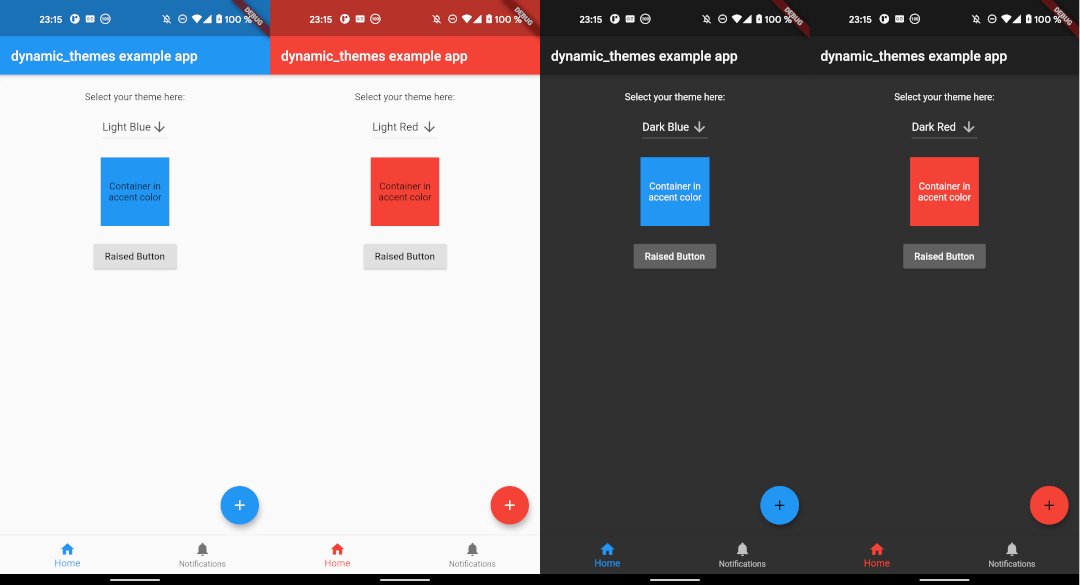
The example app can be found in the example folder. It implements a dropdown menu to select between 4 themes. The app is the source for the screenshots above.
If you experience any problems using this package, please create an issue on Github. Pull requests are also very welcome.
Many thanks to the dynamic_theme package from Norbert Kozsir this package was inspired by!