
 v0.0.13
progress_bar_chart
Ein Paket, um mehrere Werte mit Hilfe von Fortschrittsindikatoren und Animationen in einem vertikalen Diagramm anzuzeigen.
14Likes 34530-Tage-Downloads145Pub-Punkte
AndroidiOSWebmacOSWindowsLinux
Ein Paket, um mehrere Werte mit Hilfe von Fortschrittsindikatoren und Animationen in einem vertikalen Diagramm anzuzeigen.
Englischer Projektschnappschuss. Aktuelle Inhalte auf GitHub.
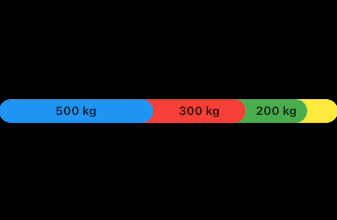
A package to display multipe values on a vertical chart using progess indicators and animation. Each value can has a color .
| Example 1 | Example 2 |
|---|---|
 |
 |
Example 1:
final List<StatisticsItem> stats = [
  StatisticsItem(Colors.blue, 500, title: 'Type 1'),
  StatisticsItem(Colors.green, 200, title: 'Type 2'),
  StatisticsItem(Colors.red, 300, title: 'Type 3'),
  StatisticsItem(Colors.yellow, 100, title: 'Type 4'),
];

ProgressBarChart(
    values: stats,
    height: 30,
    borderRadius: 20,
    totalPercentage: 1100,
    unitLabel: 'kg',
),
Example 2:
final List<StatisticsItem> stats = [
  StatisticsItem(Colors.blue, 0.4),
  StatisticsItem(Colors.green, 0.3),
  StatisticsItem(Colors.red, 0.2),
  StatisticsItem(Colors.yellow, 0.1),
];

ProgressBarChart(
  values: stats,
  height: 30,
  borderRadius: 20,
),
Without labels and colorblend:
final List<StatisticsItem> stats = [
  StatisticsItem(Colors.blue, 0.4),
  StatisticsItem(Colors.green, 0.3),
  StatisticsItem(Colors.red, 0.2),
  StatisticsItem(Colors.yellow, 0.1),
];

ProgressBarChart(
  values: stats,
  height: 30,
  borderRadius: 20,
  showLables: false,
  colorBlend: false,
)

Abhängigkeiten 5 Einträge
{"sdk":"flutter"}^0.20.2^4.5.0{"sdk":"flutter"}^4.0.0Nach Anwendungsfall filtern, Aktivität vergleichen und vor der Nutzung das Originalprojekt prüfen.
“A repository is the most basic element of GitHub.”
GitHub Docs — About repositories ↗