

 v0.0.5
circular
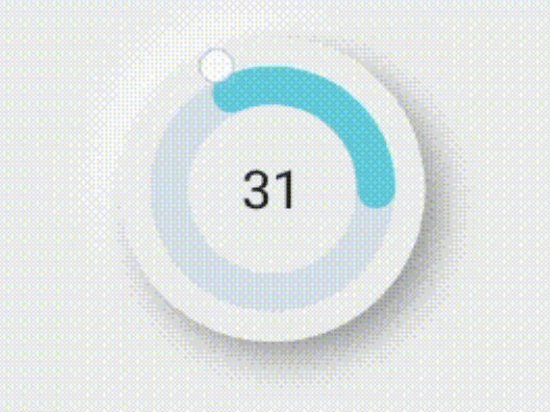
Flutter-Paket zum Auswählen und Anzeigen von Daten in kreisförmigen Schieberegler, um die Arbeit mit Werten innerhalb eines bestimmten Bereichs zu vereinfachen
29Likes 9330-Tage-Downloads140Pub-Punkte
AndroidiOSWebmacOSWindowsLinux
Mahmoudgarwallane/circular_slider open-source repository details.

Englischer Projektschnappschuss. Aktuelle Inhalte auf GitHub.



flutter pub add circular
import 'package:circular/circular.dart';
CircularSlider(
decoration: BoxDecoration(
    borderRadius: BorderRadius.circular(200),
    boxShadow: const [
      BoxShadow(
          offset: Offset(-10, -10),
          color: Colors.white,
          blurRadius: 20,
          spreadRadius: 1),
      BoxShadow(
          offset: Offset(10, 10),
          color: Color.fromARGB(255, 158, 158, 158),
          blurRadius: 20,
          spreadRadius: 1)
    ]),
maxValue: 100,
radius:100,
child: Text(
  value.toString(),
  style: TextStyle(fontSize: 30),
),
color: Color(0xffEEEEEE),
sliderColor: Color(0xff62CBDA),
unSelectedColor: Color(0xffD7DEE7),
onDrag: (value) {
  setState(() {
    this.value = value;
  });
},
),
CircularViewer(
  decoration: BoxDecoration(
      borderRadius: BorderRadius.circular(200),
      boxShadow: const [
        BoxShadow(
            offset: Offset(-10, -10),
            color: Colors.white,
            blurRadius: 20,
            spreadRadius: 1),
        BoxShadow(
            offset: Offset(10, 10),
            color: Color.fromARGB(255, 158, 158, 158),
            blurRadius: 20,
            spreadRadius: 1)
      ]),
  value: 50,
  maxValue: 100,
  radius: 100,
  textStyle: TextStyle(fontSize: 30),
  color: Color(0xffEEEEEE),
  sliderColor: Color(0xff62CBDA),
  unSelectedColor: Color(0xffD7DEE7),
)
check out the full example
after I made the the magic circle I decided to make it useful so I made this package
Contributions are always welcome!
Abhängigkeiten 3 Einträge
{"sdk":"flutter"}{"sdk":"flutter"}^1.0.0Nach Anwendungsfall filtern, Aktivität vergleichen und vor der Nutzung das Originalprojekt prüfen.
“A repository is the most basic element of GitHub.”
GitHub Docs — About repositories ↗