

 v1.1.2
colored_json
Ein Paket, das eine JSON-Zeichenfolge in ein anpassbares Flutter-Widget konvertiert.
27Likes 351030-Tage-Downloads160Pub-Punkte
AndroidiOSWebmacOSWindowsLinux
Dies ist ein Flutter-Plugin, das eine JSON-Zeichenfolge übernimmt und in ein anpassbares Flutter-Widget umwandelt.

Englischer Projektschnappschuss. Aktuelle Inhalte auf GitHub.
Convert JSON string into customizable widget.
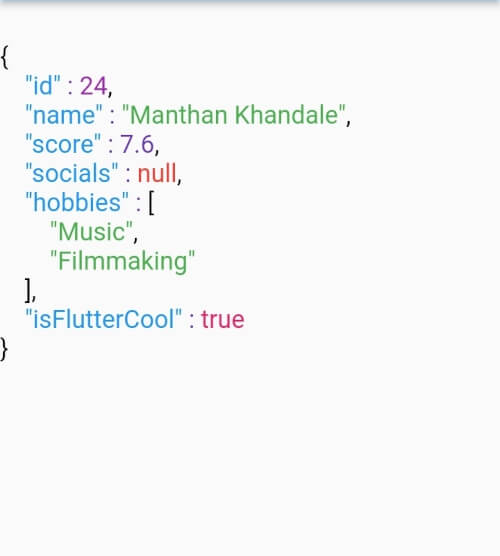
ColoredJson is a stateless widget that produces a structured view of JSON string provided. It can be used like any other flutter widget.
It's fully customizable where you can set different colors to different datatypes including colon, comma and brackets. Set indent length. Use text style of your choice. You can also change the background color.
| Defaut View | Customised View 1 | Customised View 2 |
|---|---|---|
 |
 |
 |
data parameter of ColoredJson Widgetconst String responseBody = '''
{
'id' : 1,
'name' : 'Colored Json',
'isFlutterAwesome' : true,
}
''';
ColoredJson(
data: responseBody,
)
final dartMap = {
  "id": 24,
  "name": "Manthan Khandale",
  "score": 7.6,
  "socials": null,
  "hobbies": [
    "Music",
    "Filmmaking",
  ],
  "isFlutterCool": true,
};

ColoredJson(
 data: jsonEncode(dartMap),
 indentLength: 5,
 keyColor: Colors.green,
 backgroundColor: Colors.black,
 boolColor: Colors.white,
 nullColor: Colors.redAccent,
 stringColor: Colors.cyan,
 curlyBracketColor: Colors.yellow,
 doubleColor: Colors.deepOrange,
 squareBracketColor: Colors.amber,
 commaColor: Colors.yellow,
 colonColor: Colors.purple,
 intColor: Colors.lime,
 textStyle: const TextStyle(
  fontSize: 20,
  letterSpacing: 2,
  ),
 )
| Parameter | Info |
|---|---|
| data (required) | A JSON string to be formatted |
| keyColor | Color of Json Key |
| intColor | Color of integer type value |
| doubleColor | Color of decimal type value |
| stringColor | Color of string type value |
| boolColor | Color of boolean type value |
| nullColor | Color of null type value |
| curlyBracketColor | Color of curly brackets {} |
| squareBracketColor | Color of square brackets [] |
| commaColor | Color of comma ( , ) |
| colonColor | Color of colon ( : ) |
| backgroundColor | Background color of widget |
| textStyle | Textstyle of texts in the widget |
| indentLength | Indent length |
Abhängigkeiten 3 Einträge
{"sdk":"flutter"}{"sdk":"flutter"}^1.0.0Nach Anwendungsfall filtern, Aktivität vergleichen und vor der Nutzung das Originalprojekt prüfen.
“A repository is the most basic element of GitHub.”
GitHub Docs — About repositories ↗