

 v1.0.6
swipe_to
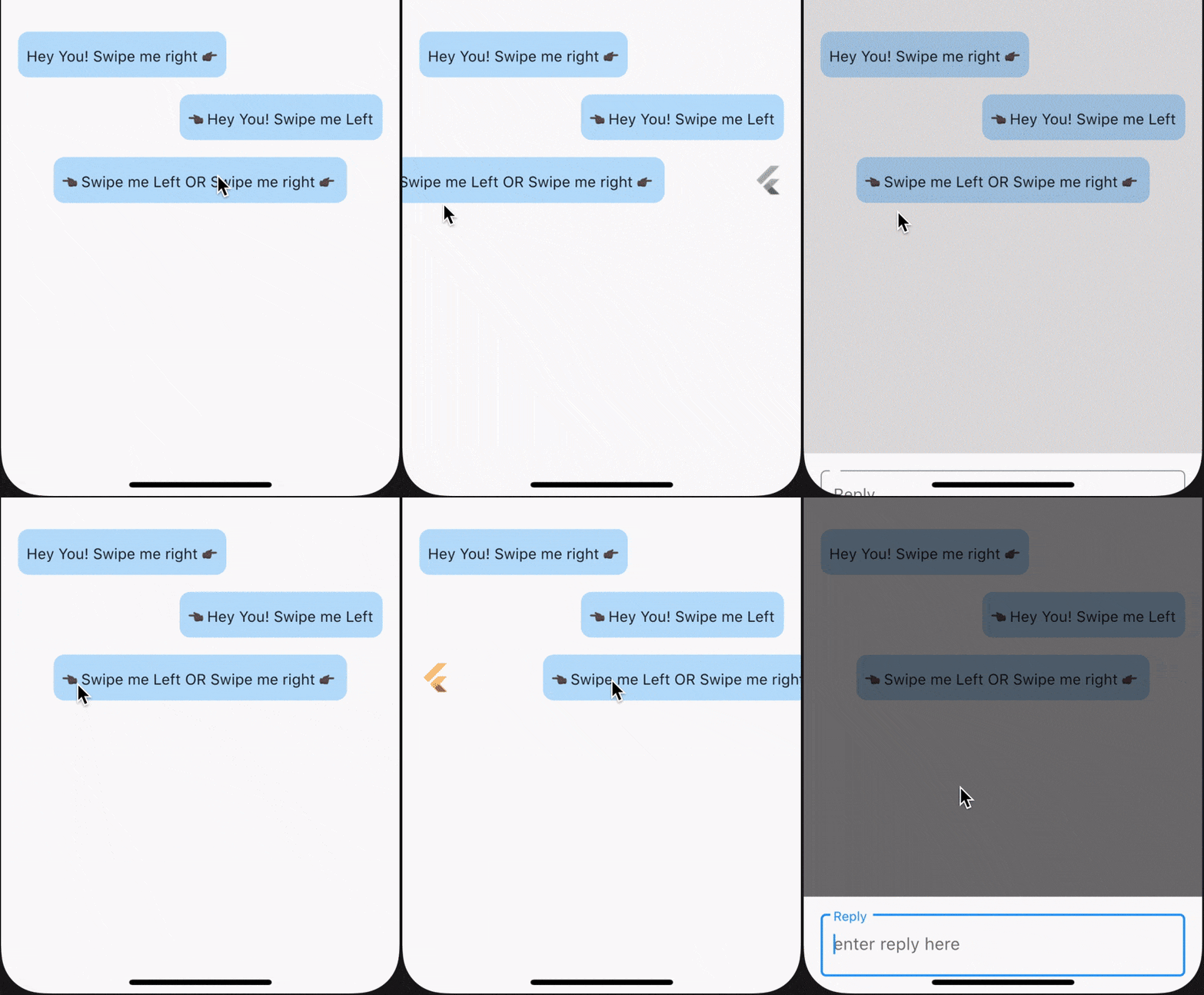
SwipeTo ist ein Wrapper für ein Chat-Anzeigewidget, das verwendet werden kann, um einen Callback auszulösen, wenn der Benutzer horizontal darauf swipe.
351Likes 816030-Tage-Downloads160Pub-Punkte
AndroidiOSWebmacOSWindowsLinux
SwipeTo ist ein Wrapper für ein Chat-Anzeigewidget, das verwendet werden kann, um einen Callback auszulösen, wenn der Benutzer horizontal darauf swipe.

Englischer Projektschnappschuss. Aktuelle Inhalte auf GitHub.
SwipeTo is a wrapper for a chat view widget which can be used initiate callback when user horizontally swipe on it.
To use this packages, you just simply need to wrap your child component in SwipeTo widget and pass a VoidCallback that you can carry forward with your task.
In the pubspec.yaml of your flutter project, add the following dependency:
dependencies:
  ...
  swipe_to: 1.0.6
In your library add the following import:
import 'package:swipe_to/swipe_to.dart';
child : (@required) StateLess or StateFull flutter widget.onRightSwipe : callback which will be initiated at the end of right swipe animation. If not passed right swipe will be disabledonLeftSwipe : callback which will be initiated at the end of left swipe animation. If not passed left swipe will be disablediconOnRightSwipe : IconData that will be displayed on left beneath child widget when swiped right. If not specified default is Icons.replyrightSwipeWidget : Widget that will be displayed beneath child widget when swipe right. If iconOnRightSwipe is defined this will have no effect.iconOnLeftSwipe : IconData that will be displayed on right beneath child widget when swiped left. If not specified default is Icons.replyleftSwipeWidget : Widget that will be displayed beneath child widget when swipe left. If iconOnLeftSwipe is defined this will have no effect.iconSize : Double value defining size of displayed icon beneath child widget. If not specified default it will take 26iconColor : Color value defining color of displayed icon beneath child widget. If not specified primaryColor from theme will be takenoffsetDx : Double dx value used in Offset() till which position of child widget will get animated. If not specified 0.3 default will be taken. onRightSwipe +dx value will be used and for onLeftSwipe -dx value will be usedanimationDuration : Duration value to define animation duration. If not specified default is 150 millisecondsswipeSensitivity : Swipe sensitivity integer value which will be in range of default min 5 to max 35. Crossing mentioned value of this parameter (+ve in right and -ve in left direction) will trigger swipe animation.swipeDirection parameter is removed. Now onLeftSwipe and onRightSwipe callback will enable swiping for a particular direction if passediconData is now split into two parameter, iconOnRightSwipe & iconOnLeftSwipe for future useendOffset is now change to accept a double value onlycallBack is now split into two parameter, onLeftSwipe & onRightSwipeSwipeTo widget for ListView itemsWhile using SwipeTo widget for ListView items, make sure to pass a Key() as key parameter of SwipeTo widget. Suggested to use UniqueKey() which will differentiate each individual widget in the Widget Tree. Check example below. To view example code click here.
ListView(
    children: snapshot.data!.map((name) {
        return SwipeTo(
            key: UniqueKey(),
            iconOnLeftSwipe: Icons.arrow_forward,
            iconOnRightSwipe: Icons.arrow_back,
            onRightSwipe: (details) {
                log("\n Left Swipe Data --> $name");
            },
            swipeSensitivity: 20,
            child: ListTile(
                tileColor: Colors.cyan.shade200,
                title: Text(name),
            ),
        );
    }).toList(),
);
swipeToLeft, swipeToRight] only. Make sure to pass relative Offset value according to passed swipeDirection value. If not specified swipeToRight will be taken as default.Icons.replyExample : SwipeToRight
Wrap your desired widget with SwipeTo & pass a call to onRightSwipe parameter.
SwipeTo(
    child: Container(
        padding: const EdgeInsets.symmetric(vertical: 10.0, horizontal: 8.0),
        child: Text('Hey You! Swipe me right 👉🏿'),
    ),
    onRightSwipe: (details) {
        print('Callback from Swipe To Right');
    },
),
Example : SwipeToLeft
Wrap your desired widget with SwipeTo & pass a call to onLeftSwipe parameter.
SwipeTo(
    child: Container(
        padding: const EdgeInsets.symmetric(vertical: 10.0, horizontal: 8.0),
        child: Text('👈🏿 Hey You! Swipe me Left'),
    ),
    onLeftSwipe: (details) {
        print('Callback from Swipe To Left');
    },
),
Example : SwipeToLeft & SwipeToRight
Wrap your desired widget with SwipeTo & pass a call to onLeftSwipe & onRightSwipe parameters.
SwipeTo(
    child: Container(
        padding: const EdgeInsets.symmetric(vertical: 10.0, horizontal: 8.0),
        child: Text('👈🏿 Swipe me Left | YOU |Swipe me right 👉🏿'),
    ),
    onLeftSwipe: (details) {
        print('Callback from Swipe To Left');
    },
    onRightSwipe: (details) {
        print('Callback from Swipe To Right');
    },
),


https://medium.com/@purvik1239/enable-swiping-right-left-for-your-flutter-application-widgets-a7b556674f9c
Abhängigkeiten 4 Einträge
{"sdk":"flutter"}{"sdk":"flutter"}^1.0.0^1.0.1Nach Anwendungsfall filtern, Aktivität vergleichen und vor der Nutzung das Originalprojekt prüfen.
“A repository is the most basic element of GitHub.”
GitHub Docs — About repositories ↗