

v0.0.7
easy_url_launcher
Ein einfaches und sehr leicht zu verwendendes Flutter-Paket zum Öffnen von URLs, E-Mails, Anrufen und SMS in Ihrer App
40Likes 20330-Tage-Downloads140Pub-Punkte
AndroidiOSWebmacOSWindowsLinux
Qasim345/easy_url_launcher open-source repository details.

Englischer Projektschnappschuss. Aktuelle Inhalte auf GitHub.
A flutter package based on url_launcher package for call,sms,email and launch url in browser or app with url parameters and launch mode as platform default or platform specific mode for web
Add package to your project by running the follwing command in your terminal
flutter pub add easy_url_launcher
Import pakage
import 'pakage:easy_url_launcher/easy_url_launcher.dart';
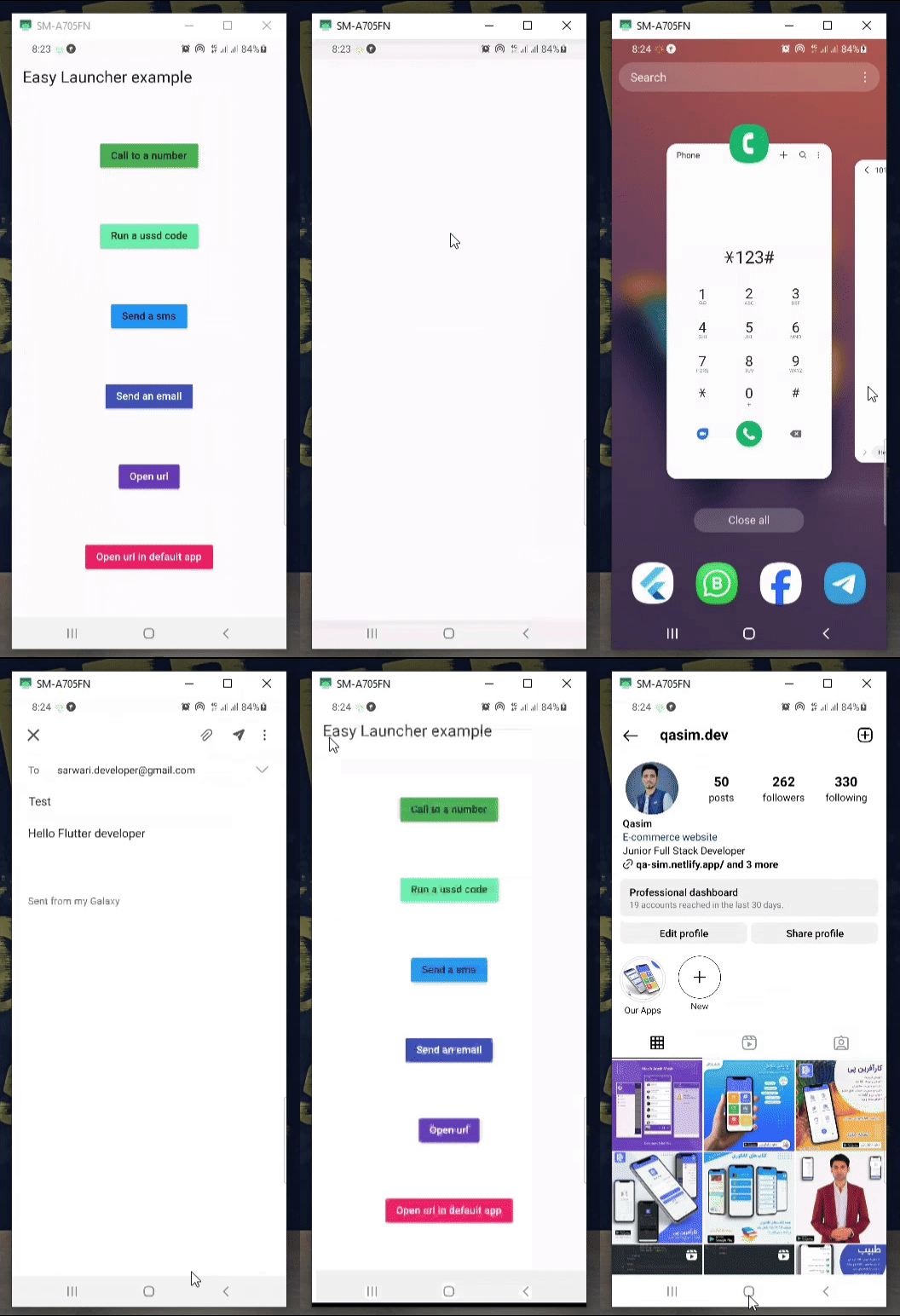
    Column(
            mainAxisAlignment: MainAxisAlignment.spaceAround,
            children: [
              MaterialButton(
                color: Colors.green,
                onPressed: () async {
                  await EasyLauncher.call(number: "767676776");
                },
                child: const Text("Call to a number"),
              ),
              MaterialButton(
                color: Colors.greenAccent,
                onPressed: () async {
                  await EasyLauncher.call(number: "*123#");
                },
                child: const Text("Run a ussd code"),
              ),
              MaterialButton(
                color: Colors.blue,
                onPressed: () async {
                  await EasyLauncher.sms(number: "1010", message: "Hello");
                },
                child: const Text("Send a sms"),
              ),
              MaterialButton(
                color: Colors.indigo,
                textColor: Colors.white,
                onPressed: () async {
                  await EasyLauncher.email(
                      email: "sarwari.developer@gmail.com",
                      subject: "Test",
                      body: "Hello Flutter developer");
                },
                child: const Text("Send an email"),
              ),
              MaterialButton(
                color: Colors.deepPurple,
                textColor: Colors.white,
                onPressed: () async {
                  await EasyLauncher.url(url: "https://pub.dev");
                },
                child: const Text("Open url"),
              ),
              MaterialButton(
                color: Colors.red,
                textColor: Colors.white,
                onPressed: () async {
                  await EasyLauncher.openMap(
                      lati: "36.7032925", long: "67.1891222");
                },
                child: const Text("Open Google map"),
              ),
              MaterialButton(
                color: Colors.pink,
                textColor: Colors.white,
                onPressed: () async {
                  await EasyLauncher.url(
                      url: "https://www.instagram.com/qasim.dev",
                      mode: Mode.platformDefault);
                },
                child: const Text("Open url in default app"),
              ),
               MaterialButton(
                color: Colors.green[700],
                textColor: Colors.white,
                onPressed: () async {
                  await EasyLauncher.sendToWhatsApp(
                      phone: "+93700000000", message: "hi");
                },
                child: const Text("Send to whatsapp"),
              ),
            ],
          ),
Abhängigkeiten 4 Einträge
{"sdk":"flutter"}^6.2.4{"sdk":"flutter"}^2.0.0Nach Anwendungsfall filtern, Aktivität vergleichen und vor der Nutzung das Originalprojekt prüfen.
“A repository is the most basic element of GitHub.”
GitHub Docs — About repositories ↗