Englischer Projektschnappschuss. Aktuelle Inhalte auf GitHub.
Flutter Datetime Picker Plus
Forked from (Pub) flutter_datetime_picker as it had issues with dart 3.0/Flutter 3.10.
This package only works on Flutter >=3.10.0. If you need an older version, please use the original package.
(Pub) flutter_datetime_picker_plus
Documentation
A flutter date time picker inspired by flutter-cupertino-date-picker
you can choose date / time / date&time in multiple languages:
Albanian(sq)
Arabic(ar)
Armenian(hy)
Azerbaijani(az)
Basque(eu)
Bengali(bn)
Bosnian(bs)
Bulgarian(bg)
Catalan(cat)
Chinese(zh)
Chinese, Traditional(tw)
Croatian(hr)
Czech(cs)
Danish(da)
Dutch(nl)
English(en)
Finnish(fi)
French(fr)
German(de)
Greek(gr, el)
Hebrew(he)
Hindi(hi)
Indonesian(id)
Italian(it)
Japanese(jp)
Kazakh(kk)
Khmer(kh)
Korean(ko)
Mongolian(mn)
Norwegian(no)
Persian(fa)
Polish(pl)
Portuguese(pt)
Russian(ru)
Serbian(sr)
Slovak(sk)
Slovenian(si, sl)
Spanish(es)
Swedish(sv)
Tamil(ta)
Thai(th)
Turkish(tr)
Ukrainian(uk)
Vietnamese(vi)
and you can also custom your own picker content
Date picker
Time picker
Date Time picker
International:
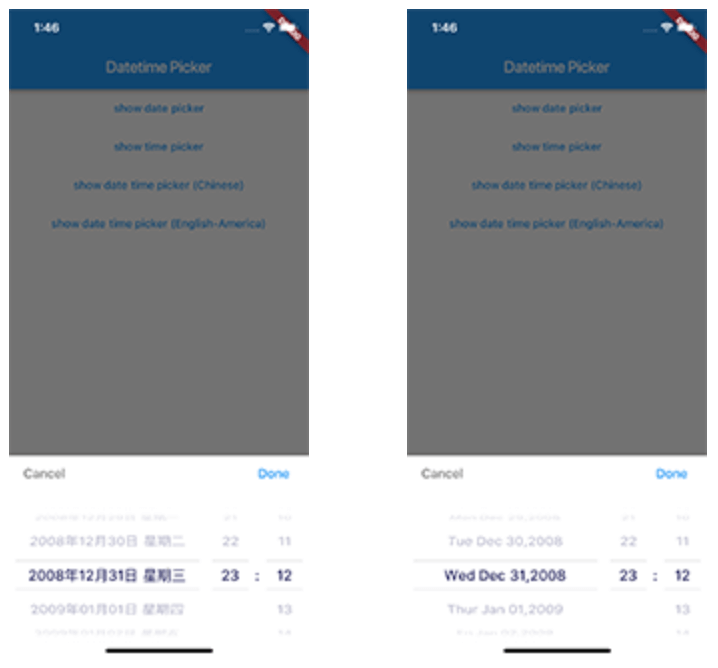
Date Time picker (Chinese)
Date Time picker (America)
Date Time picker (Dutch)
Date Time picker (Russian)
Demo App
Usage
TextButton (
onPressed: () {
DatePicker .showDatePicker (context,
showTitleActions: true ,
minTime: DateTime (2018 , 3 , 5 ),
maxTime: DateTime (2019 , 6 , 7 ), onChanged: (date) {
print ('change $date ' );
}, onConfirm: (date) {
print ('confirm $date ' );
}, currentTime: DateTime .now (), locale: LocaleType .zh);
},
child: Text (
'show date time picker (Chinese)' ,
style: TextStyle (color: Colors .blue),
));
Customize
If you want to customize your own style of date time picker, there is a class called CommonPickerModel, every type of date time picker is extended from this class, you can refer to other picker model (eg. DatePickerModel), and write your custom one, then pass this model to showPicker method, so that your own date time picker will appear, it’s easy, and will perfectly meet your demand
How to customize your own picker model:
class CustomPicker extends CommonPickerModel String digits (int value, int length) {
return '$value ' .padLeft (length, "0" );
}
CustomPicker ({DateTime currentTime, LocaleType locale}) : super (locale: locale) {
this .currentTime = currentTime ?? DateTime .now ();
this .setLeftIndex (this .currentTime.hour);
this .setMiddleIndex (this .currentTime.minute);
this .setRightIndex (this .currentTime.second);
}
@override
String leftStringAtIndex (int index) {
if (index >= 0 && index < 24 ) {
return this .digits (index, 2 );
} else {
return null ;
}
}
@override
String middleStringAtIndex (int index) {
if (index >= 0 && index < 60 ) {
return this .digits (index, 2 );
} else {
return null ;
}
}
@override
String rightStringAtIndex (int index) {
if (index >= 0 && index < 60 ) {
return this .digits (index, 2 );
} else {
return null ;
}
}
@override
String leftDivider () {
return "|" ;
}
@override
String rightDivider () {
return "|" ;
}
@override
List <int > layoutProportions () {
return [1 , 2 , 1 ];
}
@override
DateTime finalTime () {
return currentTime.isUtc
? DateTime .utc (currentTime.year, currentTime.month, currentTime.day,
this .currentLeftIndex (), this .currentMiddleIndex (), this .currentRightIndex ())
: DateTime (currentTime.year, currentTime.month, currentTime.day, this .currentLeftIndex (),
this .currentMiddleIndex (), this .currentRightIndex ());
}
}
Custom title bar
By default every picker shows a Cancel/Done bar above the wheels. Pass a
titleActionsBuilder to any DatePicker.show* method to replace it with your
own widget. The builder receives onCancel / onConfirm callbacks (which
dismiss the picker the same way the default buttons do) and the currently
selected DateTime:
DatePicker .showDatePicker (
context,
titleActionsBuilder: (context, onCancel, onConfirm, currentTime) {
return Row (
mainAxisAlignment: MainAxisAlignment .spaceBetween,
children: [
TextButton (onPressed: onCancel, child: const Text ('Close' )),
Text ('${currentTime.year} -${currentTime.month} -${currentTime.day} ' ),
TextButton (onPressed: onConfirm, child: const Text ('Pick' )),
],
);
},
);
The bar is laid out within the theme's titleHeight, so keep your widget
within that height (or raise titleHeight via a custom DatePickerTheme). The
builder is only used when showTitleActions is true (the default).
Getting Started
For help getting started with Flutter, view our online documentation .
For help on editing package code, view the documentation .


 v3.0.1