

 v1.0.0
flip_box_bar_plus
3D BottomNavigationBar, inspiriert durch Dribbble-Design von Dannniel
34Likes 3830-Tage-Downloads140Pub-Punkte
AndroidiOSWebmacOSWindowsLinux
Eine 3D-Unter-Navigationsleiste in Flutter

Englischer Projektschnappschuss. Aktuelle Inhalte auf GitHub.
Forked from Flip_box_bar, added support for vertical position
A 3D BottomNavigationBar inspired by Dribbble design by Dannniel.
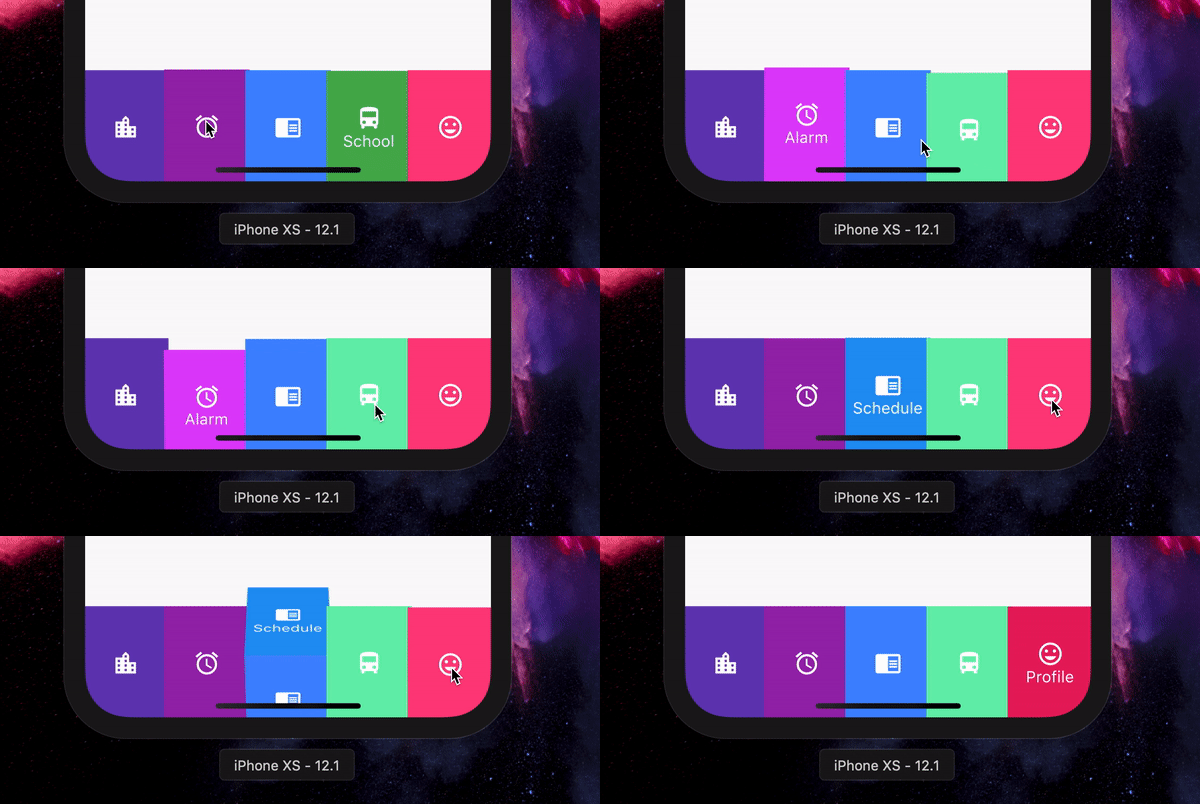
      // In Scaffold
      int selectedIndex = 0;

      FlipBoxBarPlus(
              selectedIndex: index,
              items: [
                FlipBarItem(icon: Icon(Icons.map), text: Text("Map"), frontColor: Colors.blue, backColor: Colors.blueAccent),
                FlipBarItem(icon: Icon(Icons.add), text: Text("Add"), frontColor: Colors.cyan, backColor: Colors.cyanAccent),
                FlipBarItem(icon: Icon(Icons.chrome_reader_mode), text: Text("Read"), frontColor: Colors.orange, backColor: Colors.orangeAccent),
                FlipBarItem(icon: Icon(Icons.print), text: Text("Print"), frontColor: Colors.purple, backColor: Colors.purpleAccent),
                FlipBarItem(icon: Icon(Icons.print), text: Text("Print"), frontColor: Colors.pink, backColor: Colors.pinkAccent),
              ],
              onIndexChanged: (newIndex) {
                setState() {
                    selectedIndex = newIndex;
                }
              },
            ),
The items to be displayed in the NavBar.
The duration of the animation of the box flip.
Callback for getting value of item selection.
The initial selected index of the NavBar.
The height of the NavBar when it is in bottom nav position.
Set the navigation bar as vertical.
The width of the NavBar when it is in vertical position.
Abhängigkeiten 2 Einträge
{"sdk":"flutter"}{"sdk":"flutter"}Nach Anwendungsfall filtern, Aktivität vergleichen und vor der Nutzung das Originalprojekt prüfen.
“A repository is the most basic element of GitHub.”
GitHub Docs — About repositories ↗