

v1.3.3
voice_note_kit
Ein modernes Flutter-Paket zum Aufnehmen und Wiedergeben von Sprachnotizen mit anpassbarem UI, Soundeffekten und Gesten.
86Likes 20130-Tage-Downloads130Pub-Punkte
AndroidiOSWebmacOS
abdallahyassein-dev/voice_note_kit open-source repository details.

Englischer Projektschnappschuss. Aktuelle Inhalte auf GitHub.
🎙️ Voice Note Kit is a Flutter plugin that allows you to record, save, and play voice notes with waveform visualization. It's built for mobile apps needing voice features like audio memos, task recordings, and more.


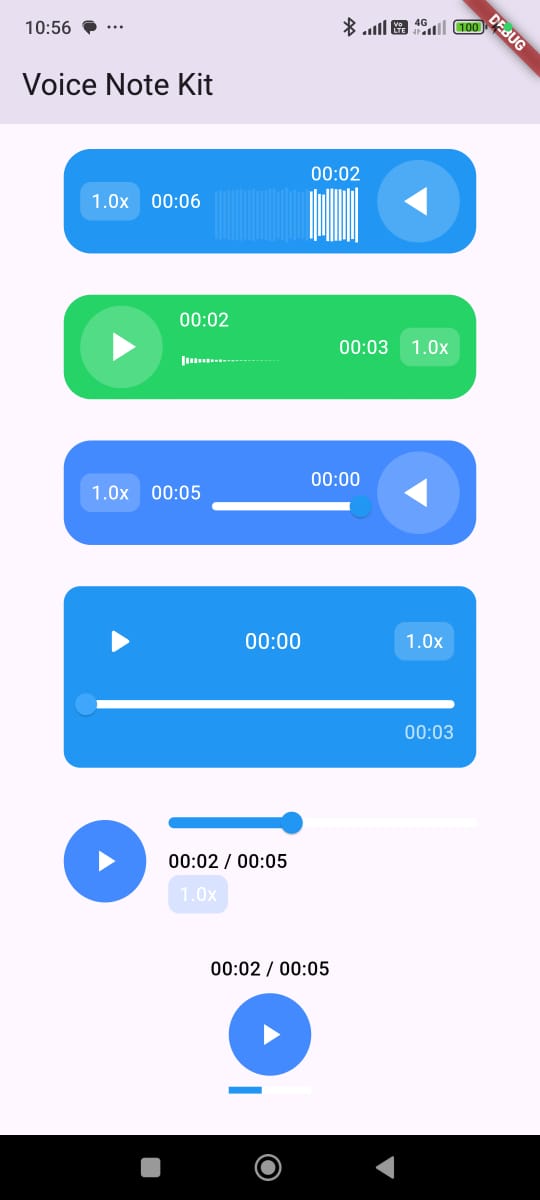 |
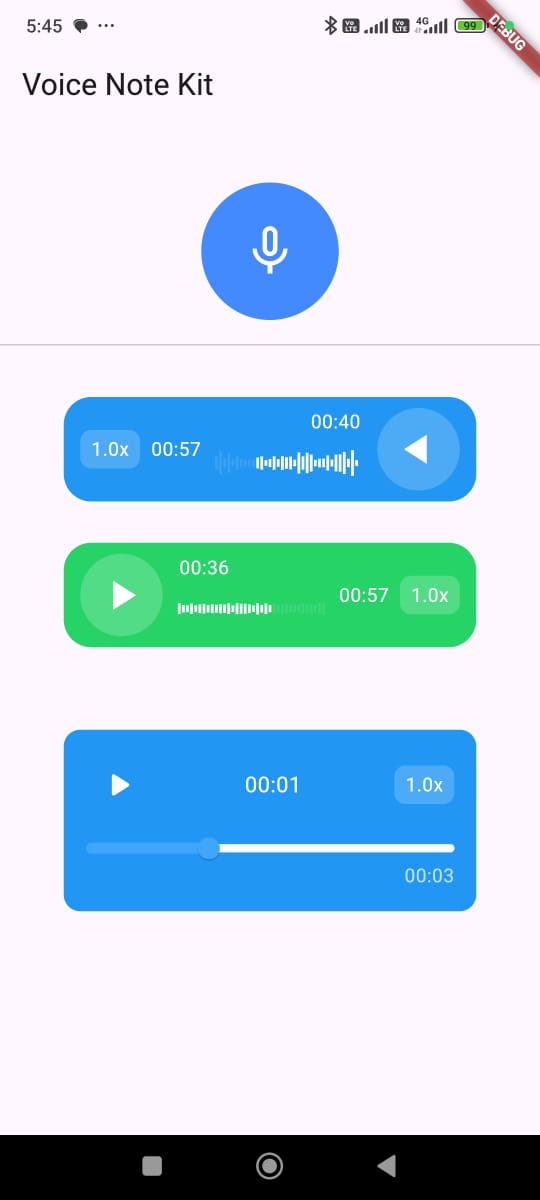 |
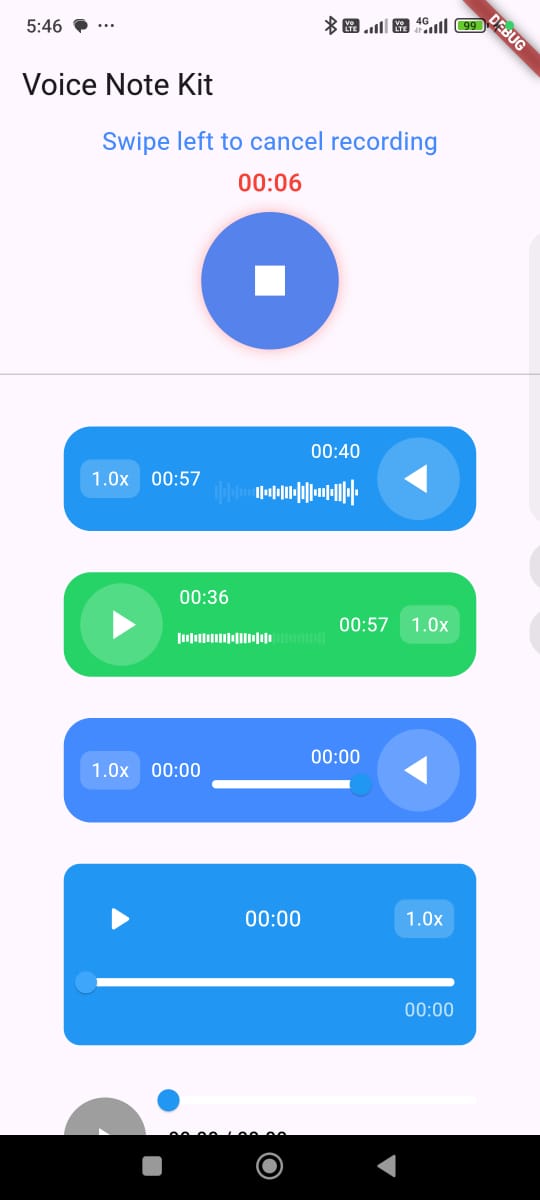 |
|---|
pubspec.yaml:dependencies:
voice_note_kit: ^1.2.0
Install Package In your project:flutter pub get
Android Configuration: In your AndroidManifest.xml:<uses-permission android:name="android.permission.RECORD_AUDIO" />
<!-- Optional: Add this permission if you want to use bluetooth telephony device like headset/earbuds -->
<uses-permission android:name="android.permission.MODIFY_AUDIO_SETTINGS" />
<!-- Optional: Add this permission if you want to save your recordings in public folders -->
<uses-permission android:name="android.permission.WRITE_EXTERNAL_STORAGE" />
in /android/app/build.gradle
minSdk = 23
// Prefered
compileSdk = 35
iOS Configuration: In your iOS Info.plist, add:<key>NSMicrophoneUsageDescription</key>
<string>This app needs access to the microphone to record audio.</string>
In Your Podfile
platform :ios, '12.0'
post_install do |installer|
  installer.pods_project.targets.each do |target|
    flutter_additional_ios_build_settings(target)
    target.build_configurations.each do |config|
      config.build_settings['GCC_PREPROCESSOR_DEFINITIONS'] ||= [
        '$(inherited)',
        'PERMISSION_MICROPHONE=1',
      ]
    end
  end
end
Macos Configuration: In your Macos Info.plist, add:<key>NSMicrophoneUsageDescription</key>
<string>This app needs access to the microphone to record audio.</string>
In Your Podfile
platform :osx, '10.15'
Open your macos/Runner/DebugProfile.entitlements and macos/Runner/Release.entitlements files.
<key>com.apple.security.device.audio-input</key>
<true/>
VoiceRecorderWidget(
        iconSize: 100,
        showTimerText: true,
        showSwipeLeftToCancel: true,

        // Optional: Add custom sounds for recording events
        // startSoundAsset: "assets/start_warning.mp3",
        // stopSoundAsset: "assets/start_warning.mp3",

        // When recording is finished
        onRecorded: (file) {
            setState(() {
            recordedFile = file;
            });
            ScaffoldMessenger.of(context).showSnackBar(
            SnackBar(content: Text('Recording saved: ${file.path}')),
            );
        },

        // For Flutter Web
        onRecordedWeb: (url) {
                setState(() {
                  recordedAudioBlobUrl = url;
                });
              },

        // When error occurs during recording
        onError: (error) {
            ScaffoldMessenger.of(context).showSnackBar(
            SnackBar(content: Text('Error: $error')),
            );
        },

        // If recording was cancelled
        actionWhenCancel: () {
            ScaffoldMessenger.of(context).showSnackBar(
            const SnackBar(content: Text('Recording Cancelled')),
            );
        },

        maxRecordDuration: const Duration(seconds: 60),
        permissionNotGrantedMessage: 'Microphone permission required',
        dragToLeftText: 'Swipe left to cancel recording',
        dragToLeftTextStyle: const TextStyle(
            color: Colors.blueAccent,
            fontSize: 18,
        ),
        cancelDoneText: 'Recording cancelled',
        backgroundColor: Colors.blueAccent,
        cancelHintColor: Colors.red,
        iconColor: Colors.white,
        timerFontSize: 18,
),
AudioPlayerWidget(
        autoPlay: false, // Whether to automatically start playback when the widget builds
        autoLoad: true, // Whether to preload the audio before the user presses play
        audioPath:
            "https://commondatastorage.googleapis.com/codeskulptor-demos/riceracer_assets/fx/engine-10.ogg", // The path or URL of the audio file
        audioType: AudioType.url, // Specifies if the audio is from a URL, asset, , file , or blobforWeb(for flutter web)
        playerStyle: PlayerStyle.style5, // The visual style of the player (you can choose between different predefined styles)
        textDirection: TextDirection.rtl, // Text direction for RTL or LTR languages
        size: 60, // Size of the play/pause button
        progressBarHeight: 5, // Height of the progress bar
        backgroundColor: Colors.blue, // Background color of the widget
        progressBarColor: Colors.blue, // Color of the progress bar (played portion)
        progressBarBackgroundColor: Colors.white, // Background color of the progress bar
        iconColor: Colors.white, // Color of the play/pause icon
        shapeType: PlayIconShapeType.circular, // Shape of the play/pause button (e.g., circular or square)
        showProgressBar: true, // Whether to show the progress bar
        showTimer: true, // Whether to display the current time/duration
        width: 300, // Width of the whole audio player widget
        audioSpeeds: const [0.5, 1.0, 1.5, 2.0, 3.0], // Supported audio playback speeds
        onSeek: (value) => print('Seeked to: $value'), // Callback when user seeks to a new position
        onError: (message) => print('Error: $message'), // Callback when an error occurs
        onPause: () => print("Paused"), // Callback when audio is paused
        onPlay: (isPlaying) => print("Playing: $isPlaying"), // Callback when audio starts or resumes playing
        onSpeedChange: (speed) => print("Speed: $speed"), // Callback when playback speed is changed
),
// If You Want to User Controller For The Player

  late final VoiceNotePlayerController playerController;

  @override
  void initState() {
    playerController = VoiceNotePlayerController();
    super.initState();
  }

  @override
  void dispose() {
    playerController.dispose();
    super.dispose();
  }

  // Play the audio from the current position
  playerController.play();

  // Pause the audio playback
  playerController.pause();

  // Set the playback speed. Accepts a double value (e.g., 1.0 for normal speed, 1.5 for 1.5x speed)
  playerController.setSpeed(1.5);

  // Seek to a specific position in the audio. The value should be between 0 and 1, where 0 represents the beginning of the audio and 1 represents the end.
  playerController.seekTo(0.2); // Seeks to 20% of the audio's total duration
You Can Find The Full Code Here
This package uses (You do not have to import them):
just_audio:
just_waveform:
record:
path_provider:
permission_handler:
http:
Hello! 👋 I'm Abdallah Yassein, a Senior Flutter Developer with extensive experience in building high-quality mobile applications. I specialize in using clean architecture and native integrations to create scalable and efficient solutions with Flutter.
In addition to my development work, I am also a content creator and educator. I run a YouTube channel where I share in-depth Flutter tutorials in Arabic, helping developers across the Middle East enhance their skills and advance their careers in mobile app development.
I am also excited to offer an in-depth Flutter course on Udemy, designed to guide complete beginners to becoming job-ready Flutter developers. This course covers the fundamentals and best practices to help you build professional-quality Flutter apps.
Feel free to explore my YouTube channel and Udemy course for Flutter development tips, advanced topics, and step-by-step tutorials. Don’t forget to subscribe and enroll to continue your learning journey!
If you like this package, feel free to ⭐️ the repo and share it!
This project is licensed under the MIT License - see the LICENSE file for details.
Abhängigkeiten 9 Einträge
{"sdk":"flutter"}^1.4.0^0.10.3^0.0.7^2.1.5^12.0.0+1^6.0.0{"sdk":"flutter"}^4.0.0Nach Anwendungsfall filtern, Aktivität vergleichen und vor der Nutzung das Originalprojekt prüfen.
“A repository is the most basic element of GitHub.”
GitHub Docs — About repositories ↗