

 v5.0.1
material_segmented_control
Ein Segmentsteuerelement wie das für iOS, jedoch im Material-Design.
103Likes 11.20030-Tage-Downloads150Pub-Punkte
AndroidiOSWebmacOSWindowsLinux
Ein Material-stilistischer Segmentierter-Steuerung mit vollständiger Kontrolle über Verhalten und Design.

Englischer Projektschnappschuss. Aktuelle Inhalte auf GitHub.
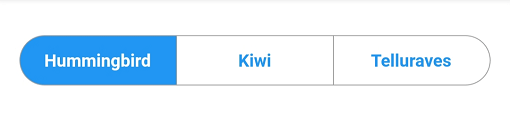
A material segmented control like the one for iOS, in Material style.

We all know well the Cupertino segmented widget in Flutter. But there is no similar in Material, so I thought, why not to create one.
You can check it out on pub.dev: (see package on pub.dev)
In your pubspec.yaml, add
dependencies:
    material_segmented_control: ^5.0.1
Wherever you want to use this widget, import
import 'package:material_segmented_control/material_segmented_control.dart';
int _currentSelection = 0;

MaterialSegmentedControl(
    children: _children,
    selectionIndex: _currentSelection,
    borderColor: Colors.grey,
    selectedColor: Colors.redAccent,
    unselectedColor: Colors.white,
    selectedTextStyle: TextStyle(color: Colors.white),
    unselectedTextStyle: TextStyle(color: Colors.redAccent),
    borderWidth: 0.7,
    borderRadius: 32.0,
    disabledChildren: [3],
    onSegmentTapped: (index) {
      setState(() {
        _currentSelection = index;
      });
    },
);

Map<int, Widget> _children = {
  0: Text('Hummingbird'),
  1: Text('Kiwi'),
  2: Text('Rio'),
  3: Text('Telluraves')
};
selectionIndex to null. It un-selects all options.onPressed to null on a button) by setting disabledChildren. Give it a list with all indices that should be disabled. Give it either null or an empty list to not use the disabled feature.You might want to check out the example project.
Abhängigkeiten 3 Einträge
{"sdk":"flutter"}{"sdk":"flutter"}^2.0.1Nach Anwendungsfall filtern, Aktivität vergleichen und vor der Nutzung das Originalprojekt prüfen.
“A repository is the most basic element of GitHub.”
GitHub Docs — About repositories ↗