Englischer Projektschnappschuss. Aktuelle Inhalte auf GitHub.
Multi select form field
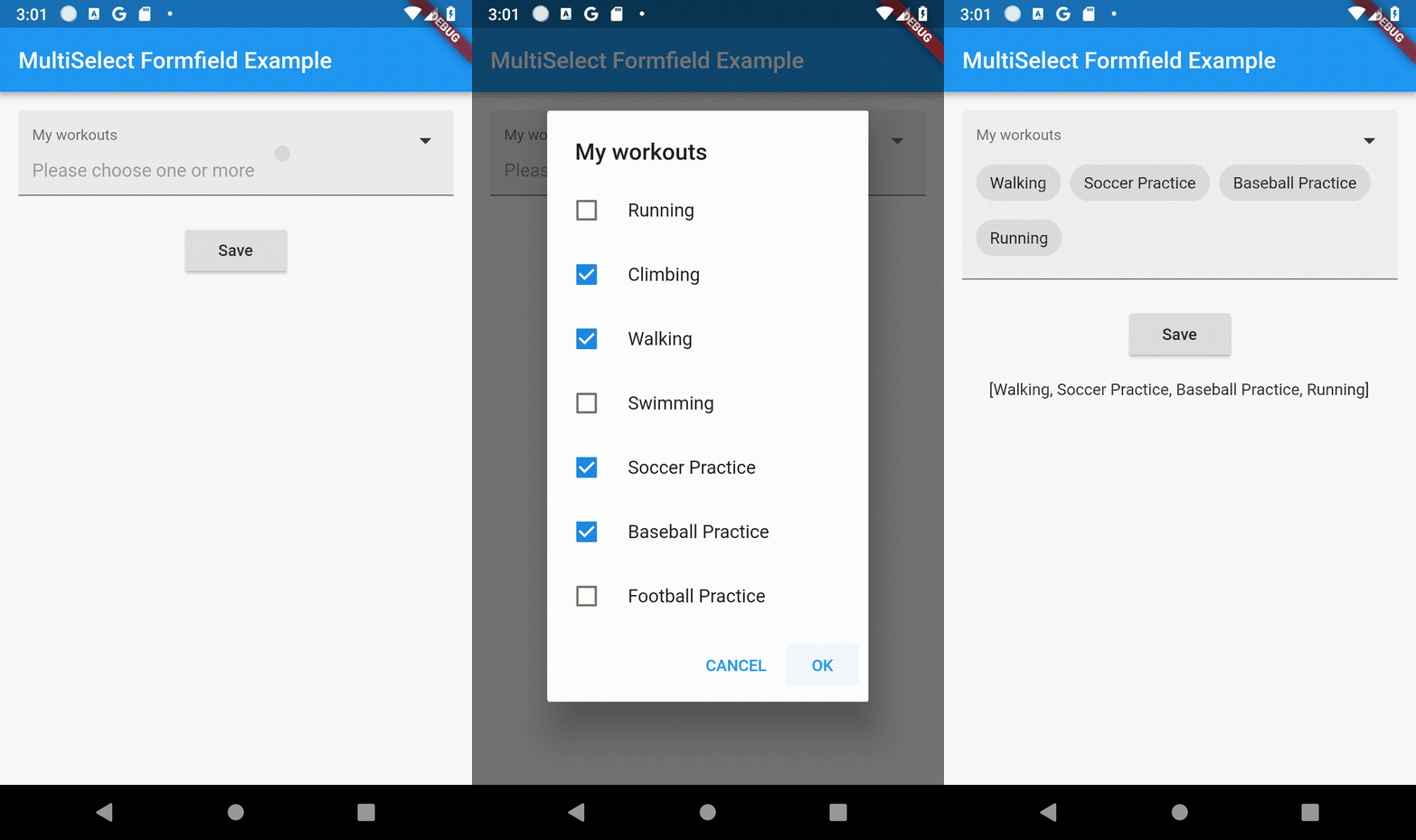
A multi select form field using alert dialog to select multiple items with checkboxes and showing as chips.
Demo
Features
Can be used as regular form field.
Simple to implement.
Simple and intuitive to use in the app.
Provides validation of data.
Provides requirement of the field.
Customizable texts.
Follows the app theme and colors.
Upgraded to Null Safety.
Customization Parameters [MultiFormField]
Parameter
Description
title Widget Set Title of MultiSelectTextFormField.
hintWidget Widget Set Hint Text of MultiSelectTextFormField.
required bool Add Selection is Compulsary or not.
errorText String Error String to be Displayed
dataSource List List of Data as DataSource To Select.
textField String Key Param from List (DataSource).
valueField String Value Param From List (DataSource).
okButtonLabel String*POsitive Button Label String.
cancelButtonLabel String*Negative Button Label String.
fillColor Color Widget Changes background color of FormField
Customization [Selection Dialog]
Parameter
Description
Shape ShapeBorder Customizes the Shape Of AlertDialog
dialogTextStyle TextStyle Customizes the TextStyle Of AlertDialog
checkBoxCheckColor Color Customizes the CheckColor
checkBoxActiveColor Color Customizes the CheckBoxActiveColor
Customization [Selection Chip]
Parameter
Description
chipLabelStyle TextStyle Customizes the TextStyle Of Selected Chip
chipBackGroundColor Color Customizes the Color Of Selected Chip
Minimal Example
MultiSelectFormField (
autovalidate: false ,
chipBackGroundColor: Colors .red,
chipLabelStyle: TextStyle (fontWeight: FontWeight .bold),
dialogTextStyle: TextStyle (fontWeight: FontWeight .bold),
checkBoxActiveColor: Colors .red,
checkBoxCheckColor: Colors .green,
dialogShapeBorder: RoundedRectangleBorder (
borderRadius: BorderRadius .all (Radius .circular (12.0 ))),
title: Text (
"Title Of Form" ,
style: TextStyle (fontSize: 16 ),
),
dataSource: [
{
"display" : "Running" ,
"value" : "Running" ,
},
{
"display" : "Climbing" ,
"value" : "Climbing" ,
},
{
"display" : "Walking" ,
"value" : "Walking" ,
},
],
textField: 'display' ,
valueField: 'value' ,
okButtonLabel: 'OK' ,
cancelButtonLabel: 'CANCEL' ,
hintWidget: Text ('Please choose one or more' ),
initialValue: _myActivities,
onSaved: (value) {
if (value == null ) return ;
setState (() {
_myActivities = value;
});
},
),
Example
import 'package:flutter/material.dart' ;
import 'package:multiselect_formfield/multiselect_formfield.dart' ;
void main () => runApp (MyApp ());
class MyApp extends StatelessWidget @override
Widget build (BuildContext context) {
return MaterialApp (
home: MyHomePage (),
);
}
}
class MyHomePage extends StatefulWidget @override
_MyHomePageState createState () => _MyHomePageState ();
}
class _MyHomePageState extends State <MyHomePage > List ? _myActivities;
late String _myActivitiesResult;
final formKey = new GlobalKey <FormState >();
@override
void initState () {
super .initState ();
_myActivities = [];
_myActivitiesResult = '' ;
}
_saveForm () {
var form = formKey.currentState!;
if (form.validate ()) {
form.save ();
setState (() {
_myActivitiesResult = _myActivities.toString ();
});
}
}
@override
Widget build (BuildContext context) {
return Scaffold (
appBar: AppBar (
title: Text ('MultiSelect Formfield Example' ),
),
body: Center (
child: Form (
key: formKey,
child: Column (
mainAxisAlignment: MainAxisAlignment .start,
children: <Widget >[
Container (
padding: EdgeInsets .all (16 ),
child: MultiSelectFormField (
autovalidate: AutovalidateMode .disabled,
chipBackGroundColor: Colors .blue,
chipLabelStyle: TextStyle (fontWeight: FontWeight .bold, color: Colors .white),
dialogTextStyle: TextStyle (fontWeight: FontWeight .bold),
checkBoxActiveColor: Colors .blue,
checkBoxCheckColor: Colors .white,
dialogShapeBorder: RoundedRectangleBorder (
borderRadius: BorderRadius .all (Radius .circular (12.0 ))),
title: Text (
"My workouts" ,
style: TextStyle (fontSize: 16 ),
),
validator: (value) {
if (value == null || value.length == 0 ) {
return 'Please select one or more options' ;
}
return null ;
},
dataSource: [
{
"display" : "Running" ,
"value" : "Running" ,
},
{
"display" : "Climbing" ,
"value" : "Climbing" ,
},
{
"display" : "Walking" ,
"value" : "Walking" ,
},
{
"display" : "Swimming" ,
"value" : "Swimming" ,
},
{
"display" : "Soccer Practice" ,
"value" : "Soccer Practice" ,
},
{
"display" : "Baseball Practice" ,
"value" : "Baseball Practice" ,
},
{
"display" : "Football Practice" ,
"value" : "Football Practice" ,
},
],
textField: 'display' ,
valueField: 'value' ,
okButtonLabel: 'OK' ,
cancelButtonLabel: 'CANCEL' ,
hintWidget: Text ('Please choose one or more' ),
initialValue: _myActivities,
onSaved: (value) {
if (value == null ) return ;
setState (() {
_myActivities = value;
});
},
),
),
Container (
padding: EdgeInsets .all (8 ),
child: ElevatedButton (
child: Text ('Save' ),
onPressed: _saveForm,
),
),
Container (
padding: EdgeInsets .all (16 ),
child: Text (_myActivitiesResult),
)
],
),
),
),
);
}
}
License
This project is licensed under the BSD License. See the LICENSE file for details.





 v0.1.7