

 v2.1.0
popup_menu
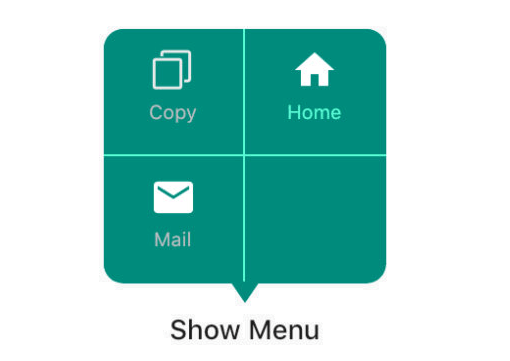
Ein Flutter-Popup-Menü. Mit reinem Dart geschrieben, unterstützt sowohl iOS als auch Android.
157Likes 244030-Tage-Downloads135Pub-Punkte
AndroidiOSWebmacOSWindowsLinux
🔥Ein Flutter-Popup-Menü. Pub-fähig.

Englischer Projektschnappschuss. Aktuelle Inhalte auf GitHub.


This project was written completely in dart, and it supports both iOS and Android.


You can find the demo at the 'example' folder.
First, you should set the context at somewhere in you code. Like below:
PopupMenu.context = context;
PopupMenu menu = PopupMenu(
      items: [
        MenuItem(title: 'Copy', image: Image.asset('assets/copy.png')),
        MenuItem(title: 'Home', image: Icon(Icons.home, color: Colors.white,)),
        MenuItem(title: 'Mail', image: Icon(Icons.mail, color: Colors.white,)),
        MenuItem(title: 'Power', image: Icon(Icons.power, color: Colors.white,)),
        MenuItem(title: 'Setting', image: Icon(Icons.settings, color: Colors.white,)),
        MenuItem(title: 'Traffic', image: Icon(Icons.traffic, color: Colors.white,))],
      onClickMenu: onClickMenu,
      onShow: onShow,
      onDismiss: onDismiss);

menu.show(rect: rect);
or
PopupMenu menu = PopupMenu(
        backgroundColor: Colors.teal,
        lineColor: Colors.tealAccent,
        maxColumn: 3,
        items: [
          MenuItem(title: 'Copy', image: Image.asset('assets/copy.png')),
          MenuItem(
              title: 'Home',
              textStyle: TextStyle(fontSize: 10.0, color: Colors.tealAccent),
              image: Icon(
                Icons.home,
                color: Colors.white,
              )),
          MenuItem(
              title: 'Mail',
              image: Icon(
                Icons.mail,
                color: Colors.white,
              )),
          MenuItem(
              title: 'Power',
              image: Icon(
                Icons.power,
                color: Colors.white,
              )),
          MenuItem(
              title: 'Setting',
              image: Icon(
                Icons.settings,
                color: Colors.white,
              )),
          MenuItem(
              title: 'PopupMenu',
              image: Icon(
                Icons.menu,
                color: Colors.white,
              ))
        ],
        onClickMenu: onClickMenu,
        onDismiss: onDismiss);
    menu.show(widgetKey: btnKey2);
Abhängigkeiten 2 Einträge
{"sdk":"flutter"}{"sdk":"flutter"}Nach Anwendungsfall filtern, Aktivität vergleichen und vor der Nutzung das Originalprojekt prüfen.
“A repository is the most basic element of GitHub.”
GitHub Docs — About repositories ↗