
Zeitspanne-Auswahl
Ein Flutter-Paket zum Auswählen einer Zeitdauer
- Sterne
- 8
- Forks
- 6
- Letzter Push (UTC)
- 10.04.2024
- Projektstatus
- Aktiv
Original-README
Englischer Projektschnappschuss. Aktuelle Inhalte auf GitHub.
Time Duration Picker
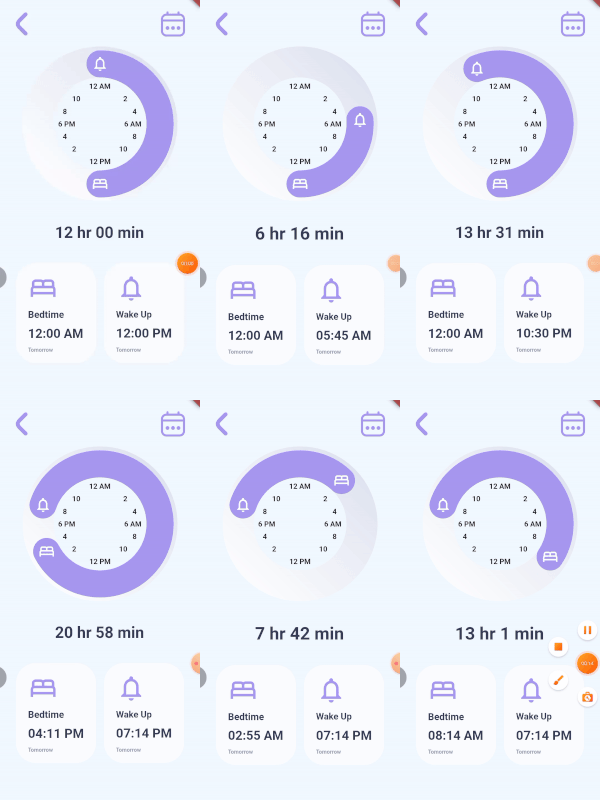
A time picker for paired consecutive tasks. It lets you specify the icons for each of your actions and callbacks when the user rotates each icon. You can optionally give callback for the time duration, decorations for the knob, the knob background, the clock and also color for your icons. The time and duration values are not displayed by the TimeDurationPicker widget, instead they are passed to the callbacks provided.
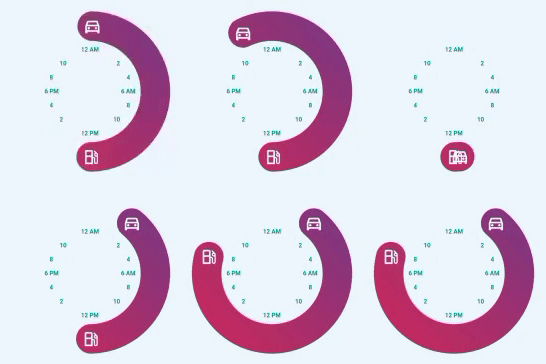
TimeDurationPicker(
      diameter: 300,
      icon1Data: Icons.directions_car_outlined,
      icon2Data: Icons.local_gas_station_outlined,
      knobDecoration: const BoxDecoration(
        gradient: LinearGradient(
          begin: Alignment.bottomLeft,
          end: Alignment.topRight,
          colors: [
            Color.fromRGBO(204, 43, 94, 1),
            Color.fromRGBO(117, 58, 136, 1),
          ],
        ),
      ),
      clockTextStyle: const TextStyle(
          color: Colors.teal, fontWeight: FontWeight.bold),
      onIcon1RotatedCallback: (value) {
        setState(() {
          goTime = value;
        });
      },
      onIcon2RotatedCallback: (value) {
        setState(() {
          gasTime = value;
        });
      },),
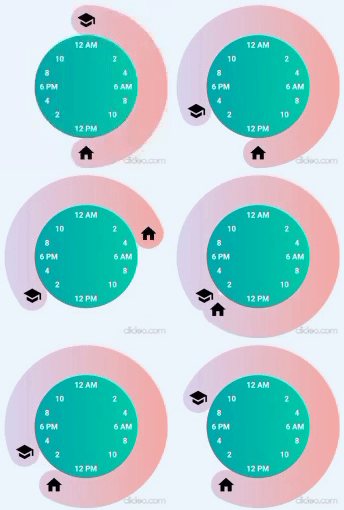
TimeDurationPicker(
  diameter: 305,
  icon1Data: Icons.school,
  icon2Data: Icons.home,
  clockTextStyle: const TextStyle(
      color: Colors.white, fontWeight: FontWeight.bold),
  iconColor: Colors.black,
  knobDecoration: const BoxDecoration(
    gradient: LinearGradient(
      colors: [
        Color.fromRGBO(221, 214, 243, 1),
        Color.fromRGBO(250, 172, 168, 1),
      ],
    ),
  ),
  clockDecoration: const BoxDecoration(
    gradient: LinearGradient(
      colors: [
        Color.fromRGBO(2, 170, 176, 1),
        Color.fromRGBO(0, 205, 172, 1),
      ],
    ),
  ),
  onIcon1RotatedCallback: (value) {
    setState(() {
      schoolTime = value;
    });
  },
  onIcon2RotatedCallback: (value) {
    setState(() {
      homeTime = value;
    });
  },
  setDurationCallback: (value) {
    setState(() {
      sleepDuration = value;
    });
  },
)
Inspired by Iphone Alarm UI Design by Ghulam Rasool

Surafel Tariku ↗
Kategorien
Verwendete Abhängigkeiten
Abhängigkeiten 3 Einträge
- flutter
{"sdk":"flutter"} - flutter_testEntwicklung
{"sdk":"flutter"} - flutter_lintsEntwicklung
^1.0.0
Wie wähle ich ein passendes Repository?
Nach Anwendungsfall filtern, Aktivität vergleichen und vor der Nutzung das Originalprojekt prüfen.
- Nach Name, Autor oder Beschreibung suchen und nach Thema eingrenzen.
- Sterne, Forks und letzte Pushes vergleichen. Sterne zeigen Interesse, garantieren aber keine Qualität.
- Vor der Nutzung README, Lizenz und Issues auf GitHub prüfen.
Quellen und Pflege
“A repository is the most basic element of GitHub.”
GitHub Docs — About repositories ↗
- dalyathan/time-duration-picker · GitHub ↗
- GitHub Docs — Saving repositories with stars ↗
- Verzeichnis gepflegt von Ducafecat ↗