

 v1.0.5
flutter_persistent_keyboard_height
Flutter-Paket zur Ermittlung der Tastaturhöhe. Kann verwendet werden, um ein Aufkleber-/Emoji-Modal mit korrekter Höhe anzuzeigen.
33Likes 5230-Tage-Downloads150Pub-Punkte
AndroidiOS
Flutter-Paket zur Ermittlung der Tastaturhöhe. Kann verwendet werden, um ein Aufkleber-/Emoji-Modal mit korrekter Höhe anzuzeigen.

Englischer Projektschnappschuss. Aktuelle Inhalte auf GitHub.

Flutter package to get keyboard height. The height is persisted during app sessions and keyboard states (you can use the height when keyboard is closed).
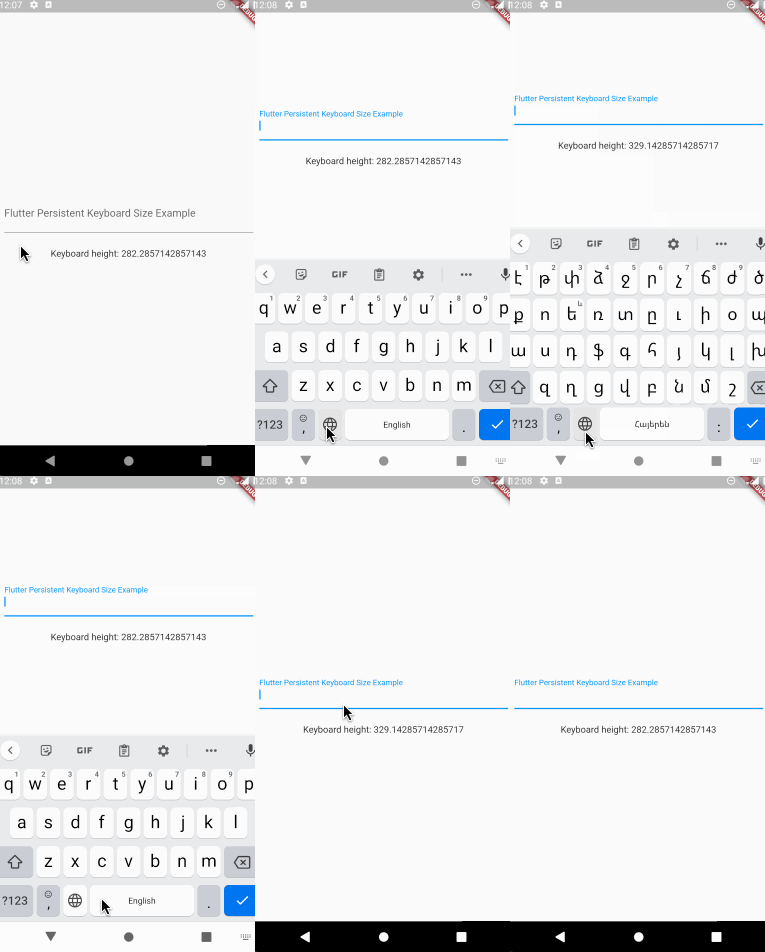
First thing you need to do is wrap a widget from children of which you want
to get the keyboard height with PersistentKeyboardHeightProvider.
Add it to the builder of your app widget (perhaps MaterialApp) if you
want to get keyboard height from all widgets.
class MyApp extends StatelessWidget {
  const MyApp({Key? key}) : super(key: key);

  @override
  Widget build(BuildContext context) {
    return MaterialApp(
      title: 'Flutter Persistent Keyboard Height Example',
      home: const FlutterPersistentKeyboardHeightExample(),
      builder: (context, child) => PersistentKeyboardHeightProvider(
        child: child!,
      ),
    );
  }
}
In order to get keyboard height use the PersistentKeyboardHeight
inherited widget:
Widget build(BuildContext context) {
  final keyboardHeight = PersistentKeyboardHeight.of(context).keyboardHeight;

  return Scaffold(
    body: Column(
      mainAxisAlignment: MainAxisAlignment.center,
      children: [
        const Padding(
          padding: EdgeInsets.all(16.0),
          child: TextField(
            decoration: InputDecoration(
              labelText: 'Flutter Persistent Keyboard Size Example',
            ),
          ),
        ),
        const SizedBox(height: 8),
        Text('Keyboard height: $keyboardHeight'),
      ],
    ),
  );
}
By default, the package uses shared_preferences to preserve the keyboard
height but if you want to use a custom solution for preserving the height
you can do that by implementing the IPersistentKeyboardHeightStorageProvider
interface and passing an instance of the class to PersistentKeyboardHeightProvider:
class CustomPersistentKeyboardHeightStorageProvider
    implements IPersistentKeyboardHeightStorageProvider {
  const CustomPersistentKeyboardHeightStorageProvider();

  @override
  Future<double> getHeight() {
    // read the height from storage
  }

  @override
  Future<void> setHeight(double height) {
    // save the height to storage
  }
}

class MyApp extends StatelessWidget {
  const MyApp({Key? key}) : super(key: key);

  @override
  Widget build(BuildContext context) {
    return MaterialApp(
      title: 'Flutter Persistent Keyboard Height Example',
      home: const FlutterPersistentKeyboardHeightExample(),
      builder: (context, child) => PersistentKeyboardHeightProvider(
        child: child!,
      ),
    );
  }
}
Check out the example directory for a complete example app.
The first version of this package was developed in two livestreams. Unfortunately, my voice disappeared at the middle of the first livestream but the second livestream is okay. In case you want to check them out, here are the links: Part 1, Part 2.
Abhängigkeiten 5 Einträge
{"sdk":"flutter"}^1.3.4^2.0.13^1.0.4{"sdk":"flutter"}Nach Anwendungsfall filtern, Aktivität vergleichen und vor der Nutzung das Originalprojekt prüfen.
“A repository is the most basic element of GitHub.”
GitHub Docs — About repositories ↗