
 v0.0.8
pricing_cards
Fantastische flexible Preiskarten mit benutzerdefinierten Stiloptionen für Ihr Flutter-Projekt
45Likes 3630-Tage-Downloads150Pub-Punkte
AndroidiOSWebmacOSWindowsLinux
Fantastische Preiskarten für Ihr Flutter-Projekt 😎

{"sdk":"flutter"}^2.0.0-nullsafety.1{"sdk":"flutter"}Englischer Projektschnappschuss. Aktuelle Inhalte auf GitHub.
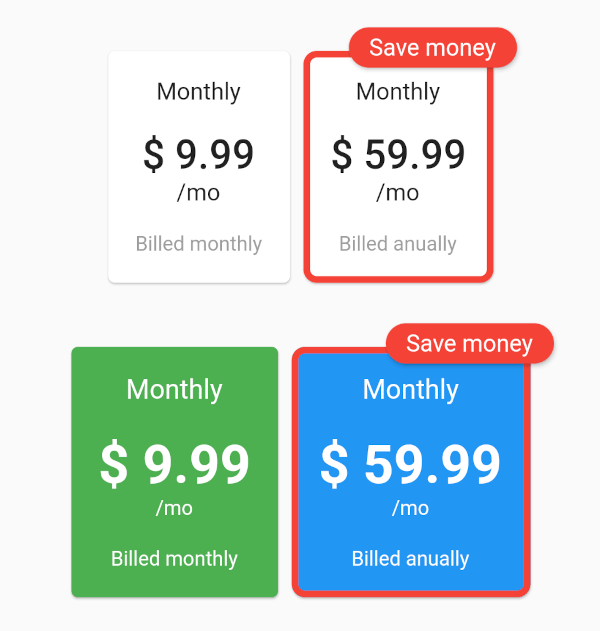
Awesome pricing cards with custom style options for your flutter project.
You can give as much cards you want to this and personalize the style of each one.
The example with all the parameters:
https://raw.githubusercontent.com/f2acode/pricing_cards/master/example/flutter_01.pngThe code of this:
Column(
    mainAxisAlignment: MainAxisAlignment.center,
    children: [
        PricingCards(
            pricingCards: [
                PricingCard(
                title: 'Monthly',
                price: '\$ 9.99',
                subPriceText: '\/mo',
                billedText: 'Billed monthly',
                onPress: () {
                    // make your business
                },
                ),
                PricingCard(
                title: 'Monthly',
                price: '\$ 59.99',
                subPriceText: '\/mo',
                billedText: 'Billed anually',
                mainPricing: true,
                mainPricingHighlightText: 'Save money',
                onPress: () {
                    // make your business
                },
                )
            ],
        ),
        SizedBox(height: 30),
        PricingCards(
            pricingCards: [
                PricingCard(
                title: 'Monthly',
                price: '\$ 9.99',
                subPriceText: '\/mo',
                billedText: 'Billed monthly',
                onPress: () {
                    // make your business
                },
                cardColor: Colors.green,
                priceStyle: TextStyle(
                    fontSize: 32,
                    fontWeight: FontWeight.bold,
                    color: Colors.white,
                ),
                titleStyle: TextStyle(
                    fontSize: 16,
                    color: Colors.white,
                ),
                billedTextStyle: TextStyle(
                    fontSize: 12,
                    color: Colors.white,
                ),
                subPriceStyle: TextStyle(
                    fontSize: 12,
                    color: Colors.white,
                ),
                cardBorder: RoundedRectangleBorder(
                    side: BorderSide(color: Colors.red, width: 4.0),
                    borderRadius: BorderRadius.circular(8.0),
                ),
                ),
                PricingCard(
                title: 'Monthly',
                price: '\$ 59.99',
                subPriceText: '\/mo',
                billedText: 'Billed anually',
                mainPricing: true,
                mainPricingHighlightText: 'Save money',
                onPress: () {
                    // make your business
                },
                cardColor: Colors.blue,
                priceStyle: TextStyle(
                    fontSize: 32,
                    fontWeight: FontWeight.bold,
                    color: Colors.white,
                ),
                titleStyle: TextStyle(
                    fontSize: 16,
                    color: Colors.white,
                ),
                billedTextStyle: TextStyle(
                    fontSize: 12,
                    color: Colors.white,
                ),
                subPriceStyle: TextStyle(
                    fontSize: 12,
                    color: Colors.white,
                ),
                cardBorder: RoundedRectangleBorder(
                    side: BorderSide(color: Colors.red, width: 4.0),
                    borderRadius: BorderRadius.circular(8.0),
                ),
                )
            ],
        ),
    ],
)