Pakete, Repositories und App-Kategorien suchen

GitHub-Repositoryflutter-es/responsive

responsive

flutter-es/responsive open-source repository details.

Projektcover von responsive
Sterne
15
Forks
4
Letzter Push (UTC)
28.11.2021
Projektstatus
Aktiv

Original-README

Englischer Projektschnappschuss. Aktuelle Inhalte auf GitHub.

responsive

build status Pub support

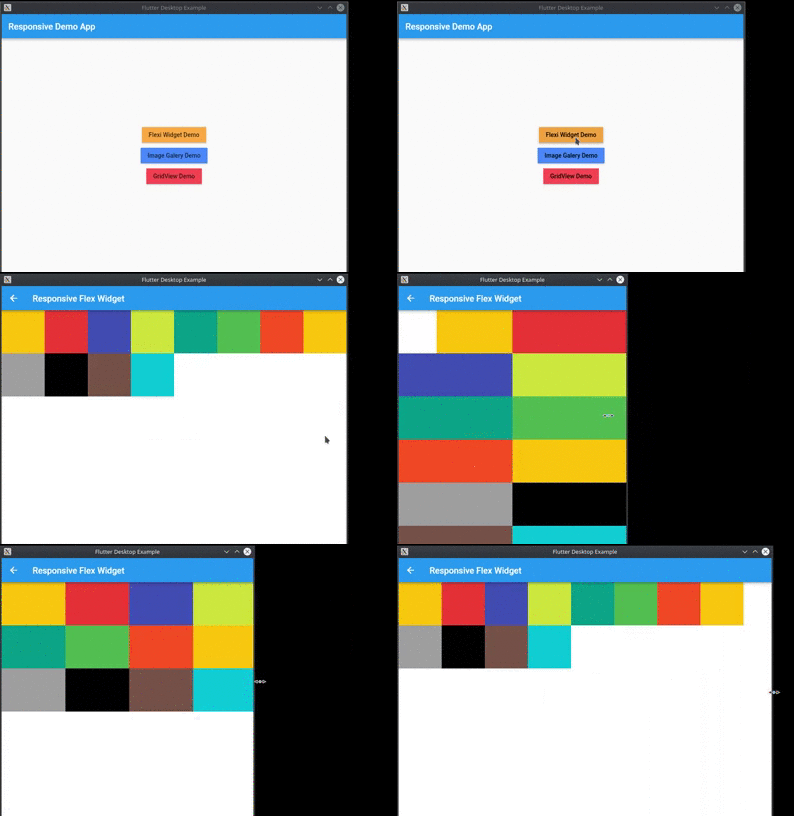
Provide a easy way to make responsive UI for Flutter Applications in mobile, desktop and web, allow different widget size for each screen size and device orientation..

Made by Marvin Quevedo and [Víctor Guardiola](mailto:victor.guardiola@gmail.com) of FlutterEs Community.

Este paquete ha sido creado por la comunidad de Flutter en Español, si deseas ser parte de nosotros, puedes visitar cualquiera de estos links:

Facebook

Slack

Twitter

www.flutter-es.io

Telegram

portrait view

landscape view

Video example

Add dependency
dependencies:
  responsive: 0.2.3

Usage

You have two ways of use it:

You can use the ReponsiveRow widget and the FlexResponsive widget to make the layout

or

you can use the static method Responsive.calcColumns to assign the correct number of columns to a widget like a GridView.

Easy to use

import 'package:flutter/material.dart';
import 'package:responsive/flex_widget.dart';
import 'package:responsive/responsive_row.dart';

void main() => runApp(MyApp());

class MyApp extends StatelessWidget {
  // This widget is the root of your application.
  @override
  Widget build(BuildContext context) {
    return MaterialApp(
      title: 'Responsive Example',
      theme: ThemeData(
        primarySwatch: Colors.blue,
      ),
      home: Scaffold(
        appBar: AppBar(),
        body: ListView(
          children: <Widget>[
            ResponsiveRow(
              columnsCount: 12,
              crossAxisAlignment: WrapCrossAlignment.center,
              children: <Widget>[
                FlexWidget(
                  child: Container(
                    height: 100,
                    color: Colors.amber,
                  ),
                  xs: 4,
                  xsOffset: 2,
                  sm: 3,
                  md: 2,
                  lg: 1,
                  xsLand: 4,
                  xsLandOffset: 0,
                  smLand: 2,
                  mdLand: 1,
                  lgLand: 1,
                ),
                FlexWidget(
                  child: Container(
                    height: 100,
                    color: Colors.red,
                  ),
                  xs: 6,
                  sm: 3,
                  md: 2,
                  lg: 1,
                  xsLand: 4,
                  smLand: 2,
                  mdLand: 1,
                  lgLand: 1,
                ),
                FlexWidget(
                  child: Container(
                    height: 100,
                    color: Colors.indigo,
                  ),
                  xs: 6,
                  sm: 3,
                  md: 2,
                  lg: 1,
                  xsLand: 4,
                  smLand: 2,
                  mdLand: 1,
                  lgLand: 1,
                ),
                FlexWidget(
                  child: Container(
                    height: 100,
                    color: Colors.lime,
                  ),
                  xs: 6,
                  sm: 3,
                  md: 2,
                  lg: 1,
                  xsLand: 4,
                  smLand: 2,
                  mdLand: 1,
                  lgLand: 1,
                ),
                FlexWidget(
                  child: Container(
                    height: 100,
                    color: Colors.teal,
                  ),
                  xs: 6,
                  sm: 3,
                  md: 2,
                  lg: 1,
                  xsLand: 4,
                  smLand: 2,
                  mdLand: 1,
                  lgLand: 1,
                ),
                FlexWidget(
                  child: Container(
                    height: 100,
                    color: Colors.green,
                  ),
                  xs: 6,
                  sm: 3,
                  md: 2,
                  lg: 1,
                  xsLand: 4,
                  smLand: 2,
                  mdLand: 1,
                  lgLand: 1,
                ),
                FlexWidget(
                  child: Container(
                    height: 100,
                    color: Colors.deepOrange,
                  ),
                  xs: 6,
                  sm: 3,
                  md: 2,
                  lg: 1,
                  xsLand: 4,
                  smLand: 2,
                  mdLand: 1,
                  lgLand: 1,
                ),
                FlexWidget(
                  child: Container(
                    height: 100,
                    color: Colors.amber,
                  ),
                  xs: 6,
                  sm: 3,
                  md: 2,
                  lg: 1,
                  xsLand: 4,
                  smLand: 2,
                  mdLand: 1,
                  lgLand: 1,
                ),
                FlexWidget(
                  child: Container(
                    height: 100,
                    color: Colors.grey,
                  ),
                  xs: 6,
                  sm: 3,
                  md: 2,
                  lg: 1,
                  xsLand: 4,
                  smLand: 2,
                  mdLand: 1,
                  lgLand: 1,
                ),
                FlexWidget(
                  child: Container(
                    height: 100,
                    color: Colors.black,
                  ),
                  xs: 6,
                  sm: 3,
                  md: 2,
                  lg: 1,
                  xsLand: 4,
                  smLand: 2,
                  mdLand: 1,
                  lgLand: 1,
                ),
                FlexWidget(
                  child: Container(
                    height: 100,
                    color: Colors.brown,
                  ),
                  xs: 6,
                  sm: 3,
                  md: 2,
                  lg: 1,
                  xsLand: 4,
                  smLand: 2,
                  mdLand: 1,
                  lgLand: 1,
                ),
                FlexWidget(
                  child: Container(
                    height: 100,
                    color: Colors.cyan,
                  ),
                  xs: 6,
                  sm: 3,
                  md: 2,
                  lg: 1,
                  xsLand: 4,
                  smLand: 2,
                  mdLand: 1,
                  lgLand: 1,
                ),
              ],
            )
          ],
        ),
      ),
    );
  }
}
Flutter ES GitHub avatar
GitHub-Autor

Flutter ES ↗

Comunidad de desarrolladores de Flutter de habla hispana.

SprachenDartHTMLObjective-CShellKotlinSwiftJava

Von diesem Repository veröffentlichte Pakete

Verwendete Abhängigkeiten

Abhängigkeiten 2 Einträge

  • flutter{"sdk":"flutter"}
  • flutter_testEntwicklung{"sdk":"flutter"}

Wie wähle ich ein passendes Repository?

Nach Anwendungsfall filtern, Aktivität vergleichen und vor der Nutzung das Originalprojekt prüfen.

  1. Nach Name, Autor oder Beschreibung suchen und nach Thema eingrenzen.
  2. Sterne, Forks und letzte Pushes vergleichen. Sterne zeigen Interesse, garantieren aber keine Qualität.
  3. Vor der Nutzung README, Lizenz und Issues auf GitHub prüfen.

Quellen und Pflege

“A repository is the most basic element of GitHub.”

GitHub Docs — About repositories ↗