Pakete, Repositories und App-Kategorien suchen

GitHub-Repositoryireshmw/crud_table

crud_table

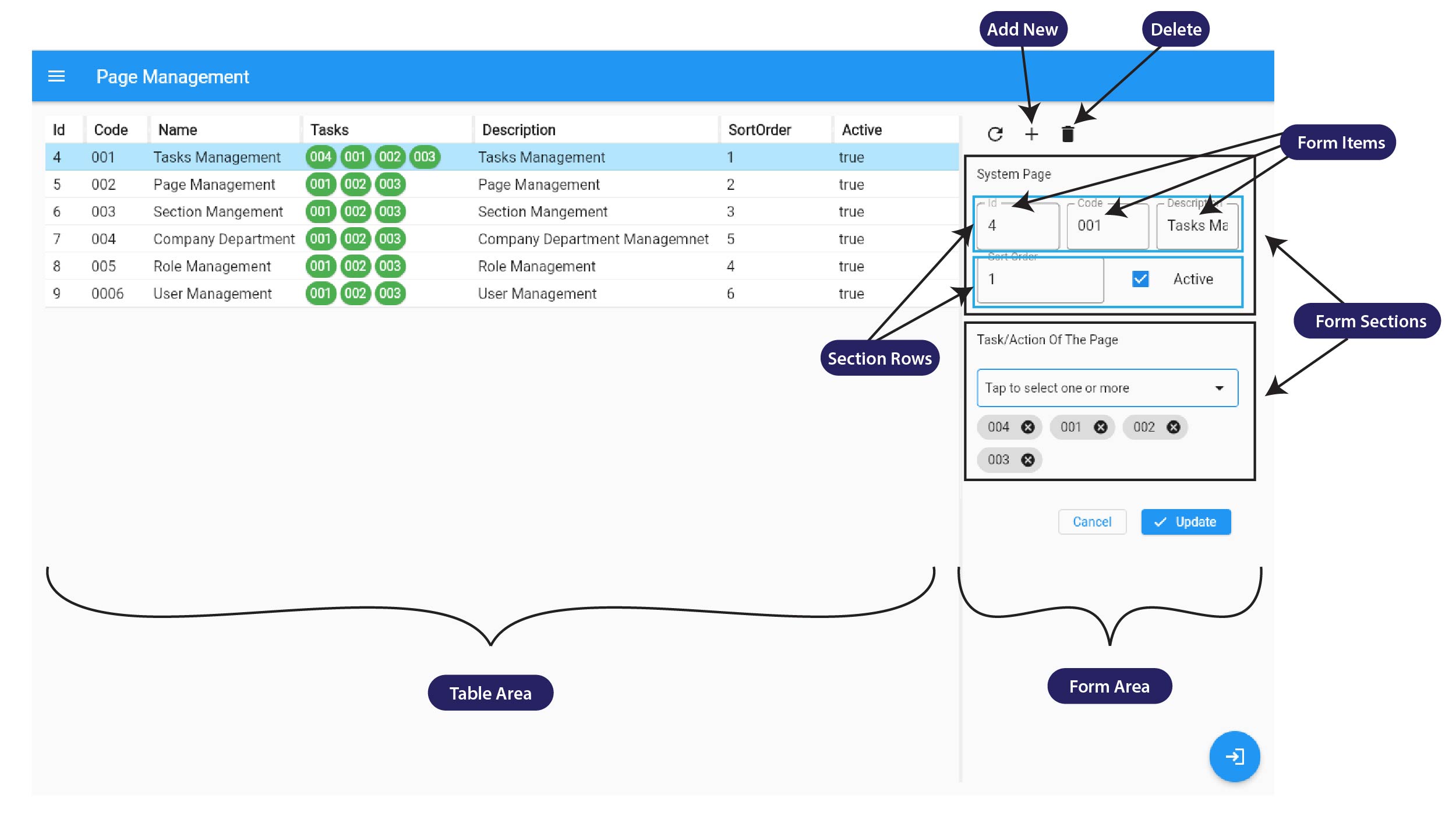
Die CRUD-Tabelle Flutter verfügt über eine Lazy-Loading-Funktion, anpassbare Spalten und ein integriertes CRUD-Formular.

Projektcover von crud_table
Sterne
23
Forks
11
Letzter Push (UTC)
13.04.2026
Projektstatus
Aktiv

Original-README

Englischer Projektschnappschuss. Aktuelle Inhalte auf GitHub.

CRUD Table Flutter

CRUD Table Flutter is a powerful Flutter package that simplifies the creation of CRUD UI for your entity, object or class. This package features a highly efficient lazy loading function, resizable columns, and an integrated CRUD form to provide a seamless user experience. With CRUD Table Flutter, you can easily manage and organize your data, boosting your productivity and efficiency.

Features

  • Lazy loading Table
  • Resizable columns
  • Integrated CRUD Form
  • Customizable UI

CRUD UI

Lazy loading

Getting started

The package uses Riverpod for state management. So Please ensure you import flutter_riverpod and wrap the app with ProviderScope.

import 'package:flutter_riverpod/flutter_riverpod.dart';

  runApp(
    ProviderScope(
      child: MyApp(),
    ),
  );

See the example project.

Installing:

In your pubspec.yaml

dependencies:
  crud_table: 
import 'package:crud_table/crud_table.dart';

Usage

When using CrudTable, a CrudViewSource field must be passed and cannot be null. In the CrudViewSource, you will find a function field called emptyEntityFactory. This function requires an empty object that will be used with the CRUD UI.
Ex :
 Let's say you use User.class with this CrudTable, then the emptyEntityFactory will be

emptyEntityFactory: () => User();

Note :
Give unique on every FormItem otherwise form data change will not work as we expect.

Check the example project.

Additional information

Inspired by Vaadin Crud UI Add-on

License

Licensed under the Apache License, Version 2.0

IRESH MADHURANGA GitHub avatar
GitHub-Autor

IRESH MADHURANGA ↗

SprachenDartHTMLSwiftKotlinObjective-C

Kategorien

Von diesem Repository veröffentlichte Pakete

Verwendete Abhängigkeiten

Abhängigkeiten 7 Einträge

Wie wähle ich ein passendes Repository?

Nach Anwendungsfall filtern, Aktivität vergleichen und vor der Nutzung das Originalprojekt prüfen.

  1. Nach Name, Autor oder Beschreibung suchen und nach Thema eingrenzen.
  2. Sterne, Forks und letzte Pushes vergleichen. Sterne zeigen Interesse, garantieren aber keine Qualität.
  3. Vor der Nutzung README, Lizenz und Issues auf GitHub prüfen.

Quellen und Pflege

“A repository is the most basic element of GitHub.”

GitHub Docs — About repositories ↗