
 v0.0.2
rolling_switch
Benutzerdefinierter Schalter mit ansprechender Animation, der es Ihnen ermöglicht, Farben, Symbole und andere kosmetische Inhalte anzupassen.
59Likes 17930-Tage-Downloads150Pub-Punkte
AndroidiOSWebmacOSWindowsLinux
Vollständig anpassbarer Roll-Schalter-Widget für Flutter-Apps

{"sdk":"flutter"}^0.0.1{"sdk":"flutter"}^1.5.3Englischer Projektschnappschuss. Aktuelle Inhalte auf GitHub.
Rolling Switch Package
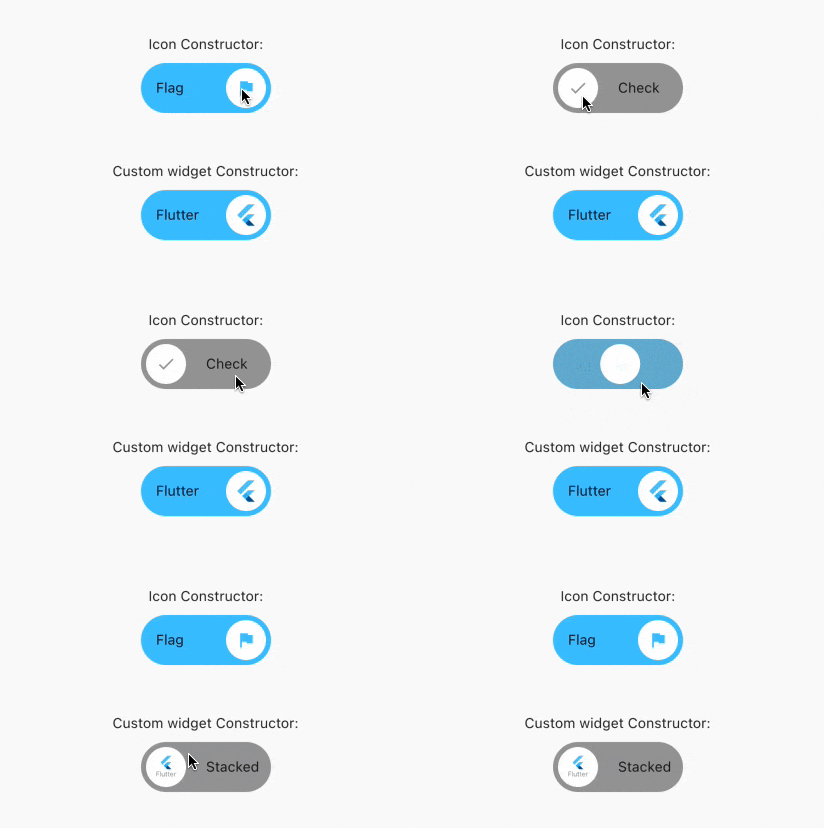
Full customizable rolling switch widget for flutter apps forked from this library
Custom Switch button with attractive animation,
made to allow you to customize colors, icons, custom widget and other cosmetic content.
Manage the widget states in the same way you do with the classical material's switch widget.
style: lint https://img.shields.io/github/license/jamescardona11/rolling_switch https://img.shields.io/pub/v/rolling_switch
Import this library into your project:
roling_switch: ^latest_version
RollingSwitch.icon(
  onChanged: (bool state) {
    print('turned ${(state) ? 'on' : 'off'}');
  },
  rollingInfoRight: const RollingIconInfo(
    icon: Icons.flag,
    text: Text('Flag'),
  ),
  rollingInfoLeft: const RollingIconInfo(
    icon: Icons.check,
    backgroundColor: Colors.grey,
    text: Text('Check'),
  ),
),
const RollingWidgetInfo(icon: FlutterLogo())
RollingSwitch.icon(
  rollingInfoRight: const RollingIconInfo(
    backgroundColor: Colors.green,
  ),
  rollingInfoLeft: const RollingIconInfo(
    backgroundColor: Colors.grey,
  ),
)
RollingSwitch.icon(
  ...
  circularColor: (icon: FlutterLogo())
)
RollingSwitch.icon(
  rollingInfoRight: const RollingIconInfo(
    text: Text('Flag'),
  ),
  rollingInfoLeft: const RollingIconInfo(
    text: Text('Stack'),
  ),
)
RollingSwitch.icon(
  ...
  enableDrag: true
)
https://github.com/jamescardona11/rolling_switch/blob/main/img/example.gif?raw=true