

 v0.6.0
segment_display
Segmentanzeigewidget für Flutter. Unterstützt verschiedene Arten von Segmentanzeigen und Segmentanpassung.
28Likes 56930-Tage-Downloads160Pub-Punkte
AndroidiOSWebmacOSWindowsLinux
Segmentanzeigewidget für Flutter
Englischer Projektschnappschuss. Aktuelle Inhalte auf GitHub.
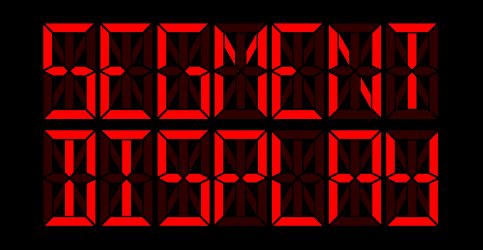


Segment display widget for Flutter. Supports multiple types of segment displays and segment customization.
. (decimal point) and : (colon) charactersshowDisabledDividers)customCharacterMap)See WEB DEMO.
Add this to your package's pubspec.yaml file:
dependencies:
  segment_display: ^0.6.0
You can install packages from the command line:
$ flutter pub get
Now in your Dart code, you can use:
import 'package:segment_display/segment_display.dart';
Example:
SevenSegmentDisplay(
  value: "123",
  size: 12.0,
)
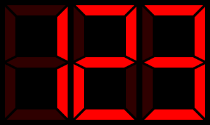
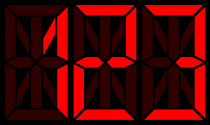
Example:
FourteenSegmentDisplay(
  value: "123",
  size: 12.0,
)
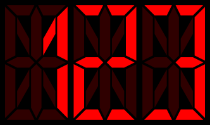
Example:
SixteenSegmentDisplay(
  value: "123",
  size: 12.0,
)
You can customize segment display with:
characterSpacing - space between individual charactersbackgroundColor - display background colorsegmentStyle - style for segments (shape, color,...), see segment styleshowDisabledDividers - always show a decimal point after each digit (dim unless . is present in value)customCharacterMap - add or override character-to-bitmask entriesExample:
SevenSegmentDisplay(
  value: "123",
  size: 12.0,
  characterSpacing: 10.0,
  backgroundColor: Colors.transparent,
  segmentStyle: HexSegmentStyle(
    enabledColor: Colors.red,
    disabledColor: Colors.red.withValues(alpha: 0.15),
  ),
)
Set showDisabledDividers: true to always show a decimal point after each digit — dim when not in value, lit when . follows the character:
SevenSegmentDisplay(
  value: "12.3",
  size: 12.0,
  showDisabledDividers: true,  // dots visible after all digits
)
Use customCharacterMap to add characters not in the built-in map, or override existing ones, by supplying a char → bitmask map:
// 7-segment: bit 0 = G (middle), bit 6 = A (top), etc.
SevenSegmentDisplay(
  value: "~",
  size: 12.0,
  customCharacterMap: {'~': 0x63},
)
To change segment color, size or shape, use segment style.
There are following segment styles:
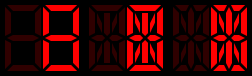
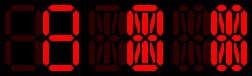
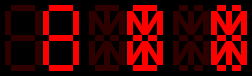
and you can also create your own style (shape) - see custom segment styles
Example:
SevenSegmentDisplay(
  value: "13:37",
  size: 12.0,
  segmentStyle: HexSegmentStyle(
    enabledColor: const Color(0xFF00FF00),
    disabledColor: const Color(0xFF00FF00).withValues(alpha: 0.15),
    segmentBaseSize: const Size(1.0, 2.0),
  ),
)
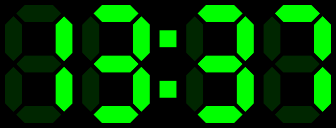
enabledColor - color of enabled segmentsdisabledColor - color of disabled segmentssegmentBaseSize - size ratio for segments; Size(1.0, 2.0) basically means that ratio will be 1:2 (width:length)NOTE:
SegmentStyle.segmentBaseSize*SegmentDisplay.size= segmentSize
To create your own segment style (shape), extend SegmentStyle and implement
createHorizontalPath, createVerticalPath, createDiagonalBackwardPath and createDiagonalForwardPath.
class CustomSegmentStyle extends SegmentStyle {

  const CustomSegmentStyle({
    super.segmentBaseSize,
    super.enabledColor,
    super.disabledColor,
  });

  @override
  Path createHorizontalPath(SegmentPosition position, Size segmentSize) {
    // ...
  }

  @override
  Path createVerticalPath(SegmentPosition position, Size segmentSize) {
    // ...
  }

  @override
  Path createDiagonalBackwardPath(SegmentPosition position, Size segmentSize) {
    // ...
  }

  @override
  Path createDiagonalForwardPath(SegmentPosition position, Size segmentSize) {
    // ...
  }
}
You can also customize the shape for individual segments by overriding createPath** methods.
For 7-segment display, there are createPath7* methods, for 14-segment display createPath14* and so on.
Example: if you want to change the shape of the top segment in 7-segment display, you just have to override createPath7A method.
class CustomSegmentStyle extends SegmentStyle {

  // ..

  @override
  Path createPath7A(Size segmentSize, double padding) {
    // ...
  }

  // ...

}
NOTE:
createPath**methods usecreateHorizontalPath/createVerticalPath/createDiagonalBackwardPath/createDiagonalForwardPathby default so you don't have to override allcreatePath7*methods.
Please file feature requests and bugs at the issue tracker.

Abhängigkeiten 3 Einträge
{"sdk":"flutter"}{"sdk":"flutter"}>=5.0.0 <7.0.0Nach Anwendungsfall filtern, Aktivität vergleichen und vor der Nutzung das Originalprojekt prüfen.
“A repository is the most basic element of GitHub.”
GitHub Docs — About repositories ↗