FLUTTER ECOSYSTEM

marcglasberg/animated_size_and_fade

Flutter-Paket: Ein Widget, das eine Fade- und Größenübergang zwischen Widgets mit gleicher Breite, aber unterschiedlicher Höhe durchführt, und Sie müssen deren Größen nicht im Voraus kennen.

Projektcover von animated_size_and_fade
Stars
47
Forks
8
Letzter Push (UTC)
13.02.2025
Projektstatus
Aktiv
Marcelo Glasberg GitHub avatar
GITHUB User

Marcelo Glasberg ↗

Senior Software Engineer • AI • Full stack • Mobile • Web • https://glasberg.dev

San Francisco / New York / Rio de JaneiroOffizielle Website ↗
SprachenDartObjective-CJava

Von diesem Repository veröffentlichte Pakete

Verwendete Abhängigkeiten

Abhängigkeiten 2 Einträge
  • flutter{"sdk":"flutter"}
  • flutter_testEntwicklung{"sdk":"flutter"}

Original-README

Englischer Projektschnappschuss. Aktuelle Inhalte auf GitHub.

Projekt-README ein-/ausklappen

Pub popularity Pub Version GitHub stars Code Climate issues GitHub closed issues GitHub repo size GitHub forks PRs Welcome Developed by Marcelo Glasberg Glasberg.dev on pub.dev Platforms

Sponsor

https://raw.githubusercontent.com/marcglasberg/animated_size_and_fade/HEAD/example/SponsoredByMyTextAi.png

animated_size_and_fade

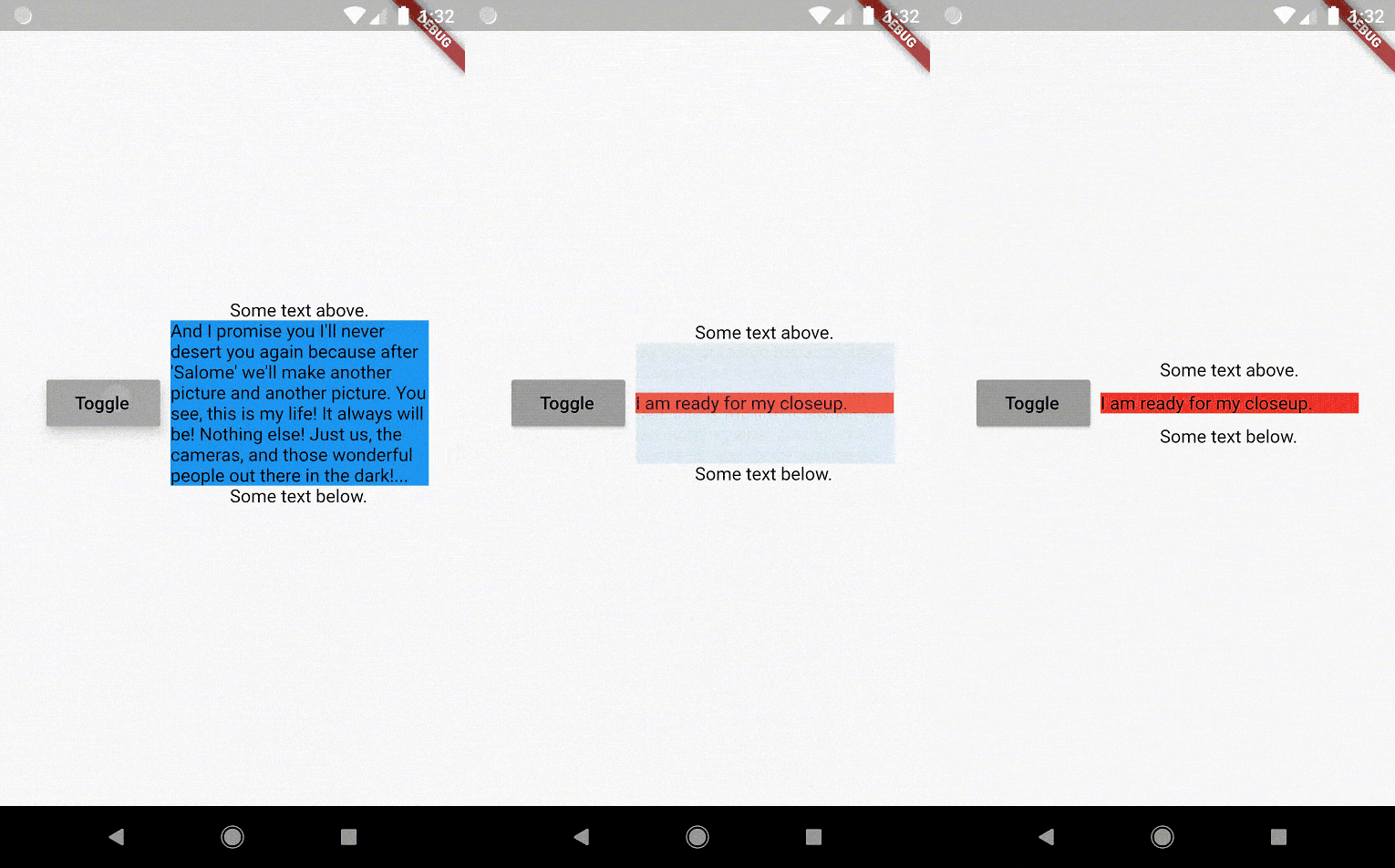
The AnimatedSizeAndFade widget allows you to:

  1. Do a fade and size transition between two widgets.
  2. Show and hide a widget, by resizing it vertically while fading.
https://github.com/marcglasberg/animated_size_and_fade/blob/master/example/lib/animated_size_and_fade.gif?raw=true
Size and Fade

To do a fade and size transition when you change the child widget, the "old" and the "new" child must have the same width, but can have different heights, and you don't need to know their sizes in advance.

You can also define a duration and curve for both the fade and the size, separately.

Important: If the "new" child is the same widget type as the "old" child, but with different parameters, then AnimatedSizeAndFade will NOT do a transition between them, since as far as the framework is concerned, they are the same widget, and the existing widget can be updated with the new parameters. To force the transition to occur, set a Key (typically a ValueKey taking any widget data that would change the visual appearance of the widget) on each child widget that you wish to be considered unique.

Example:

bool toggle=true;
Widget widget1 = ...;
Widget widget2 = ...;

AnimatedSizeAndFade(
   child: toggle ? widget1 : widget2
);
Show and Hide

The AnimatedSizeAndFade.showHide constructor may be used to show/hide a widget, by resizing it vertically while fading.

Example:

bool toggle=true;
Widget widget = ...;    

AnimatedSizeAndFade.showHide(
   show: toggle,
   child: widget,
);

How does it compare to other similar widgets?

  • With AnimatedCrossFade you must provide both the firstChild and secondChild at the same time, but with AnimatedSizeAndFade you may simply change its child.

  • With AnimatedSwitcher you may simply change its child, but then it only animates the fade, not the size.

  • AnimatedContainer only works if you know the size of the children in advance.


Note: See the StackOverflow question that prompted this widget development.


By Marcelo Glasberg

glasberg.dev
github.com/marcglasberg
linkedin.com/in/marcglasberg/
twitter.com/glasbergmarcelo
stackoverflow.com/users/3411681/marcg
medium.com/@marcglasberg

My article in the official Flutter documentation:

The Flutter packages I've authored:

My Medium Articles:

https://raw.githubusercontent.com/marcglasberg/animated_size_and_fade/HEAD/example/SponsoredByMyTextAi.png