
 v3.0.0
data_table_2
Platzhalter für Flutter's DataTable und PaginatedDataTable mit festen/stickigen Kopfzeilen und einigen zusätzlichen Funktionen
984Likes 220.00030-Tage-Downloads160Pub-Punkte
AndroidiOSWebmacOSWindowsLinux
In-Place-Ersatz für Flutter's DataTable und PaginatedDataTable mit festem/stickigem Kopfzeile und zusätzlichen Funktionen

Abhängigkeiten 8 Einträge
{"sdk":"flutter"}^2.13.0^1.0.0{"sdk":"flutter"}^2.2.0^0.20.3^6.0.0—Englischer Projektschnappschuss. Aktuelle Inhalte auf GitHub.
Pub Version GitHub Tests Codecov
! Don't put the widgets inside unbounded parents. You don't need scrollables anymore (e.g. SingleChildScrollView) - widgets handle scrolling by theirselves. If you need a widget inside a Column(), wrap it into Expanded() or Flexible().
In-place substitute for Flutter's stock DataTable and PaginatedDataTable widgets with fixed/sticky header/top rows and left columns. A few useful features missing in the originals were added.
DataTable2 and PaginatedDataTable2 widgets are based on the sources of Flutter's originals, mimic the API and provide seamless integration.
If you've been using (or considered using) standard Flutter's widgets for displaying tables or data grids and missed the sticky headers (or vertical borders, 'No rows' placeholder, straightforward async data source API etc.) - you've come to the right place. No need to learn yet another API of a new control, just stick to well described DataTable and PaginatedDataTable.
Please check the example folder which demonstrates various features of the widgets. There's also a DataGrid Sample in separate repo which is based on DataTable2.
PaginatedDataTable2)
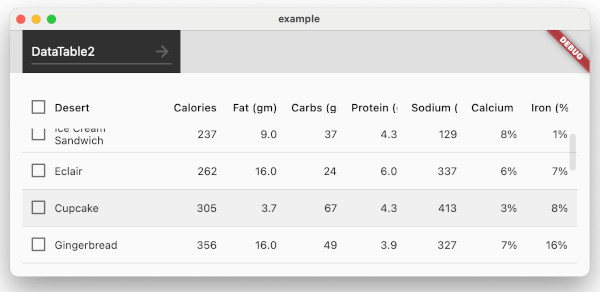
DataTable2.fixedTopRowsDataTable2.fixedLeftColumnsautoRowsToHeight property on PaginatedDataTable2 allows to auto calculate page size depending on how much rows fit the height and makes vertical scrolling unnecessaryisVerticalScrollBarVisible and isHorizontalScrollBarVisibleDataColumn definitions with DataColumn2 (which is a descendant of DataColumn). The class provides size property which can be set to one of 3 relative sizes (S, M and L)smRatio and lmRatio paramsfixedWidth parameter allows to define absolute value for column widthminWidth property) which is useful in portrait orientations with multiple columns not fitting the screenbottomMargin property) to allow slight over-scrollFlexible and SingleScrollView widgets to allow widget to fill parent container and be scrollable
scrollController property. See example 'DataTable2 - Scroll-up' which shows 'up' button when scrolling down and allows to jump to the top of the tablePaginatedDataTable2.fit property controls whether the paginator sticks to the bottom and leaves a gap to data rows aboveDataRow2 alternative to stock DataRow which provides row level tap events (including right clicks)
PaginatedDataTable2.renderEmptyRowsInTheEnd property changes the default Flutter way of rendering pages with empty rowsDataRow2.specificRowHeight allows overriding default height for any rowsortArrowIcon and sortArrowAnimationDuration properties, custom arrow builder with sortArrowBuilderheadingCheckboxTheme, datarowCheckboxTheme and checkboxAlignmentempty property which allows defining a placeholder widget to be displayed when data source is emptyborder allows drawing inner and outer vertical and horizontal borders (e.g. outlining individual cells) - stock widgets only allow drawing horizontal row splittersPaginatorController allows to externally control PaginatedDataTable2 state (e.g. switch pages, change page size etc.)AsynPaginatedDataTable2 widget built for asynchronous scenarios (such a requesting data from a web service) relying on AsyncDataTableSource returning rows in a FutureNOTE:* don't put the widgets into any unconstrained parents with infinite width or height (e.g. scrollables such as SingleChildScrollView, Column etc.). The widgets are designed to stretch and fill all available space within parent and have a number of own scrollables inside to address fixed rows/columns feature. Putting it inside unconstrained parent break widgets.
material_ui):dependencies:
data_table_2: ^3.0.0
material_ui: ^1.0.0
import 'package:data_table_2/data_table_2.dart';
import 'package:material_ui/material_ui.dart';
import 'package:data_table_2/data_table_2.dart';
import 'package:material_ui/material_ui.dart';
import 'package:flutter/rendering.dart';

/// Example without a datasource
class DataTable2SimpleDemo extends StatelessWidget {
  const DataTable2SimpleDemo();

  @override
  Widget build(BuildContext context) {
    return Padding(
      padding: const EdgeInsets.all(16),
      child: DataTable2(
          columnSpacing: 12,
          horizontalMargin: 12,
          minWidth: 600,
          columns: [
            DataColumn2(
              label: Text('Column A'),
              size: ColumnSize.L,
            ),
            DataColumn(
              label: Text('Column B'),
            ),
            DataColumn(
              label: Text('Column C'),
            ),
            DataColumn(
              label: Text('Column D'),
            ),
            DataColumn(
              label: Text('Column NUMBERS'),
              numeric: true,
            ),
          ],
          rows: List<DataRow>.generate(
              100,
              (index) => DataRow(cells: [
                    DataCell(Text('A' * (10 - index % 10))),
                    DataCell(Text('B' * (10 - (index + 5) % 10))),
                    DataCell(Text('C' * (15 - (index + 5) % 10))),
                    DataCell(Text('D' * (15 - (index + 10) % 10))),
                    DataCell(Text(((index + 0.1) * 25.4).toString()))
                  ]))),
    );
  }
}
If you're already using the standard widgets you can reference the package and add '2' to the names of stock widgets (making them DataTable2 or PaginatedDataTable2) and that is it.
Breaking change in 3.0.0: Material widgets and types (DataColumn, DataRow, DataTable, etc.) now come from the standalone material_ui package instead of package:flutter/material.dart. Add material_ui to your dependencies and update Material imports. Public types in this package extend Material classes from material_ui, so mixing SDK Material imports with data_table_2 3.x can cause type identity mismatches.
If your app uses localized Material widgets (e.g. paginator labels), replace flutter_localizations Material delegates with material_ui:
import 'package:material_ui/material_ui.dart';

MaterialApp(
  localizationsDelegates: GlobalMaterialLocalizations.delegates,
  // ...
)
Do not import both package:flutter_localizations/flutter_localizations.dart and package:material_ui/material_ui.dart without hide/as prefixes — GlobalMaterialLocalizations is defined in both and will cause ambiguous-import errors.
minWidth), data rows width are predefined by constructor params. Content that doesn't fit a cell gets clipped
DataRow.onSelectChanged event handlerDataTable2.showCheckboxColumn set to true AND there must be some rows with onSelectChanged event handler being not nullrenderEmptyRowsInTheEnd