

 v1.1.3
drop_cap_text
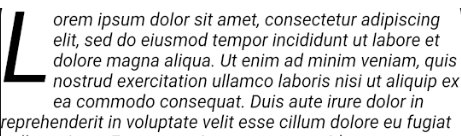
Dieser Flutter-Plugin soll den Drop-Cap-Effekt bei der Großschreibung von Texten erreichen.
101Likes 26430-Tage-Downloads55Pub-Punkte
Keine Plattformdaten
Dieser Flutter-Plugin soll den Drop-Cap-Effekt bei der Großschreibung von Texten erreichen.

Englischer Projektschnappschuss. Aktuelle Inhalte auf GitHub.


This Flutter plugin aims to achive drop cap in text capitalization.
import 'package:drop_cap_text/drop_cap_text.dart';
DropCapText(
    loremIpsumText,
    style: TextStyle(fontStyle: FontStyle.italic),
),

| Name | Type | Default | Description |
|---|---|---|---|
| data | String | null | |
| mode | DropCapMode | DropCapMode.inside | aside, upwards, .. |
| textAlign | TextAlign | null | |
| indentation | Offset | Offset.zero | |
| dropCapChars | int | 1 | |
| dropCapPadding | EdgeInsets | EdgeInsets.zero | |
| dropCap | DropCap [Widget] |
null | |
| style | TextStyle | null | |
| dropCapStyle | TextStyle | ||
| forceNoDescent | bool | false | |
| parseInlineMarkdown | bool | false | bold |
| dropCapPosition | DropCapPosition | DropCapPosition.start | |
| textDirection | TextDirection | TextDirection.ltr | |
| maxLines | int | ||
| overflow | TextOverflow | TextOverflow.clip |

DropCapText(
    loremIpsumText,
    dropCap: DropCap(
    width: 100,
    height: 100,
    child: Image.network(
    	'https://www.codemate.com/wp-content/uploads/2017/09/flutter-logo.png')
    ),
),
only supports italic bold underline

DropCapText(
  'Lorem ipsum **dolor sit amet, consectetur adipiscing elit, ++sed do eiusmod++ tempor incididunt** ut labore et _dolore magna aliqua_.',
  parseInlineMarkdown: true,
  dropCapStyle: TextStyle(fontSize: 100, fontWeight: FontWeight.bold, color: Colors.green),
  dropCapPadding: EdgeInsets.only(right: 19.0),
  style: TextStyle(fontSize: 18.0, height: 1.5),
),

DropCapText(
    loremIpsumText,
    dropCapPosition: DropCapPosition.end,
    textAlign: TextAlign.justify,
    dropCap: DropCap(
    width: 100,
    height: 100,
    child: Image.network(
    	'https://www.codemate.com/wp-content/uploads/2017/09/flutter-logo.png')
    ),
),

DropCapText(
    loremIpsumText,
    style: TextStyle(
        height: 1.3,
        fontFamily: 'times',
    ),
    dropCapChars: 2,
    indentation: Offset(25, 10),
),

DropCapText(
    loremIpsumText,
    mode: DropCapMode.upwards,
    dropCapStyle: TextStyle(
        color: Colors.red,
        fontWeight: FontWeight.bold,
        fontSize: 120,
        fontFamily: 'times',
    ),
),

DropCapText(
    loremIpsumText,
    style: TextStyle(
        fontWeight: FontWeight.bold,
        height: 1.2,
    ),
    mode: DropCapMode.aside,
),
Abhängigkeiten 2 Einträge
{"sdk":"flutter"}{"sdk":"flutter"}Nach Anwendungsfall filtern, Aktivität vergleichen und vor der Nutzung das Originalprojekt prüfen.
“A repository is the most basic element of GitHub.”
GitHub Docs — About repositories ↗