
 v2.1.5
animated_appbar
AppBar, der sich dynamisch mit der Seitennavigation ändern kann.
29Likes 10530-Tage-Downloads160Pub-Punkte
AndroidiOSWebmacOSWindowsLinux
Flutter-Plugin, animiertes Appbar
Englischer Projektschnappschuss. Aktuelle Inhalte auf GitHub.


AppBar which can dynamically change height with page navigation.
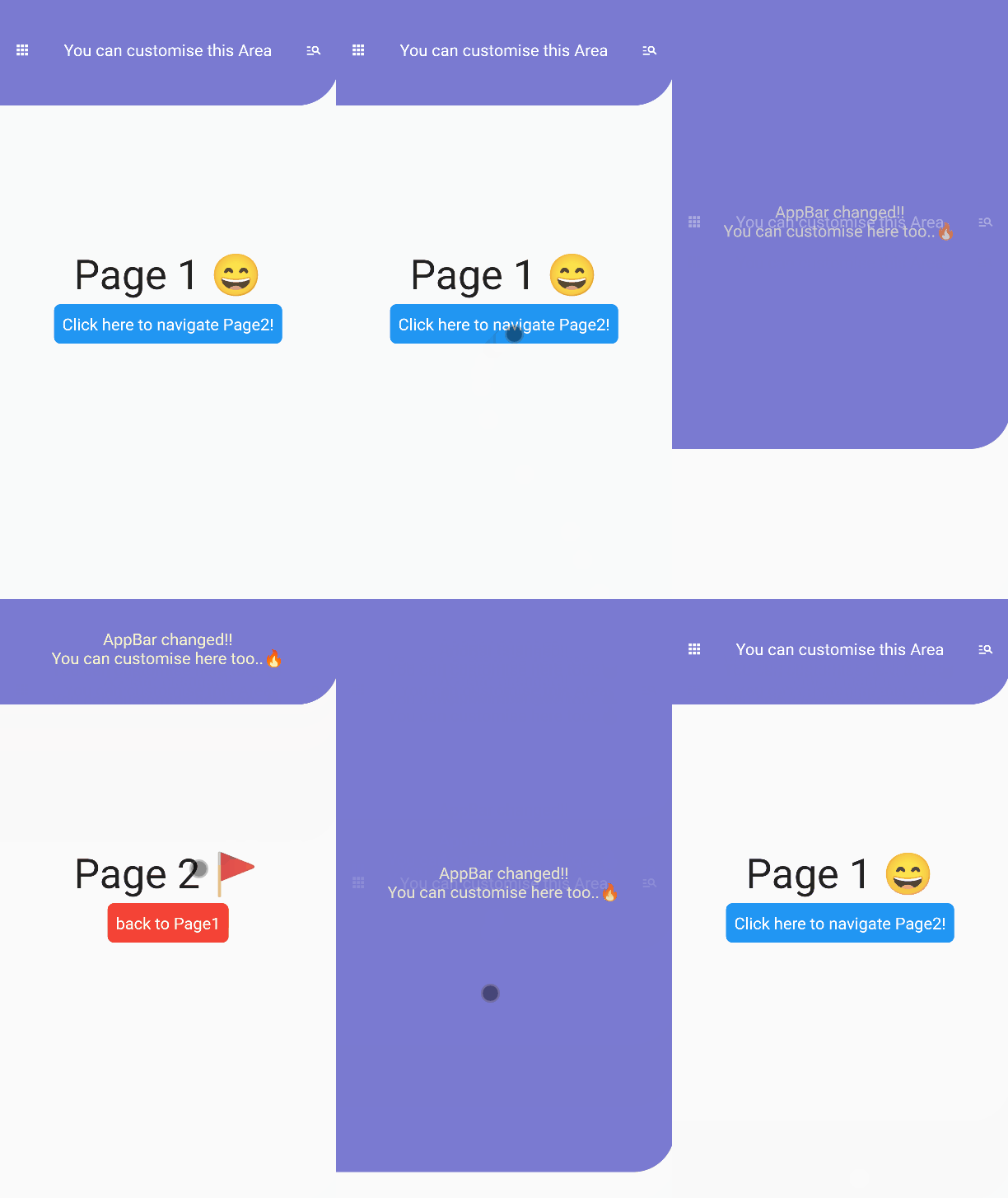
This package is expected to be used with BaseLayout and AnimatedAppBar
// In this scenario
// we have to pages.
// In Page1, We will navigate to Page2 with dynamic animations.
// In Page2, We will back to Page1 with dynamic animations.
import 'package:flutter/material.dart';
import 'package:animated_appbar/animated_appbar.dart';

void main() {
  runApp(MyApp());
}

class MyApp extends StatefulWidget {
  @override
  _MyAppState createState() => _MyAppState();
}

class _MyAppState extends State<MyApp> with TickerProviderStateMixin{

  @override
  Widget build(BuildContext context) {

    return MaterialApp(
      debugShowCheckedModeBanner: false,
      // BaseLayout is declared in this package
      // If you wanna using AnimatedAppBar, You must use [BaseLayout]
      home: BaseLayout(
        // AnimatedAppBar is declared in this package
        appBar: AnimatedAppBar(
          initHeight: 135.0,
          backgroundColor: Color(0xff7a7ad1),
          child: Container(
            // If you want to change your appbar,
            // You must set key like this.
            // If you don't set this properties,
            // You couldn't see beautiful animation.
            key: UniqueKey(),
            child:Center(
              child: Row(
                mainAxisAlignment: MainAxisAlignment.spaceAround,
                crossAxisAlignment: CrossAxisAlignment.center,
                children: [
                  Icon(
                    Icons.apps,
                    color: Colors.white,
                    size: 20.0,
                  ),
                  Text(
                    "You can customise this Area",
                    style: TextStyle(
                      color: Colors.white,
                      fontSize: 20.0,
                    ),
                  ),
                  Icon(
                    Icons.manage_search,
                    color: Colors.white,
                    size: 20.0,
                  ),
                ],
              ),
            ),
          ),
        ),
        // Setting initial Page in here!!!!!
        scaffold: Page1(),
      ),
    );
  }
}

// When routing page with this package,
// You must write [with RoutePage] like below.
// In this class, routing methods are defined.
class Page1 extends StatelessWidget with RoutePage{
  // This variable is Page2's new AppBar widget.
  // You have not using AnimatedAppBar
  // Just use any other Widget without AnimatedAppBar
  Widget newAppBar = Container(
    // You must set key like this.
    // If you don't set this properties,
    // You couldn't see beautiful animation.
    key:UniqueKey(),
    child:Column(
      mainAxisAlignment: MainAxisAlignment.center,
      children: [
        Text(
          "AppBar changed!!",
          style: TextStyle(
            color: Color(0xfff7f4cc),
            fontSize: 20,
          ),
        ),
        Text(
          "You can customise here too..🔥",
          style: TextStyle(
            color: Color(0xfff7f4cc),
            fontSize: 20,
          ),
        ),
      ],
    ),
  );
  @override
  Widget build(BuildContext context) {
    return Scaffold(
      body:  Center(
        child:Column(
          mainAxisAlignment:MainAxisAlignment.center,
          children: [
            Text(
              "Page 1 😄",
              style:TextStyle(
                fontSize: 50,
              ),
            ),
            SizedBox(height: 5),
            Container(
              decoration:BoxDecoration(
                color: Colors.blue,
                borderRadius: BorderRadius.all(
                  Radius.circular(8)
                ),
              ),
              padding: EdgeInsets.all(10.0),
              child: TextButton(
                  // If you wanna route page, Using routePage(Widget page)!
                  // Ig you wannt route page with new appbar, Using routePageWithNewAppBar(widget page, widget appBar)
                  onPressed: ()=> routePageWithNewAppBar(Page2(),newAppBar),
                  child: Text(
                    "Click here to navigate Page2!",
                    style: TextStyle(
                      fontSize: 20,
                      color: Colors.white
                    ),
                  ),
                ),
            ),
          ],
        ),
      ),
    );
  }
}

class Page2 extends StatelessWidget with RoutePage{

  @override
  Widget build(BuildContext context) {
    return Scaffold(
      body:  Center(
        child:Column(
          mainAxisAlignment:MainAxisAlignment.center,
          children: [
            Text(
              "Page 2 🚩",
              style:TextStyle(
                fontSize: 50,
              ),
            ),
            SizedBox(height: 5),
            Container(
              decoration:BoxDecoration(
                color: Colors.red,
                borderRadius: BorderRadius.all(
                  Radius.circular(8)
                ),
              ),
              padding: EdgeInsets.all(10.0),
              child: TextButton(
                // If you wanna back to previous page, Just using [previousPage()] method.
                onPressed: () => previousPage(),
                child: Text(
                  "back to Page1",
                  style: TextStyle(
                    fontSize: 20,
                    color: Colors.white
                  ),
                ),
              ),
            ),
          ],
        ),
      ),
    );
  }
}
If you have any requests / contributes or questions, please feel free to visit github.

Nach Anwendungsfall filtern, Aktivität vergleichen und vor der Nutzung das Originalprojekt prüfen.
“A repository is the most basic element of GitHub.”
GitHub Docs — About repositories ↗