Flutter Screen Lock
This Flutter plugin provides an feature for screen lock.
Enter your passcode to unlock the screen.
You can also use biometric authentication as an option.
https://raw.githubusercontent.com/naoki0719/flutter_screen_lock/master/resources/flutter_screen_lock_v3.gif
Landscape view
https://raw.githubusercontent.com/naoki0719/flutter_screen_lock/master/resources/landscape.png
Features
- By the length of the character count
- You can change
Cancel and Delete widget
- Optimizes the UI for device size and orientation
- You can disable cancellation
- You can use biometrics (local_auth plugin)
- Biometrics can be displayed on first launch
- Unlocked callback
- You can specify a mismatch event.
- Limit the maximum number of retries
- Keyboard input support for devices with physical keyboards
- Number keys (0-9) and numpad input
- Backspace key for deletion
- Enter key for confirmation
- Escape key for cancellation
Usage
You can easily lock the screen with the following code.
To unlock, enter correctString.
Simple
If you give the same input as correctString, it will automatically close the screen.
import 'package:flutter_screen_lock/flutter_screen_lock.dart';

screenLock(
  context: context,
  correctString: '1234',
);
Block user
Provides a screen lock that cannot be cancelled.
import 'package:flutter_screen_lock/flutter_screen_lock.dart';

screenLock(
  context: context,
  correctString: '1234',
  canCancel: false,
);
Passcode creation
You can have users create a new passcode with confirmation
import 'package:flutter_screen_lock/flutter_screen_lock.dart';

screenLockCreate(
  context: context,
  onConfirmed: (value) => print(value), // store new passcode somewhere here
);
Control the creation state
import 'package:flutter_screen_lock/flutter_screen_lock.dart';

final inputController = InputController();

screenLockCreate(
  context: context,
  inputController: inputController,
);

// Somewhere else...
inputController.unsetConfirmed(); // reset first and confirm input
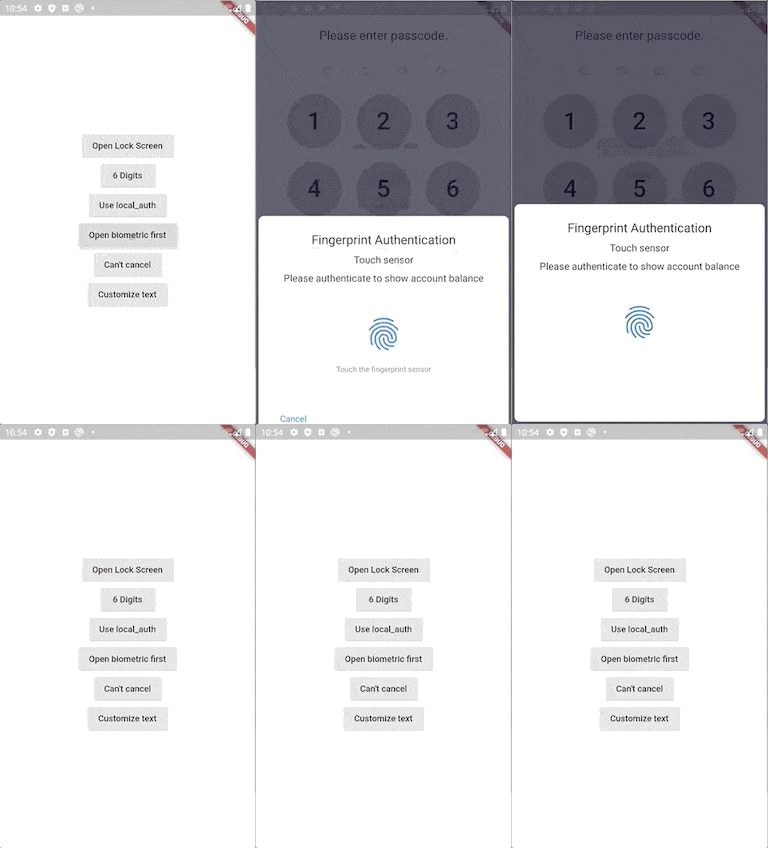
Use local_auth
Add the local_auth package to pubspec.yml.
It includes an example that calls biometrics as soon as screenLock is displayed in didOpened.
import 'package:flutter_screen_lock/flutter_screen_lock.dart';
import 'package:local_auth/local_auth.dart';
import 'package:flutter/material.dart';

Future<void> localAuth(BuildContext context) async {
  final localAuth = LocalAuthentication();
  final didAuthenticate = await localAuth.authenticateWithBiometrics(
      localizedReason: 'Please authenticate');
  if (didAuthenticate) {
    Navigator.pop(context);
  }
}

screenLock(
  context: context,
  correctString: '1234',
  customizedButtonChild: Icon(Icons.fingerprint),
  customizedButtonTap: () async => await localAuth(context),
  didOpened: () async => await localAuth(context),
);
Fully customize
You can customize every aspect of the screenlock.
Here is an example:
import 'package:flutter/material.dart';
import 'package:flutter_screen_lock/flutter_screen_lock.dart';

screenLockCreate(
  context: context,
  title: const Text('change title'),
  confirmTitle: const Text('change confirm title'),
  onConfirmed: (value) => Navigator.of(context).pop(),
  config: const ScreenLockConfig(
    backgroundColor: Colors.deepOrange,
  ),
  secretsConfig: SecretsConfig(
    spacing: 15, // or spacingRatio
    padding: const EdgeInsets.all(40),
    secretConfig: SecretConfig(
      borderColor: Colors.amber,
      borderSize: 2.0,
      disabledColor: Colors.black,
      enabledColor: Colors.amber,
      height: 15,
      width: 15,
      build: (context,
              {required config, required enabled}) =>
          Container(
        decoration: BoxDecoration(
          shape: BoxShape.rectangle,
          color: enabled
              ? config.enabledColor
              : config.disabledColor,
          border: Border.all(
            width: config.borderSize,
            color: config.borderColor,
          ),
        ),
        padding: const EdgeInsets.all(10),
        width: config.width,
        height: config.height,
      ),
    ),
  ),
  keyPadConfig: KeyPadConfig(
    buttonConfig: StyledInputConfig(
      textStyle:
          StyledInputConfig.getDefaultTextStyle(context)
              .copyWith(
        color: Colors.orange,
        fontWeight: FontWeight.bold,
      ),
      buttonStyle: OutlinedButton.styleFrom(
        shape: const RoundedRectangleBorder(),
        backgroundColor: Colors.deepOrange,
      ),
    ),
    displayStrings: [
      '零',
      '壱',
      '弐',
      '参',
      '肆',
      '伍',
      '陸',
      '質',
      '捌',
      '玖'
    ],
  ),
  cancelButton: const Icon(Icons.close),
  deleteButton: const Icon(Icons.delete),
);
https://raw.githubusercontent.com/naoki0719/flutter_screen_lock/master/resources/customize_styles_v3.png
Version migration
8.x to 9 migration
- Change
screenLockConfig parameter to config
- Change
keyPadConfig parameter to config
7.x to 8 migration
- Change all callback names from
didSomething to onSomething
- Change
screenLock with confirm: true to screenLockCreate
- Change
ScreenLock with confirm: true to ScreenLock.create
- Replace
StyledInputConfig with KeyPadButtonConfig
- Replace
spacingRatio with fixed value spacing in Secrets
6.x to 7 migration
- Requires dart >= 2.17 and Flutter 3.0
- Replace
InputButtonConfig with KeyPadConfig.
- Change
delayChild to delayBuilder.
delayBuilder is no longer displayed in a new screen. Instead, it is now located above the Secrets.
- Accept
BuildContext in secretsBuilder.
5.x to 6 migration
ScreenLock does not use Navigator.pop internally anymore.
The developer should now pop by themselves when desired.
screenLock call will pop automatically if onUnlocked is null.
4.x to 5 migration
Import name has changed from:
import 'package:flutter_screen_lock/functions.dart';
to
import 'package:flutter_screen_lock/flutter_screen_lock.dart';
Apps that use this library
TimeKey
Support me!
Buy Me A Coffee


 v9.2.2+2