Indonesian documentation is here
Introduction
pub package
build
Inspired by bootstrap ,
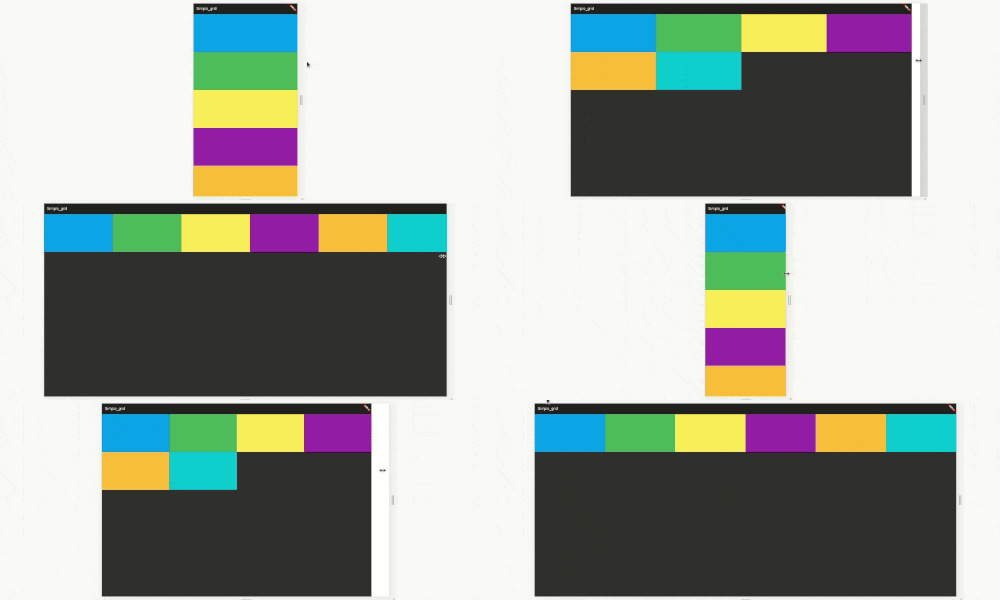
This is dynamic grid layout that you can use Like a bootstrap grid, but the size following material UI break points. You can also customize your break point like here.
This package purely using mediaquery, don't worry about the render.
Simple Demo
code example here
https://raw.githubusercontent.com/nggepe/simple_grid/master/doc/demo-grid.gif
Order Demo
code example here
https://raw.githubusercontent.com/nggepe/simple_grid/master/doc/order-example.gif
Grid Explanation
Bootstrap, material-ui or another web-grid always use 12 size. Here is the image example:
https://raw.githubusercontent.com/nggepe/simple_grid/master/doc/grid-example.png
Classes
There are 4 classes that you have to now, these are:
SpGrid is the container of grid, more information hereSpGridItem is the children of SpGrid, more information hereSpGridSize is the class that you can declare the maximum of the screen size, more information hereSpOrder, this class is a sort class. when you use 1 of it's value, the value will create an ordering when the screen on the value condition. more information here
Example
SpGrid(width: MediaQuery.of(context).size.width, children: [
  SpGridItem(
    xs: 12,
    sm: 6,
    md: 4,
    lg: 3,
    child: Container(
      color: Colors.blue,
      height: 200,
    ),
  ),
  SpGridItem(
    xs: 12,
    sm: 6,
    md: 4,
    lg: 3,
    child: Container(
      color: Colors.green,
      height: 200,
    ),
  ),
  SpGridItem(
    xs: 12,
    sm: 6,
    md: 4,
    lg: 3,
    child: Container(
      color: Colors.yellow,
      height: 200,
    ),
  ),
  SpGridItem(
    xs: 12,
    sm: 6,
    md: 4,
    lg: 3,
    child: Container(
      color: Colors.purple,
      height: 200,
    ),
  ),
]);
Order Example
import 'package:flutter/material.dart';
import 'package:simple_grid/simple_grid.dart';

void main() {
  runApp(MyApp());
}

class MyApp extends StatelessWidget {
  @override
  Widget build(BuildContext context) {
    return MaterialApp(
      title: 'Simple_grid',
      theme: ThemeData(
        brightness: Brightness.dark,
      ),
      home: MyHomePage(),
    );
  }
}

class MyHomePage extends StatelessWidget {
  @override
  Widget build(BuildContext context) {
    return Scaffold(
      appBar: AppBar(
        title: Text("SIMPLE GRID EXAMPLE"),
      ),
      body: SpGrid(
        width: MediaQuery.of(context).size.width,
        spacing: 10,
        runSpacing: 10,
        children: [
          SpGridItem(
            xs: 12,
            md: 6,
            order: SpOrder(sm: 1, xs: 1),
            child: Container(
              height: 200,
              child: Column(
                mainAxisAlignment: MainAxisAlignment.center,
                children: [
                  Text(
                    "Hello!",
                    style: TextStyle(fontSize: 40),
                    textAlign: TextAlign.center,
                  ),
                  SizedBox(
                    height: 10,
                  ),
                  Text(
                    "I'm John Doe and I Love Programming",
                    style: TextStyle(fontSize: 25),
                    textAlign: TextAlign.center,
                  ),
                ],
              ),
            ),
          ),
          SpGridItem(
            xs: 12,
            md: 6,
            order: SpOrder(sm: 0, xs: 0),
            child: Container(
              height: 200,
              decoration: BoxDecoration(
                  image: DecorationImage(
                      image: NetworkImage(
                          "https://raw.githubusercontent.com/nggepe/simple_grid/master/doc/john.png"))),
            ),
          ),
        ],
      ),
    );
  }
}
Customize Break Point
SpGrid(
  width: MediaQuery.of(context).size.width,
  gridSize: SpGridSize(xs: 0, sm: 500, md: 768, lg: 980, xl: 1200),
  children:[],
)


 v0.1.5