

 v1.2.2
flutter_verification_code_field
Flutter-Überprüfungscode-Eingabe. Hauptsächlich zum Eingeben oder Einfügen von OTP-Codes aus Autorisierungse-Mails oder Nachrichten verwendet.
27Likes 9630-Tage-Downloads160Pub-Punkte
AndroidiOS
otakoyi/flutter_verification_code_field open-source repository details.

Englischer Projektschnappschuss. Aktuelle Inhalte auf GitHub.

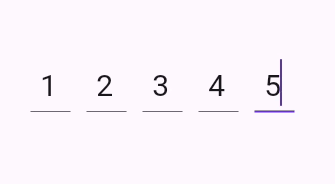
A flutter package which contains a verification code field with a number of advantages, namely with the ability to customize your own validation pattern, customize the number of OTP fields or their size, as well as the spacing between OTP fields, also supports text insertion or character replacement in any cell.

Add this to your package's pubspec.yaml file:
dependencies:
  flutter_verification_code_field: ^1.0.0
You can install packages from the command line:
with pub:
$ pub get
with Flutter:
$ flutter pub get
Now in your Dart code, you can use:
import 'package:flutter_verification_code_field/flutter_verification_code_field.dart';
VerificationCodeField is a Hook Widget that can be used for OTP verification.
Include it in your code like:
    VerificationCodeField(
      length: 5,
      onFilled: (value) => print(value),
      size: Size(30, 60),
      spaceBetween: 16,
      matchingPattern: RegExp(r'^\d+$'),
    );
It has many configurable properties, including:
length – Number of the OTP Fieldssize – Size of the single OTP FieldspaceBetween – Space between the OTP fieldsmatchingPattern – Pattern for validationThere are also custom callback:
onFilled – Callback function that is called when the verification code is filledIf you encounter any problems feel free to open an issue. If you feel the library is missing a feature, please raise a ticket on GitHub and I'll look into it. Pull request are also welcome.
Abhängigkeiten 5 Einträge
{"sdk":"flutter"}^0.21.2^2.4.1{"sdk":"flutter"}^5.0.0Nach Anwendungsfall filtern, Aktivität vergleichen und vor der Nutzung das Originalprojekt prüfen.
“A repository is the most basic element of GitHub.”
GitHub Docs — About repositories ↗