Pakete, Repositories und App-Kategorien suchen

GitHub-Repositorysanta112358/cell_calendar

cell_calendar

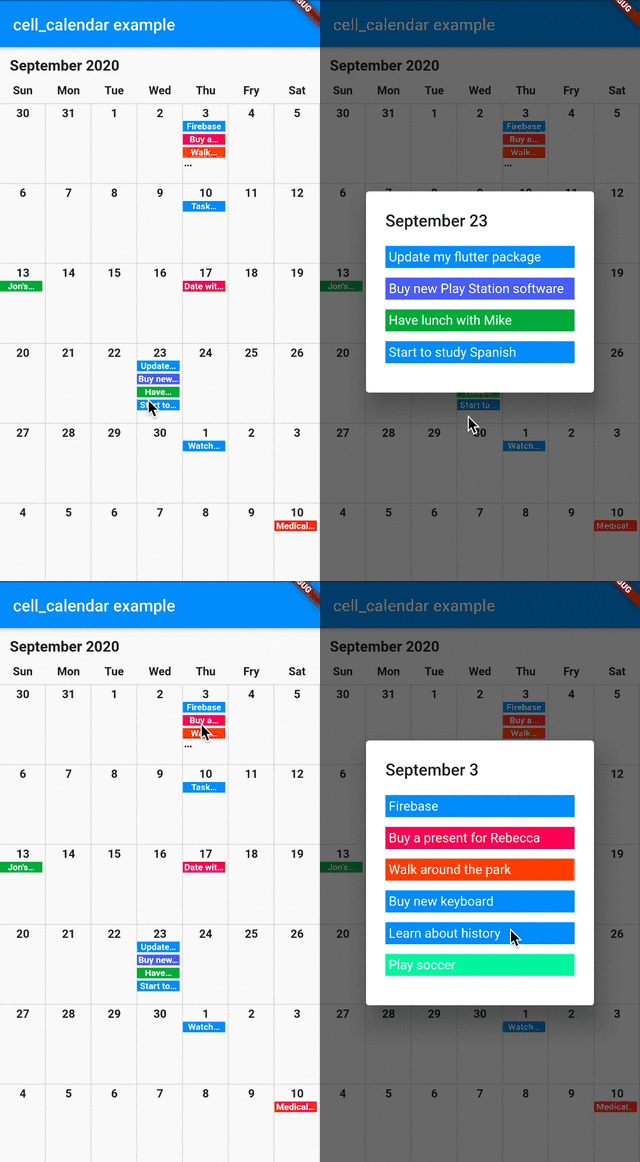
Modernes Kalender-Widget mit nützlichen Funktionen. Ermöglicht Ihnen, in kürzester Zeit ein gut gestaltetes Kalender-Widget zu entwickeln.

Projektcover von cell_calendar
Sterne
49
Forks
46
Letzter Push (UTC)
28.01.2026
Projektstatus
Aktiv

Original-README

Englischer Projektschnappschuss. Aktuelle Inhalte auf GitHub.

cell_calendar

pub package License: MIT

Modern calendar widget with useful features. Enables to develop well designed calendar in a moment.

Inspired by the UI of Google Calendar

cell_calendar

Usage

  • Events

You can show the events in the calendar by inserting the list of CalendarEvent as events

    CellCalendar(
      events: [
        CalendarEvent(eventName: "Event 1",eventDate: DateTime1),
        CalendarEvent(eventName: "Event 2",eventDate: DateTime2),
      ]
    );

If you need to customize the calendar more, the additional parameters like eventBackGroundColor, eventTextColor and eventID are helpful.

  • onPageChanged

The callback onPageChanged is literally called when the current page is changed.

    CellCalendar(
      onPageChanged: (firstDate, lastDate) {
        print("This is the first date of the new page: $firstDate");
        print("This is the last date of the new page: $lastDate");
      }
    );

In this sample code, firstDate is the date in the very first cell of the new page, and its logic is same as lastDate.

  • onCellTapped

The callback onCellTapped is called when user tapped a cell.

    CellCalendar(
      onCellTapped: (date) {
        print("$date is tapped !");
      }
    );

It is called with tapped DateTime, so you can get the events on the date if you want.

    CellCalendar(
      onCellTapped: (date){
        print("$date is tapped !");
        final eventsOnTheDate = sampleEvents().where((event) {
          final eventDate = event.eventDate;
          return eventDate.year == date.year &&
              eventDate.month == date.month &&
              eventDate.day == date.day;
        }).toList();
        /// ex) Show dialog or navigate to new page with [eventsOnTheDate]
      }
    );

  • daysOfTheWeekBuilder and monthYearLabelBuilder

If you don't want to use default labels on the calendar, you can use callbacks for customization.

    CellCalendar(
      daysOfTheWeekBuilder: (dayIndex) {
        /// dayIndex: 0 for Sunday, 6 for Saturday.
        final labels = ["S", "M", "T", "W", "T", "F", "S"];
        return Padding(
          padding: const EdgeInsets.only(bottom: 4.0),
          child: Text(
            labels[dayIndex],
            style: TextStyle(
              fontWeight: FontWeight.bold,
            ),
            textAlign: TextAlign.center,
          ),
        );
      },
      monthYearLabelBuilder: (datetime) {
        final year = datetime.year.toString();
        final month = datetime.month.toString();
        return Padding(
          padding: const EdgeInsets.all(16.0),
          child: Text(
            "$month, $year",
            style: TextStyle(
              fontSize: 24,
              fontWeight: FontWeight.bold,
            ),
          ),
        );
      },
    )

If you have any requests or questions, please feel free to ask on github.

Contributors ✨

Thanks goes to these wonderful people (emoji key):

Santa Takahashi
Santa Takahashi

💻
Denis Filonov
Denis Filonov

💻
HPanda
HPanda

💻

This project follows the all-contributors specification. Contributions of any kind welcome!

Santa Takahashi GitHub avatar
GitHub-Autor

Santa Takahashi ↗

cat enthusiast

SprachenDartC++CMakeHTMLCSwiftKotlinObjective-C

Kategorien

Von diesem Repository veröffentlichte Pakete

Verwendete Abhängigkeiten

Abhängigkeiten 3 Einträge

  • flutter{"sdk":"flutter"}
  • hooks_riverpod^2.3.6
  • flutter_testEntwicklung{"sdk":"flutter"}

Wie wähle ich ein passendes Repository?

Nach Anwendungsfall filtern, Aktivität vergleichen und vor der Nutzung das Originalprojekt prüfen.

  1. Nach Name, Autor oder Beschreibung suchen und nach Thema eingrenzen.
  2. Sterne, Forks und letzte Pushes vergleichen. Sterne zeigen Interesse, garantieren aber keine Qualität.
  3. Vor der Nutzung README, Lizenz und Issues auf GitHub prüfen.

Quellen und Pflege

“A repository is the most basic element of GitHub.”

GitHub Docs — About repositories ↗