
newsbuzz
Nachrichten-App, die in Flutter mit der News-API zur Abfrage von Echtzeitdaten und Firebase als Backend und Authentifizierung erstellt wurde.
- Sterne
- 597
- Forks
- 190
- Letzter Push (UTC)
- 27.10.2018
- Projektstatus
- Aktiv
Original-README
Englischer Projektschnappschuss. Aktuelle Inhalte auf GitHub.
News Buzz
News App created in Flutter using News API for fetching realtime data and Firebase as the backend and authenticator.
Features
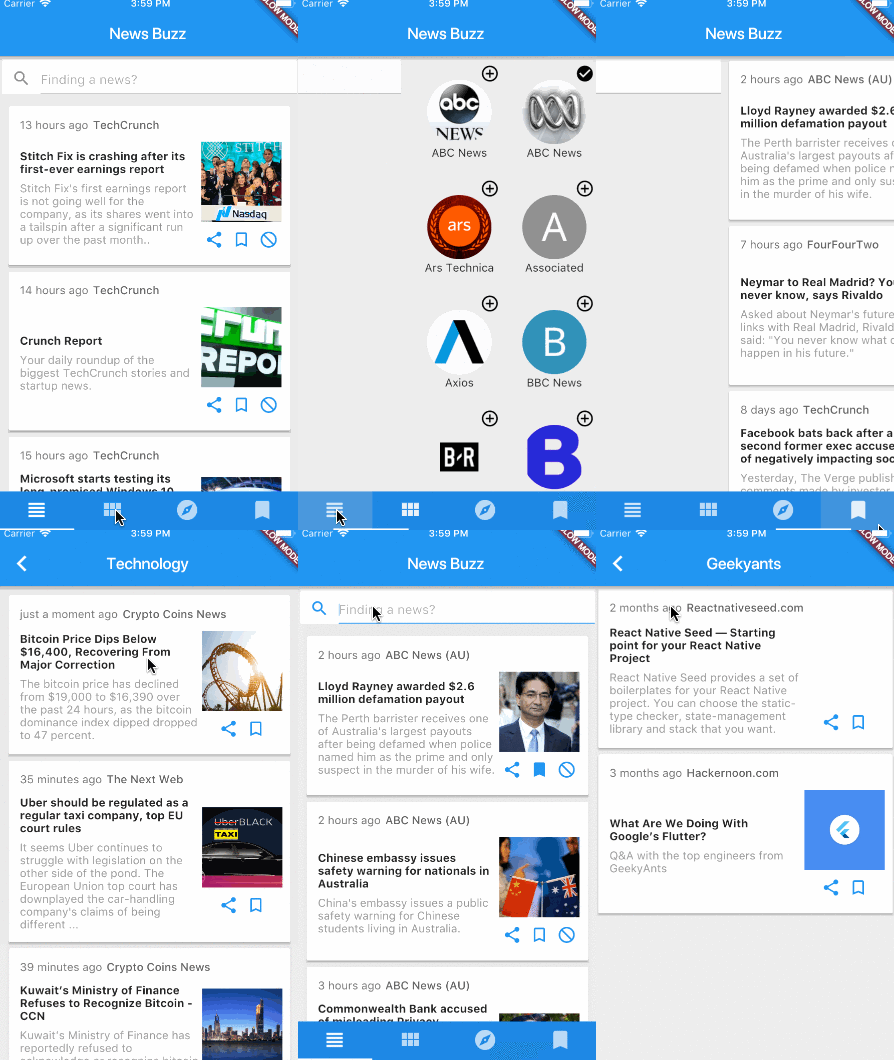
- Custom news feed based on selected sources
- Saving articles
- Explore news based on categories
- Search for topics
- Sharing articles
Preview
Dependencies
Getting Started
1. Setup Flutter
2. Clone the repo
$ git clone https://github.com/theankurkedia/newsbuzz.git
$ cd newsbuzz/
3. Setup firebase app
- You'll need to create a Firebase instance. Follow the instructions at https://console.firebase.google.com.
- Once your Firebase instance is created, you'll need to enable anonymous authentication.
- Go to the Firebase Console for your new instance.
- Click "Authentication" in the left-hand menu
- Click the "sign-in method" tab
- Click "Google" and enable it
- (skip if not running on Android)
- Create an app within your Firebase instance for Android, with package name com.yourcompany.news
- Run the following command to get your SHA-1 key:
keytool -exportcert -list -v \
-alias androiddebugkey -keystore ~/.android/debug.keystore
- In the Firebase console, in the settings of your Android app, add your SHA-1 key by clicking "Add Fingerprint".
- Follow instructions to download google-services.json
- place
google-services.jsonintonewsbuzz/android/app/.
- (skip if not running on iOS)
- Create an app within your Firebase instance for iOS, with package name com.yourcompany.news
- Follow instructions to download GoogleService-Info.plist, and place it into newsbuzz/ios/Runner in XCode
- Open newsbuzz/ios/Runner/Info.plist. Locate the CFBundleURLSchemes key. The second item in the array value of this key is specific to the Firebase instance. Replace it with the value for REVERSED_CLIENT_ID from GoogleService-Info.plist
4. Run the app
$ flutter run
License
Licensed under the MIT license.

GitHub-Autor
Ankur Kedia ↗
SprachenDartRubyObjective-CJava
Kategorien
Verwendete Abhängigkeiten
Abhängigkeiten 11 Einträge
- flutter
{"sdk":"flutter"} - flutter_testEntwicklung
{"sdk":"flutter"} - shareEntwicklung
^0.2.1 - flutter_webview_pluginEntwicklung
^0.0.9+1 - google_sign_inEntwicklung
0.3.1 - firebase_analyticsEntwicklung
0.0.4 - firebase_authEntwicklung
0.2.0 - firebase_databaseEntwicklung
0.0.12 - firebase_storageEntwicklung
0.0.5 - timeagoEntwicklung
^1.2.0 - cupertino_iconsEntwicklung
^0.1.0
Ranglisten
Wie wähle ich ein passendes Repository?
Nach Anwendungsfall filtern, Aktivität vergleichen und vor der Nutzung das Originalprojekt prüfen.
- Nach Name, Autor oder Beschreibung suchen und nach Thema eingrenzen.
- Sterne, Forks und letzte Pushes vergleichen. Sterne zeigen Interesse, garantieren aber keine Qualität.
- Vor der Nutzung README, Lizenz und Issues auf GitHub prüfen.
Quellen und Pflege
“A repository is the most basic element of GitHub.”
GitHub Docs — About repositories ↗
- theankurkedia/newsbuzz · GitHub ↗
- GitHub Docs — Saving repositories with stars ↗
- Verzeichnis gepflegt von Ducafecat ↗