Share Social Network
pub package
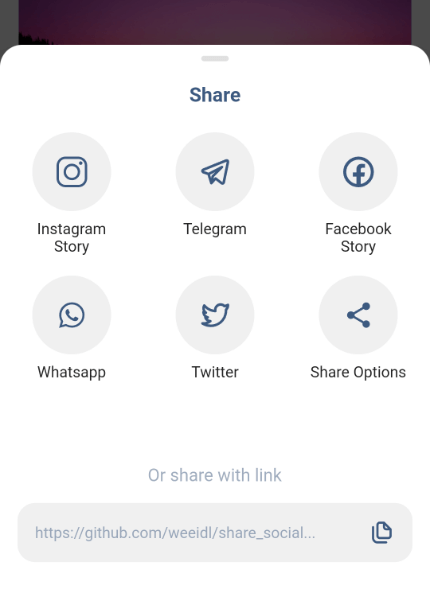
A ready-made platform that provides a wide range of ways to share, you will need to provide access directly to certain popular applications or just share using the built-in default sharing.
Platforms
Works on both platforms Android and iOS
| Image |
Image |
Image |
| Video |
Photo |
Video |
Initial settings
Android Configuration
Paste the following attribute in the AndroidManifest.xml tag in the android/app/src/main/AndroidManifest.xml:
`xmlns:tools="http://schemas.android.com/tools"`
For example:
        <manifest xmlns:android="http://schemas.android.com/apk/res/android"
         xmlns:tools="http://schemas.android.com/tools"
         package...
Create a xml file named filepaths.xml in the app/src/main/res/xml folder and paste this code in the file :
<?xml version="1.0" encoding="utf-8"?>
<paths xmlns:android="http://schemas.android.com/apk/res/android">
    <cache-path name="image" path="/"/>
</paths>
Add this code snippet to the very bottom manifest/application in the android/app/src/main/AndroidManifest.xml insert after meta-data:
 		     <provider
            android:name="androidx.core.content.FileProvider"
            android:authorities="${applicationId}.com.weeidl.share_social_network"
            android:exported="false"
            android:grantUriPermissions="true"
            tools:replace="android:authorities">
            <meta-data
                android:name="android.support.FILE_PROVIDER_PATHS"
                android:resource="@xml/filepaths" />
        </provider>
iOS Configuration
Add this to your Info.plist to use share on instagram and facebook story
<key>LSApplicationQueriesSchemes</key>
	<array>
	<string>instagram-stories</string>
	<string>facebook-stories</string>
	<string>facebook</string>
	<string>instagram</string>
	<string>twitter</string>
	<string>whatsapp</string>
 <string>tg</string>
	</array>
Add this if you are using share on facebook. For this you have to create an app on https://developers.facebook.com/ and get the App ID
<key>FacebookAppID</key>
<string>xxxxxxxxxxxxxxx</string>
Getting Started
Add the package to your pubspec.yaml:
share_social_network: ^1.2.9
In your dart file, import the library:
import 'package:share_social_network/share_social_network.dart';
Instead of using a ShareSocialNetwork use ShareSocialNetwork.show Widget:
  ShareSocialNetwork.show(
    context: context,
    backgroundColor: Colors.white,
    pillColor: Colors.black12,
    transitionDuration: Duration(milliseconds: 300),
    screenshotController: screenshotController,
    copyToClipboard: "https://github.com/weeidl/share_social...",
    telegram: Telegram(
      content: "Hello World \n https://github.com/weeidl",
    ),
    instagram: Instagram(
      backgroundBottomColor: "#FF7391",
      backgroundTopColor: "#591E78",
      attributionURL: "https://deep-link-url",
      imagePath: imagePath,
    ),
    facebook: Facebook(
      backgroundTopColor: "#ffffff",
      attributionURL: "https://github.com/weeidl",
      backgroundBottomColor: "#000000",
      imagePath: imagePath,
      appId: "xxxxxxxxxxxxx",
    ),
    more: More(
      message: 'Hello World \n https://github.com/weeidl',
    ),
    twitter: Twitter(
      captionText: 'Share twitter',
      hashtags: ["hello", "world", "weeild", "artur"],
      url: 'https://github.com/weeidl',
      trailingText: " \nweeidl",
    ),
    whatsapp: Whatsapp(
      content: 'Hello World \n https://github.com/weeidl',
    ),
  );
 }
Example:
Example of how to send something to instagram:
ScreenshotController screenshotController = ScreenshotController();
void shareSocialNetwork(BuildContext context) async {
  String imagePath = await screenshotController.capture().then((image) async {
    final directory = await getApplicationDocumentsDirectory();
    final file = await File('${directory.path}/temp.png').create();
    await file.writeAsBytes(image!);
    return file.path;
  });
  ShareSocialNetwork.show(
    context: context,
    backgroundColor: Colors.white,
    pillColor: Colors.black12,
    transitionDuration: Duration(milliseconds: 300),
    screenshotController: screenshotController,
    copyToClipboard: "https://github.com/weeidl/share_social...",
    instagram: Instagram(
      backgroundBottomColor: "#FF7391",
      backgroundTopColor: "#591E78",
      attributionURL: "https://deep-link-url",
      imagePath: imagePath,
    ),
  );
}
Follow Me:
instagram
Telegram
LinkedIn
GitHub


 v1.2.9