

 v2.0.0
flutter_update_dialog
Ein schönes Anwendungsaktualisierungsdialogfeld für Flutter. Sie können Ihr eigenes Aktualisierungspopup-Fenster anpassen!
58Likes 20030-Tage-Downloads150Pub-Punkte
AndroidiOSWebmacOSWindowsLinux
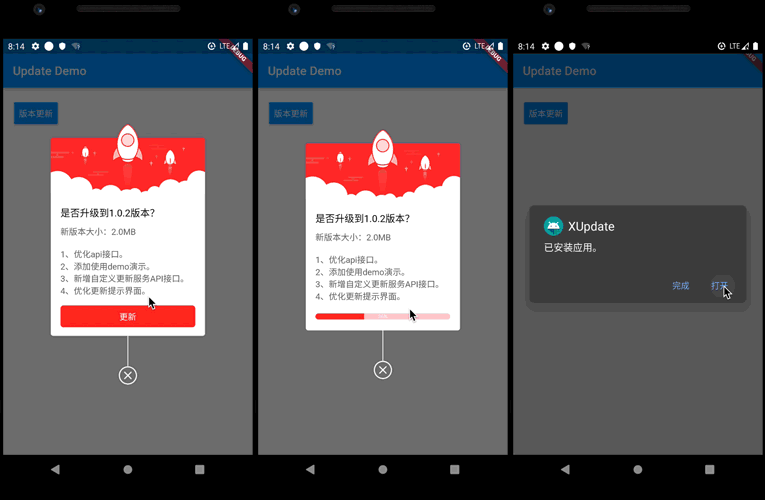
Dialog zur Aktualisierung der Anwendungsversion.

Englischer Projektschnappschuss. Aktuelle Inhalte auf GitHub.


Application version update dialog. With it, you can customize the logic of version update.
You can refer to the following project:
https://github.com/xuexiangjys/flutter_app_update_example
You should ensure that you add the flutter_update_dialog as a dependency in your flutter project.
// pub 集成
dependencies:
  flutter_update_dialog: ^2.0.0

//github  集成
dependencies:
  flutter_update_dialog:
    git:
      url: git://github.com/xuexiangjys/flutter_update_dialog.git
      ref: master
  void defaultStyle() {
    if (dialog != null && dialog.isShowing()) {
      return;
    }
    dialog = UpdateDialog.showUpdate(context,
        title: "是否升级到4.1.4版本?",
        updateContent: "新版本大小:2.0M\n1.xxxxxxx\n2.xxxxxxx\n3.xxxxxxx",
        onUpdate: onUpdate);
  }
  void customStyle() {
    if (dialog != null && dialog.isShowing()) {
      return;
    }
    dialog = UpdateDialog.showUpdate(context,
        width: 250,
        title: "是否升级到4.1.4版本?",
        updateContent: "新版本大小:2.0M\n1.xxxxxxx\n2.xxxxxxx\n3.xxxxxxx",
        titleTextSize: 14,
        contentTextSize: 12,
        buttonTextSize: 12,
        topImage: Image.asset('assets/bg_update_top.png'),
        extraHeight: 5,
        radius: 8,
        themeColor: Color(0xFFFFAC5D),
        progressBackgroundColor: Color(0x5AFFAC5D),
        isForce: true,
        updateButtonTxt: '升级',
        ignoreButtonTxt: '忽略此版本',
        enableIgnore: true, onIgnore: () {
          ToastUtils.waring("忽略");
          dialog.dismiss();
        },
        onUpdate: onUpdate);
  }
| Name | Type | Default | Description |
|---|---|---|---|
| width | double | 0.618 * screenWidth | dialog width |
| title | String | / | dialog title |
| updateContent | String | / | Update the modified content |
| onUpdate | VoidCallback | / | Click on the update button event |
| titleTextSize | double | 16.0 | The size of the title text |
| contentTextSize | double | 14.0 | The size of the update content text |
| buttonTextSize | double | 14.0 | The size of the button text |
| themeColor | Color | Colors.red | Theme color |
| progressBackgroundColor | Color | 0xFFFFCDD2 | The background color of the progress bar |
| topImage | Image | / | Picture at the top |
| extraHeight | double | 5.0 | Extra height from top image |
| radius | double | 4.0 | Angle of corner |
| enableIgnore | bool | false | Whether to enable the ignore version button |
| updateButtonText | String | '更新' | Update button text |
| ignoreButtonText | String | '忽略此版本' | Ignore button text |
| isForce | bool | false | Whether to force update |
| onIgnore | VoidCallback | / | Click on the ignore button event |
Abhängigkeiten 2 Einträge
{"sdk":"flutter"}{"sdk":"flutter"}Nach Anwendungsfall filtern, Aktivität vergleichen und vor der Nutzung das Originalprojekt prüfen.
“A repository is the most basic element of GitHub.”
GitHub Docs — About repositories ↗