

 v2.3.1
flutter_grid_button
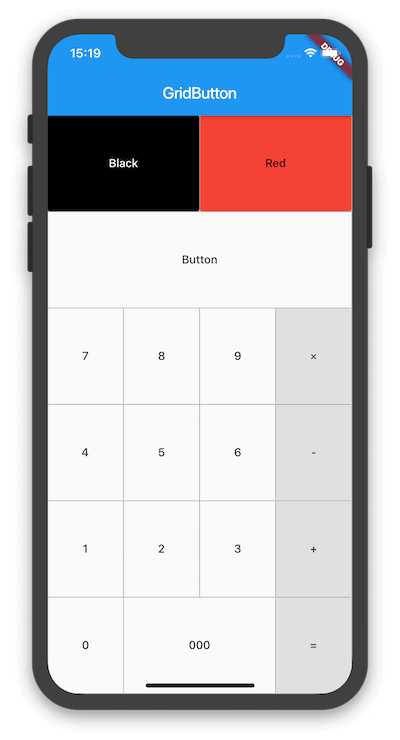
Flutter-Widget, das Schaltflächen in einem Raster anordnet. Es ist nützlich zum Erstellen einer Zifferntastatur, eines Rechners usw.
30Likes 387030-Tage-Downloads160Pub-Punkte
AndroidiOSWebmacOSWindowsLinux
Flutter-Widget, das Schaltflächen in einem Raster anordnet.

Englischer Projektschnappschuss. Aktuelle Inhalte auf GitHub.
Flutter widget that arrange buttons in a grid. It is useful for making a number pad, calculator, and so on.


To use this plugin, add flutter_grid_button as a dependency in your pubspec.yaml file.
dependencies:
 flutter_grid_button:
Import the library in your file.
import 'package:flutter_grid_button/flutter_grid_button.dart';
See the example directory for a complete sample app using GridButton.
Or use the GridButton like below.
GridButton(
  onPressed: (String value) {
    /*...*/
  },
  items: [
    [
      GridButtonItem(title: "1"),
      GridButtonItem(child: Text("2")),
      GridButtonItem(title: "3", flex: 2),
    ],
    [
      GridButtonItem(title: "a", value: "100", longPressValue: "long"),
      GridButtonItem(title: "b", color: Colors.lightBlue)
    ],
  ],
)
Abhängigkeiten 3 Einträge
{"sdk":"flutter"}{"sdk":"flutter"}^1.0.0Nach Anwendungsfall filtern, Aktivität vergleichen und vor der Nutzung das Originalprojekt prüfen.
“A repository is the most basic element of GitHub.”
GitHub Docs — About repositories ↗