Search packages, repositories and app categories

GitHub repositoryAjoy-1704001/flutter_animated_reaction

flutter_animated_reaction

Ajoy-1704001/flutter_animated_reaction open-source repository details.

flutter_animated_reaction project cover
Stars
4
Forks
3
Last push (UTC)
Jun 16, 2023
Project status
Active

Original README

English project snapshot. Visit GitHub for the latest content.

Flutter Animated Reaction

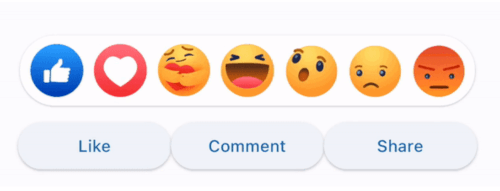
Flutter Animated Reaction is an animated reaction overlay(Example: Facebook, LinkedIn) which can be customized using your own reaction icons(images/gifs). Wherever your reaction button is on the screen, this package helps you to pop up an animated reaction overlay at the right location on the screen with your preferred reactions icon.

Demo

animated

Features

  • Customized reaction icon i.e. images, gifs can be added in the list
  • Cool animation to display the reaction overlay
  • Dragging any reaction icon generates nice animation
  • In built facebook reaction icons
  • Reaction sound feature

Getting started

import 'package:flutter_animated_reaction/flutter_animated_reaction.dart';

Usage

For better understanding, you can see example application.

AnimatedFlutterReaction().showOverlay(context: context,
                                      key: key,
                                      onReaction: (val){
                                         print(val);
                                      });
Parameters
Parameter Description
Key Global Key used in the reaction button . It is used to find the renderBox and measure it's position.
reactions List of all reaction icons which you want to show in the overlay.(Image/Gifs path)
onReaction(int) It is triggered when any of the reaction is tapped
backgroundColor It describes overlay background color
overlaySize It specifies overlay width
iconSize It can set the size of reaction icons. Default size is (45,45)

How to Contribute

  1. Fork it
  2. Create your feature branch (git checkout -b new-feature)
  3. Commit your changes (git commit -m 'Add some feature')
  4. Push to the branch (git push origin new-feature)
  5. Create new Pull Request
Ajoy Deb Nath GitHub avatar
GitHub author

Ajoy Deb Nath ↗

LanguagesC++CMakeDartRubySwiftHTMLCObjective-CShellKotlin

Packages published by this repository

Dependencies used

Dependency list 4 items

How do I choose a repository?

Start with your use case, compare repository activity, and check the original project before adopting it.

  1. Search by repository name, owner or description, then narrow the results by topic.
  2. Compare stars, forks and recent pushes. Stars show community interest, not a guarantee of quality.
  3. Read the README, license and issues on GitHub before using a project.

Sources and maintenance

“A repository is the most basic element of GitHub.”

GitHub Docs — About repositories ↗