

 v3.0.1
simple_url_preview
Flutter package to show url preview. Custamizable height, background and text styles, as well as lines.
77Likes 10330-day downloads60Pub points
Platforms unavailable
Simple url preview package for flutter

English project snapshot. Visit GitHub for the latest content.
Flutter package to show url preview
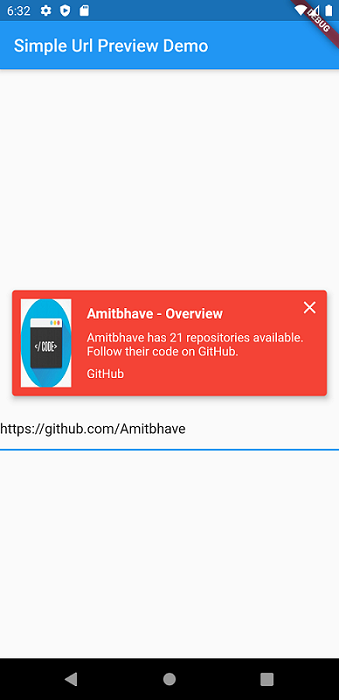
This shows url preview of a URL. (Now migrated to null-safety).
Currently only supports Open Graph Protocol
Please use latest version of the package.
Add simple_url_preview to pubspec.yaml, and hit command 'flutter pub get'
dependencies:
  ...
  simple_url_preview: ^3.0.1
SimpleUrlPreview(
  url: 'https://pub.dev/',
),
SimpleUrlPreview(
  url: 'https://pub.dev/',
  previewHeight: 200,
  previewContainerPadding: EdgeInsets.all(10),
),
Default bgColor = Theme.of(context).primaryColor
SimpleUrlPreview(
  url: 'https://pub.dev/',
  bgColor: Colors.red,
),
Default titleStyle = TextStyle( fontWeight: FontWeight.bold, fontSize: 16, color: Theme.of(context).accentColor )
Default descriptionStyle = TextStyle( fontSize: 14, color: Theme.of(context).accentColor )
Default siteNameStyle = TextStyle( fontSize: 14, color: Theme.of(context).accentColor )
SimpleUrlPreview(
  url: 'https://pub.dev/',
  titleStyle: TextStyle(
    fontSize: 16,
    fontWeight: FontWeight.bold,
    color: Colors.red,
  ),
  descriptionStyle: TextStyle(
    fontSize: 14,
    color: Theme.of(context).primaryColor,
  ),
  siteNameStyle: TextStyle(
    fontSize: 14,
    color: Theme.of(context).primaryColor,
  ),
),
SimpleUrlPreview(
  url: 'https://pub.dev/',
  isClosable: true,
),
Default and maximum title lines = 2 and description lines = 3.
SimpleUrlPreview(
  url: 'https://pub.dev/',
  titleLines: 1,
  descriptionLines: 2,
  imageLoaderColor: Colors.white,
),
By Default, will open URL in default browser.
SimpleUrlPreview(
  url: 'https://pub.dev/',
  onTap: () => print('Hello Flutter URL Preview'),
),
Would :heart: to see any contributions.
If you liked my work, show some :heart: by :star: repo.
Also you can appreciate by

|

|
Dependency list 8 items
{"sdk":"flutter"}^0.13.3^0.15.0^6.0.6^0.3.0^3.0.0^1.15.0{"sdk":"flutter"}Start with your use case, compare repository activity, and check the original project before adopting it.
“A repository is the most basic element of GitHub.”
GitHub Docs — About repositories ↗