
 v1.6.0
flutter_pw_validator
Flutter Pw Validator package helps you to validate sign in user-entered password with your rules.
176Likes 2.9K30-day downloads150Pub points
AndroidiOSWebmacOSWindowsLinux
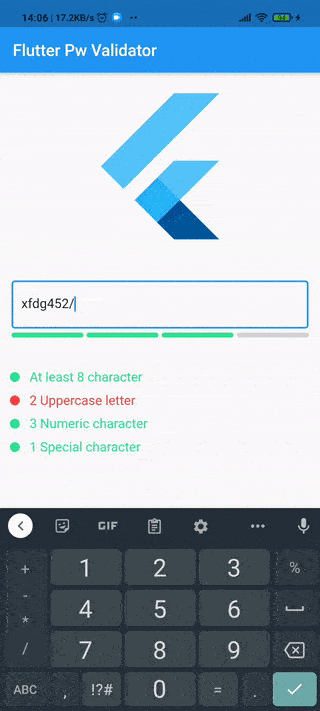
Flutter Password Validator package helps you to validate user-entered passwords in your flutter app.

{"sdk":"flutter"}{"sdk":"flutter"}English project snapshot. Visit GitHub for the latest content.
License Pub Version GitHub stars
https://user-images.githubusercontent.com/29792606/108348045-89a33480-71f6-11eb-99a9-bf56a09f0e26.gif https://user-images.githubusercontent.com/29792606/108348177-afc8d480-71f6-11eb-991c-34fad5bcf621.gif https://user-images.githubusercontent.com/29792606/108348154-a9d2f380-71f6-11eb-9c80-20400eba992e.gif https://user-images.githubusercontent.com/29792606/108406989-626d5700-7238-11eb-87bd-8e8b1adeb680.gif
Flutter Password Validator package helps you to validate sign-in user-entered passwords with your rules.
dependencies:
  flutter_pw_validator: <latest>
flutter pub get
import 'package:flutter_pw_validator/flutter_pw_validator.dart';
new TextField(
    controller: _passwordController
),
new FlutterPwValidator(
    controller: _passwordController,
    minLength: 6,
    uppercaseCharCount: 2,
    lowercaseCharCount: 2,
    numericCharCount: 3,
    specialCharCount: 1,
    width: 400,
    height: 150,
    onSuccess: yourCallbackFunction,
    onFail: yourCallbackFunction
)
| Property | Description | Default Value | Required |
|---|---|---|---|
| controller | Takes your password TextField controller | null | Yes |
| minLength | Takes total minimum length of password | null | Yes |
| uppercaseCharCount | Takes minimum uppercase character count that has to include in the password | 0 | No |
| lowercaseCharCount | Takes minimum lowercase character count that has to include in the password | 0 | No |
| numericCharCount | Takes minimum numeric character count that has to include in the password | 0 | No |
| specialCharCount | Takes minimum special character count that has to include in the password | 0 | No |
| width | Takes the widget width | null | Yes |
| height | Takes the widget height | null | Yes |
| onSuccess | A void callback function that runs when the password is matched with the condition(s) | null | Yes |
| onFail | A void callback that gets called everytime the password doesn't match with the condition(s) | null | No |
| defaultColor | Takes default state color of the widget | Color(0xFFd3d3d3) | No |
| successColor | Takes success state color of the widget | Color(0xFF2ee292) | No |
| failureColor | Takes failure state color of the widget | Color(0xFFf9433e) | No |
| strings | A class implementing the default FlutterPwValidatorStrings |
English FlutterPwValidatorStrings |
No |
| key | Key to access the widget state and its functions GlobalKey<FlutterPwValidatorState>() |
null | No |
If you want to translate this plugin simply implements the FlutterPwValidatorStrings class and pass it to the widget.
class FrenchStrings implements FlutterPwValidatorStrings {
  @override
  final String atLeast = 'Au moins - caractères';
  @override
  final String uppercaseLetters = '- Lettres majuscules';
  @override
  final String numericCharacters = '- Chiffres';
  @override
  final String specialCharacters = '- Caractères spéciaux';
}

FlutterPwValidator(
    // ...
    // your config above
    strings: FrenchStrings()
)