Search packages, repositories and app categories

GitHub repositoryGeekAbdelouahed/flutter-reaction-button

flutter-reaction-button

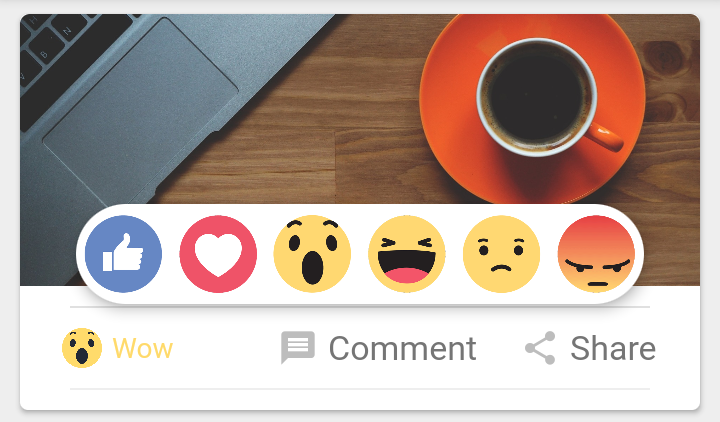
Flutter Reaction Button is a customizable Flutter package that allows you to easily create interactive buttons with reaction emojis, similar to Facebook's iconic reaction buttons.

flutter-reaction-button project cover
Stars
213
Forks
83
Last push (UTC)
Jun 25, 2024
Project status
Active

Original README

English project snapshot. Visit GitHub for the latest content.

pub package

Flutter reaction button

Flutter Reaction Button is a customizable Flutter package that allows you to easily create interactive buttons with reaction emojis, similar to Facebook's iconic reaction buttons.

Screenshot

App Screenshot

Installation

# pubspec.yaml
dependencies:
  flutter:
    sdk: flutter
  flutter_reaction_button: <last-version>

Usage

import 'package:flutter_reaction_button/flutter_reaction_button.dart';

ReactionButton<String>(
    onReactionChanged: (Reaction<String>? reaction) {
        debugPrint('Selected value: ${reaction?.value}');
    },
    reactions: <Reaction<String>>[
        Reaction<String>(
            value: 'like',
            icon: widget,
        ),
        Reaction<String>(
            value: 'love',
            icon: widget,
        ),
        ...
    ],
    initialReaction: Reaction<String>(
        value: 'like',
        icon: widget,
    ),
    selectedReaction: Reaction<String>(
        value: 'like_fill',
        icon: widget,
    ),
)

License

MIT License

Copyright (c) 2023 Abdelouahed Medjoudja

Permission is hereby granted, free of charge, to any person obtaining a copy
of this software and associated documentation files (the "Software"), to deal
in the Software without restriction, including without limitation the rights
to use, copy, modify, merge, publish, distribute, sublicense, and/or sell
copies of the Software, and to permit persons to whom the Software is
furnished to do so, subject to the following conditions:

The above copyright notice and this permission notice shall be included in all
copies or substantial portions of the Software.

THE SOFTWARE IS PROVIDED "AS IS", WITHOUT WARRANTY OF ANY KIND, EXPRESS OR
IMPLIED, INCLUDING BUT NOT LIMITED TO THE WARRANTIES OF MERCHANTABILITY,
FITNESS FOR A PARTICULAR PURPOSE AND NONINFRINGEMENT. IN NO EVENT SHALL THE
AUTHORS OR COPYRIGHT HOLDERS BE LIABLE FOR ANY CLAIM, DAMAGES OR OTHER
LIABILITY, WHETHER IN AN ACTION OF CONTRACT, TORT OR OTHERWISE, ARISING FROM,
OUT OF OR IN CONNECTION WITH THE SOFTWARE OR THE USE OR OTHER DEALINGS IN THE
SOFTWARE.
Abdelouahed Medjoudja GitHub avatar
GitHub author

Abdelouahed Medjoudja ↗

Mobile Developer

BrandbassadorAlgeria
LanguagesDartHTMLSwiftKotlinObjective-C

Categories

Packages published by this repository

Dependencies used

Dependency list 3 items

  • flutter{"sdk":"flutter"}
  • flutter_testDevelopment{"sdk":"flutter"}
  • flutter_lintsDevelopment^2.0.1

How do I choose a repository?

Start with your use case, compare repository activity, and check the original project before adopting it.

  1. Search by repository name, owner or description, then narrow the results by topic.
  2. Compare stars, forks and recent pushes. Stars show community interest, not a guarantee of quality.
  3. Read the README, license and issues on GitHub before using a project.

Sources and maintenance

“A repository is the most basic element of GitHub.”

GitHub Docs — About repositories ↗