
 v1.0.5
kdgaugeview
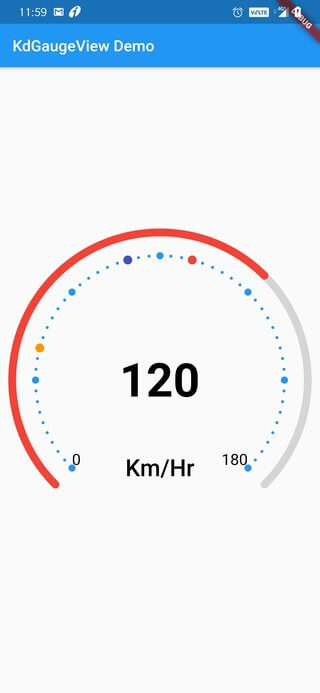
KDGaugeView is a simple and customizable gauge control for Flutter
25Likes 18330-day downloads140Pub points
AndroidiOSWebmacOSWindowsLinux
KDGaugeView is a simple and customizable gauge control for Flutter

Dependency list 2 items
{"sdk":"flutter"}{"sdk":"flutter"}English project snapshot. Visit GitHub for the latest content.
KDGaugeView is a simple and customizable gauge control for Android inspired by KdGaugeView
The source code is 100% Dart.
pub package License
I need some clean Guage view for my Flutter application.
Add this to your package's pubspec.yaml file:
This library is posted in pub.dev
dependencies:
	kdgaugeview: ^1.0.4
After Importing this library, you can directly use this view in your Widget tree
import 'package:kdgaugeview/kdgaugeviewflutter.dart';
GlobalKey<KdGaugeViewState> key = GlobalKey<KdGaugeViewState>();
KdGaugeView(
    key: key,
    minSpeed: 0,
    maxSpeed: 180,
    speed: 70,
    animate: true,
)
Update the speed of the Gauge View using this method
key.currentState.updateSpeed(120, animate: true,duration: Duration(milliseconds: 400));
Depending on your view you may want to tweak the UI. For now you can these custom attributes
| Property | Type | Description |
|---|---|---|
| 'speed' | double | Initial speed for the Gauge |
| 'speedTextStyle' | TextStyle | Text Style for Speed Text |
alt text alt text
Saurabh K Sharma - GIT
I am very new to open source community. All suggestion and improvement are most welcomed.
git checkout -b feature/fooBar)git commit -am 'Add some fooBar')git push origin feature/fooBar)