Search packages, repositories and app categories

GitHub repositoryYeLwinOo-Steve/toasty_box

toasty_box

A beautiful toast library with heart-melting animations 🍞

toasty_box project cover
Stars
23
Forks
6
Last push (UTC)
Oct 5, 2025
Project status
Active

Original README

English project snapshot. Visit GitHub for the latest content.

Toasty Box

Toasty Box is a flutter plugin for showing beautiful animated toasts in your app. It comes with a fully customizable features and breath-taking animations.

Toasty Box Example Video

Table of Contents

Installation

To use this plugin, add it to your pubspec.yaml file:

dependencies:
  toasty_box: ^1.0.1

Then, run:

$ flutter pub get

Usage

Basic Usage

Import the package:

import 'package:toasty_box/toasty_box.dart';

Show a simple message toast:

ToastService.showToast(
                  context,
                  message: "This is a message toast 👋😎!",
                );

Pretty simple, isn't it? 😏

Message Toast Widget Toast
Customization

You can customize the appearance of your toasts by providing additional parameters.

For message toasts -

ToastService.showToast(
                  context,
                  isClosable: true,
                  backgroundColor: Colors.teal.shade500,
                  shadowColor: Colors.teal.shade200,
                  length: ToastLength.medium,
                  expandedHeight: 100,
                  message: "This is a message toast 👋😎!",
                  messageStyle: TextStyle(fontSize: 18),
                  leading: const Icon(Icons.messenger),
                  slideCurve: Curves.elasticInOut,
                  positionCurve: Curves.bounceOut,
                  dismissDirection: DismissDirection.none,
                );

For widget toast -

ToastService.showWidgetToast(
                  context,
                  isClosable: true,
                  backgroundColor: Colors.teal.shade500,
                  shadowColor: Colors.teal.shade200,
                  length: ToastLength.medium,
                  expandedHeight: 100,
                  leading: const Icon(Icons.messenger),
                  slideCurve: Curves.elasticInOut,
                  positionCurve: Curves.bounceOut,
                  dismissDirection: DismissDirection.none,
                  child: Container(
                  	color: Colors.blue,
                  	child: Center(
                  		child: Text('This is widget toast!'),
                  	),
                  ),
                );
Customization Options
  • message: The text to be displayed in the toast.
  • messageStyle: Message text style to be displayed in the toast
  • leading: Leading widget in the toast
  • isClosable: Shows the close button as a trailing widget
  • expandedHeight: Height of the toast from bottom of the screen when it is tapped
  • length: The duration of the toast in ToastLength enum - [short,medium,long,ages,never]
  • backgroundColor: The background color of the toast.
  • shadowColor: Shadow color of the toast
  • slideCurve: Animation curve when list of toasts is reordered
  • positionCurve: Animation curve when toast enters the screen and exits from the screen
  • child: Widget in the toast to be shown

Moreover, there are other 3 types of toast templates I've prepared for your need -

For Success Toast:

ToastService.showSuccessToast(
                  context,
                  length: ToastLength.medium,
                  expandedHeight: 100,
                  message: "This is a success toast 🥂!",
                );

Success Toast

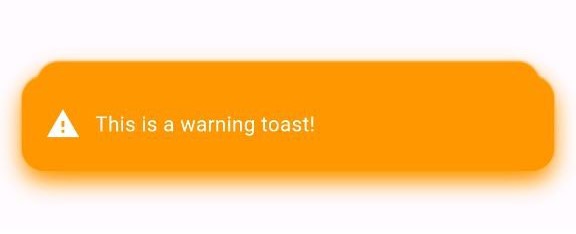
For Warning Toast:

ToastService.showWarningToast(
                  context,
                  length: ToastLength.medium,
                  expandedHeight: 100,
                  message: "This is a warning toast!",
                );

Warning Toast For Error Toast:

ToastService.showErrorToast(
  context,
  length: ToastLength.medium,
  expandedHeight: 100,
  message: "This is an error toast!",
);

Error Toast

Example

Check out the example folder for a comprehensive implementation of how to use this plugin. The example demonstrates various customization options and use cases. You can run the example using:

$ cd example
$ flutter run

Contributing

We welcome contributions! If you find any issues or have suggestions for improvements, feel free to open an issue or submit a pull request.

License

This project is licensed under the MIT License - see the LICENSE.md file for details.


MIT License

Copyright (c) 2023 YE LWIN OO

Permission is hereby granted, free of charge, to any person obtaining a copy
of this software and associated documentation files (the "Software"), to deal
in the Software without restriction, including without limitation the rights
to use, copy, modify, merge, publish, distribute, sublicense, and/or sell
copies of the Software, and to permit persons to whom the Software is
furnished to do so, subject to the following conditions:

The above copyright notice and this permission notice shall be included in all
copies or substantial portions of the Software.

THE SOFTWARE IS PROVIDED "AS IS", WITHOUT WARRANTY OF ANY KIND, EXPRESS OR
IMPLIED, INCLUDING BUT NOT LIMITED TO THE WARRANTIES OF MERCHANTABILITY,
FITNESS FOR A PARTICULAR PURPOSE AND NONINFRINGEMENT. IN NO EVENT SHALL THE
AUTHORS OR COPYRIGHT HOLDERS BE LIABLE FOR ANY CLAIM, DAMAGES OR OTHER
LIABILITY, WHETHER IN AN ACTION OF CONTRACT, TORT OR OTHERWISE, ARISING FROM,
OUT OF OR IN CONNECTION WITH THE SOFTWARE OR THE USE OR OTHER DEALINGS IN THE
SOFTWARE.

🏗️🏗️ More updates are coming soon...

Ye Lwin Oo GitHub avatar
GitHub author

Ye Lwin Oo ↗

he who debugs

@rypelabsThailandOfficial website ↗
LanguagesDartSwiftKotlinObjective-C

Categories

Packages published by this repository

Dependencies used

Dependency list 3 items

  • flutter{"sdk":"flutter"}
  • flutter_testDevelopment{"sdk":"flutter"}
  • flutter_lintsDevelopment^2.0.0

How do I choose a repository?

Start with your use case, compare repository activity, and check the original project before adopting it.

  1. Search by repository name, owner or description, then narrow the results by topic.
  2. Compare stars, forks and recent pushes. Stars show community interest, not a guarantee of quality.
  3. Read the README, license and issues on GitHub before using a project.

Sources and maintenance

“A repository is the most basic element of GitHub.”

GitHub Docs — About repositories ↗