
flutter_improved_scrolling
Attempt to implement better scrolling for Flutter Web and Desktop. Includes keyboard, MButton and custom mouse wheel scrolling.

- Stars
- 50
- Forks
- 25
- Last push (UTC)
- Jan 27, 2026
- Project status
- Active
Original README
English project snapshot. Visit GitHub for the latest content.
This package has been deprecated


An attempt to implement better scrolling for Flutter Web and Desktop.
Includes keyboard, MButton and custom mouse wheel scrolling.
Getting started
Example
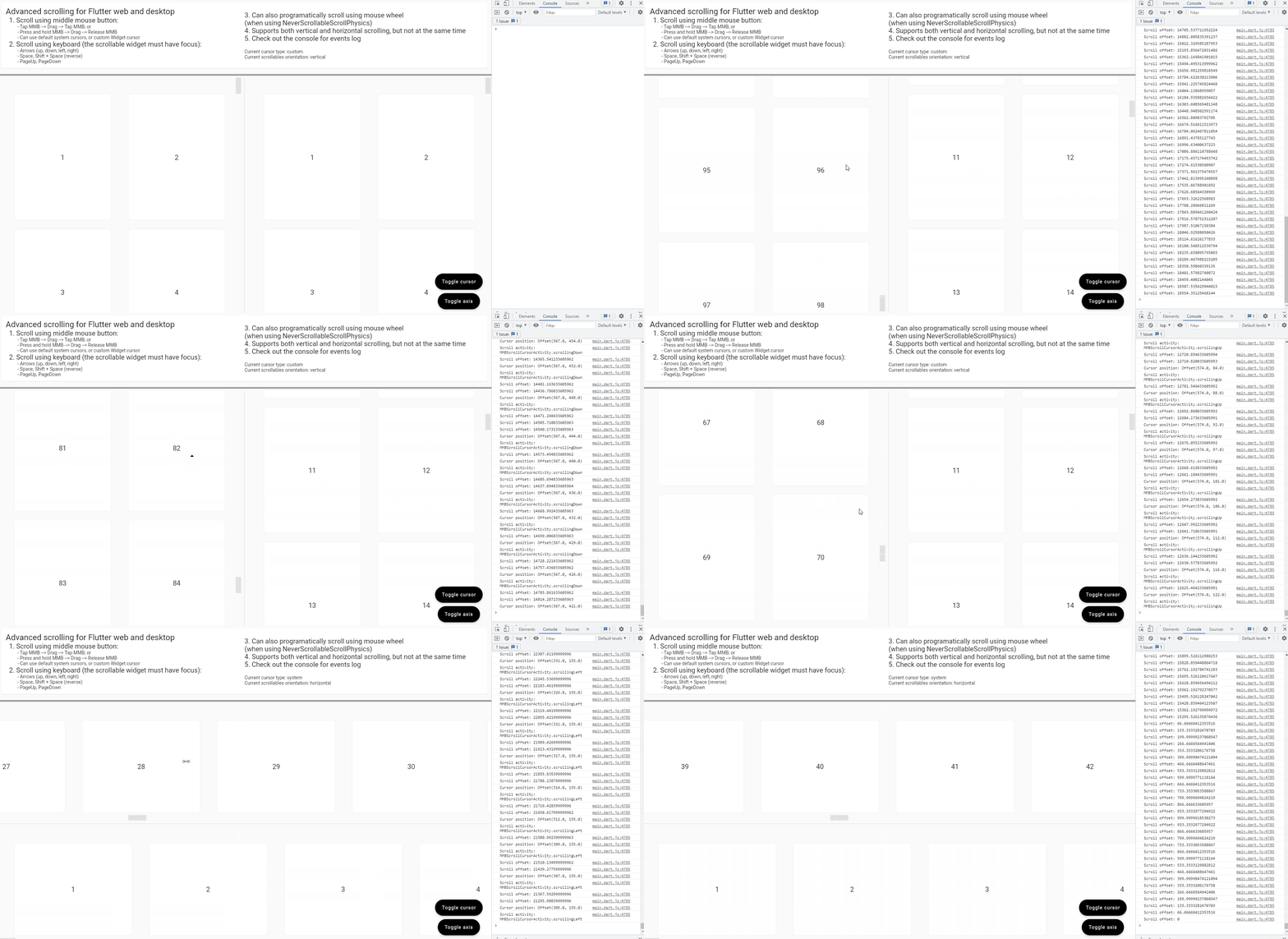
Usage and features
(from the example app)
final controller = ScrollController();

...

ImprovedScrolling(
      scrollController: controller,
      onScroll: (scrollOffset) => debugPrint(
        'Scroll offset: $scrollOffset',
      ),
      onMMBScrollStateChanged: (scrolling) => debugPrint(
        'Is scrolling: $scrolling',
      ),
      onMMBScrollCursorPositionUpdate: (localCursorOffset, scrollActivity) => debugPrint(
            'Cursor position: $localCursorOffset\n'
            'Scroll activity: $scrollActivity',
      ),
      enableMMBScrolling: true,
      enableKeyboardScrolling: true,
      enableCustomMouseWheelScrolling: true,
      mmbScrollConfig: MMBScrollConfig(
        customScrollCursor: useSystemCursor ? null : const DefaultCustomScrollCursor(),
      ),
      keyboardScrollConfig: KeyboardScrollConfig(
        arrowsScrollAmount: 250.0,
        homeScrollDurationBuilder: (currentScrollOffset, minScrollOffset) {
          return const Duration(milliseconds: 100);
        },
        endScrollDurationBuilder: (currentScrollOffset, maxScrollOffset) {
          return const Duration(milliseconds: 2000);
        },
      ),
      customMouseWheelScrollConfig: const CustomMouseWheelScrollConfig(
        scrollAmountMultiplier: 2.0,
      ),
      child: ScrollConfiguration(
        behavior: const CustomScrollBehaviour(),
        child: GridView(
          controller: controller,
          physics: const NeverScrollableScrollPhysics(),
          scrollDirection: axis,
          padding: const EdgeInsets.all(24.0),
          gridDelegate: const SliverGridDelegateWithMaxCrossAxisExtent(
            maxCrossAxisExtent: 400.0,
            mainAxisExtent: 400.0,
          ),
          children: buildScrollableItemList(axis),
        ),
      ),
    );
Requirements
- The
ImprovedScrollingWidget must be added as a parent of your scrollable Widget (List/Grid/SingleChildScrollView/etc). - You must create and provide the same scroll controller to both the
ImprovedScrollingWidget and your scrollable Widget.
- Optional: If you want to programatically scroll when rotating the mouse wheel and not let the framework manage the scrolling, you can set
physics: NeverScrollableScrollPhysics()to your scrollable and then setenableCustomMouseWheelScrolling: trueonImprovedScrollingto enable this feature.
Features:
-
Scrolling using the keyboard (Arrows, Page{Up, Down}, Spacebar, Home, End)
You need to set
enableKeyboardScrolling: trueand then you can configure the scrolling amount, duration and curve by usingkeyboardScrollConfig: KeyboardScrollConfig(...) -
Scrolling using the middle mouse button ("auto-scrolling")
You need to set
enableMMBScrolling: trueand then you can configure the scrolling delay, velocity, acceleration and cursor appearance and size by usingmmbScrollConfig: MMBScrollConfig(...)
There is also a
DefaultCustomScrollCursorclass which is a default custom cursor implementation -
Programatically scroll using the mouse wheel
You need to set
enableCustomMouseWheelScrolling: trueand then you can configure the scrolling speed, duration, curve and throttling time by usingcustomMouseWheelScrollConfig: CustomMouseWheelScrollConfig(...) -
Horizontal scrolling using Left/Right arrows or Shift + mouse wheel
Requires
enableKeyboardScrolling: trueandenableCustomMouseWheelScrolling: trueto be set.
Callbacks:
Other than the above features, there are also a few callbacks available on the ImprovedScrolling Widget:
// Triggers whenever the ScrollController scrolls, no matter how or why
onScroll: (double scrollOffset) => debugPrint(
  'Scroll offset: $scrollOffset',
),

// Triggers whenever the middle mouse button scrolling feature is activated or deactivated
onMMBScrollStateChanged: (bool scrolling) => debugPrint(
  'Is scrolling: $scrolling',
),

// Triggers whenever the cursor is moved on the scrollable area, while the
// middle mouse button feature is active and is scrolling
//
// We also get the current scroll activity (idle or moving up/down/left/right)
// at the time the cursor moves
onMMBScrollCursorPositionUpdate: (
  Offset localCursorOffset,
  MMBScrollCursorActivity scrollActivity,
) => debugPrint(
    'Cursor position: $localCursorOffset\n'
    'Scroll activity: $scrollActivity',
 ),
License

Adrian Flutur ↗
Dependencies used
Dependency list 3 items
- flutter
{"sdk":"flutter"} - flutter_testDevelopment
{"sdk":"flutter"} - lintDevelopment
^1.6.0
How do I choose a repository?
Start with your use case, compare repository activity, and check the original project before adopting it.
- Search by repository name, owner or description, then narrow the results by topic.
- Compare stars, forks and recent pushes. Stars show community interest, not a guarantee of quality.
- Read the README, license and issues on GitHub before using a project.
Sources and maintenance
“A repository is the most basic element of GitHub.”
GitHub Docs — About repositories ↗