

 v0.0.3
overlapping_panels
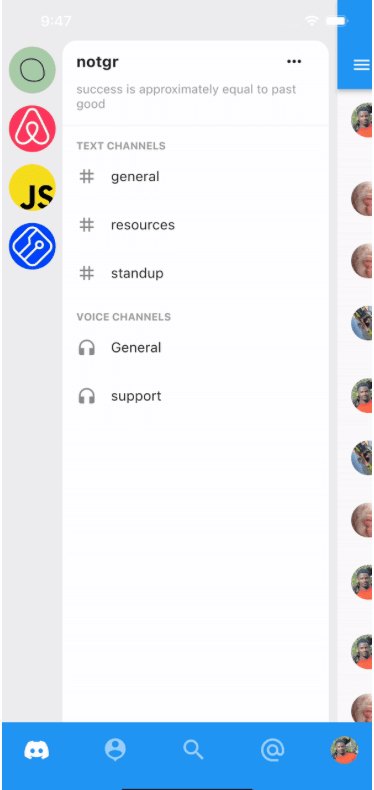
Inspired by Discord's mobile app navigation. Add left and right panels to your app with gestures to reveal panels and callbacks to listen for reveals.
56Likes 2730-day downloads150Pub points
AndroidiOSWebmacOSWindowsLinux
Discord inspired navigation for Flutter apps

English project snapshot. Visit GitHub for the latest content.

Add Discord-like navigation to your app. Demo project here: overlapping_panels_demo

This widget does not support navigation events yet. So pressing the back button, does not slide the main panel back into view. This feature will be implemented in the nearest future.
Simple and straight to the point. Just provide usual widgets for all panels:
class _MyHomePageState extends StatelessWidget {

  @override
  Widget build(BuildContext context) {
    return Stack(
      children: [
        OverlappingPanels(
          // Using the Builder widget is not required. You can pass your widget directly.
          // But to use `OverlappingPanels.of(context)` you need to wrap your widget in a Builder
          left: Builder(builder: (context) {
            return const LeftPage();
          }),
          right: Builder(
            builder: (context) => const RightPage(),
          ),
          main: Builder(
            builder: (context) {
              return const MainPage();
            },
          ),
          onSideChange: (side) {
            setState(() {
              if (side == RevealSide.main) {
                // hide something
              } else if (side == RevealSide.left) {
                // show something
              }
            });
          },
        ),
      ],
    );
  }
}
To be able to reveal a panel with the tap of a button, for example, do:
IconButton(
  icon: const Icon(Icons.menu),
  onPressed: () {
    // This is the main point
    OverlappingPanels.of(context)?.reveal(RevealSide.left);
  },
)
Dependency list 3 items
{"sdk":"flutter"}{"sdk":"flutter"}^1.0.0Start with your use case, compare repository activity, and check the original project before adopting it.
“A repository is the most basic element of GitHub.”
GitHub Docs — About repositories ↗