

 v3.0.1
pluto_menu_bar
A menu bar for flutter. You can add as many submenus as you want, and you can change the default style.
161Likes 1.2K30-day downloads150Pub points
AndroidiOSWebmacOSWindowsLinux
A menu bar for flutter.

English project snapshot. Visit GitHub for the latest content.
PlutoMenuBar is a horizontal menu bar for flutter.
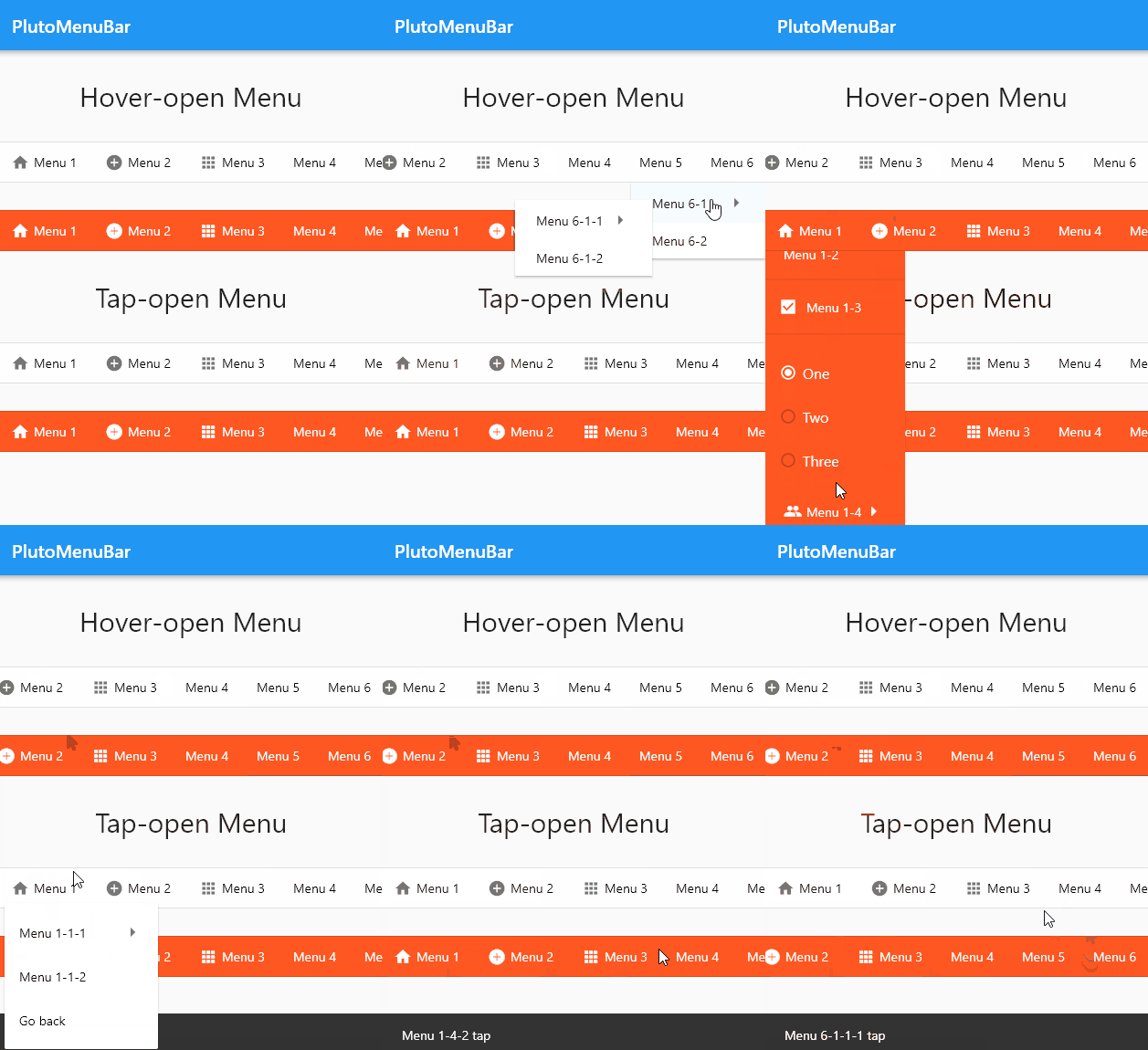
// ignore_for_file: avoid_print

import 'package:flutter/material.dart';
import 'package:pluto_menu_bar/pluto_menu_bar.dart';

void main() {
  runApp(const MyApp());
}

class MyApp extends StatelessWidget {
  const MyApp({Key? key}) : super(key: key);

  @override
  Widget build(BuildContext context) {
    return MaterialApp(
      debugShowCheckedModeBanner: false,
      home: Scaffold(
        appBar: AppBar(
          title: const Text('PlutoMenuBar'),
        ),
        body: const PlutoMenuBarDemo(),
      ),
    );
  }
}

class PlutoMenuBarDemo extends StatefulWidget {
  const PlutoMenuBarDemo({
    super.key,
  });

  @override
  State<PlutoMenuBarDemo> createState() => _PlutoMenuBarDemoState();
}

class _PlutoMenuBarDemoState extends State<PlutoMenuBarDemo> {
  late final List<PlutoMenuItem> whiteHoverMenus;

  late final List<PlutoMenuItem> orangeHoverMenus;

  late final List<PlutoMenuItem> whiteTapMenus;

  late final List<PlutoMenuItem> orangeTapMenus;

  @override
  void initState() {
    super.initState();

    whiteHoverMenus = _makeMenus(context);
    orangeHoverMenus = _makeMenus(context);
    whiteTapMenus = _makeMenus(context);
    orangeTapMenus = _makeMenus(context);
  }

  void message(context, String text) {
    ScaffoldMessenger.of(context).hideCurrentSnackBar();

    final snackBar = SnackBar(
      content: Text(text),
    );

    ScaffoldMessenger.of(context).showSnackBar(snackBar);
  }

  List<PlutoMenuItem> _makeMenus(BuildContext context) {
    return [
      PlutoMenuItem(
        title: 'Menu 1',
        icon: Icons.home,
        children: [
          PlutoMenuItem(
            title: 'Menu 1-1',
            icon: Icons.group,
            onTap: () => message(context, 'Menu 1-1 tap'),
            children: [
              PlutoMenuItem(
                title: 'Menu 1-1-1',
                onTap: () => message(context, 'Menu 1-1-1 tap'),
                children: [
                  PlutoMenuItem(
                    title: 'Menu 1-1-1-1',
                    onTap: () => message(context, 'Menu 1-1-1-1 tap'),
                  ),
                  PlutoMenuItem(
                    title: 'Menu 1-1-1-2',
                    onTap: () => message(context, 'Menu 1-1-1-2 tap'),
                  ),
                ],
              ),
              PlutoMenuItem(
                title: 'Menu 1-1-2',
                onTap: () => message(context, 'Menu 1-1-2 tap'),
              ),
            ],
          ),
          PlutoMenuItem(
            title: 'Menu 1-2',
            onTap: () => message(context, 'Menu 1-2 tap'),
          ),
          PlutoMenuItem.divider(height: 10),
          PlutoMenuItem.checkbox(
            title: 'Menu 1-3',
            initialCheckValue: true,
            // onTap: () => message(context, 'Menu 1-3 tap'),
            onChanged: (flag) => print(flag),
          ),
          PlutoMenuItem.divider(height: 10),
          PlutoMenuItem.radio(
            title: 'Menu 1-3',
            initialRadioValue: _RadioItems.one,
            radioItems: _RadioItems.values,
            // onTap: () => message(context, 'Menu 1-3 tap'),
            onChanged: (item) => print(item),
            getTitle: (item) {
              switch (item as _RadioItems) {
                case _RadioItems.one:
                  return 'One';
                case _RadioItems.two:
                  return 'Two';
                case _RadioItems.three:
                  return 'Three';
              }
            },
          ),
          PlutoMenuItem(
            title: 'Menu 1-4',
            icon: Icons.group,
            onTap: () => message(context, 'Menu 1-4 tap'),
            children: [
              PlutoMenuItem(
                title: 'Menu 1-4-1',
                onTap: () => message(context, 'Menu 1-4-1 tap'),
                children: [
                  PlutoMenuItem(
                    title: 'Menu 1-4-1-1',
                    onTap: () => message(context, 'Menu 1-4-1-1 tap'),
                  ),
                  PlutoMenuItem(
                    title: 'Menu 1-4-1-2',
                    onTap: () => message(context, 'Menu 1-4-1-2 tap'),
                  ),
                ],
              ),
              PlutoMenuItem(
                title: 'Menu 1-4-2',
                onTap: () => message(context, 'Menu 1-4-2 tap'),
              ),
            ],
          ),
        ],
      ),
      PlutoMenuItem(
        title: 'Menu 2',
        icon: Icons.add_circle,
        children: [
          PlutoMenuItem(
            title: 'Menu 2-1',
            onTap: () => message(context, 'Menu 2-1 tap'),
          ),
        ],
      ),
      PlutoMenuItem(
        title: 'Menu 3',
        icon: Icons.apps_outlined,
        onTap: () => message(context, 'Menu 3 tap'),
      ),
      PlutoMenuItem(
        title: 'Menu 4',
        onTap: () => message(context, 'Menu 4 tap'),
      ),
      PlutoMenuItem(
        title: 'Menu 5',
        onTap: () => message(context, 'Menu 5 tap'),
      ),
      PlutoMenuItem(
        title: 'Menu 6',
        children: [
          PlutoMenuItem(
            title: 'Menu 6-1',
            onTap: () => message(context, 'Menu 6-1 tap'),
            children: [
              PlutoMenuItem(
                title: 'Menu 6-1-1',
                onTap: () => message(context, 'Menu 6-1-1 tap'),
                children: [
                  PlutoMenuItem(
                    title: 'Menu 6-1-1-1',
                    onTap: () => message(context, 'Menu 6-1-1-1 tap'),
                  ),
                  PlutoMenuItem(
                    title: 'Menu 6-1-1-2',
                    onTap: () => message(context, 'Menu 6-1-1-2 tap'),
                  ),
                ],
              ),
              PlutoMenuItem(
                title: 'Menu 6-1-2',
                onTap: () => message(context, 'Menu 6-1-2 tap'),
              ),
            ],
          ),
          PlutoMenuItem(
            title: 'Menu 6-2',
            onTap: () => message(context, 'Menu 6-2 tap'),
          ),
        ],
      ),
    ];
  }

  @override
  Widget build(BuildContext context) {
    return SingleChildScrollView(
      child: Column(
        children: [
          const SizedBox(height: 30),
          const Text('Hover-open Menu', style: TextStyle(fontSize: 30)),
          const Text('Works normally in an environment with a mouse.'),
          const SizedBox(height: 30),
          PlutoMenuBar(
            mode: PlutoMenuBarMode.hover,
            menus: whiteHoverMenus,
          ),
          const SizedBox(height: 30),
          PlutoMenuBar(
            mode: PlutoMenuBarMode.hover,
            backgroundColor: Colors.deepOrange,
            itemStyle: const PlutoMenuItemStyle(
              activatedColor: Colors.white,
              indicatorColor: Colors.deepOrange,
              textStyle: TextStyle(color: Colors.white),
              iconColor: Colors.white,
              moreIconColor: Colors.white,
            ),
            menus: orangeHoverMenus,
          ),
          const SizedBox(height: 30),
          const Text('Tap-open Menu', style: TextStyle(fontSize: 30)),
          const SizedBox(height: 30),
          PlutoMenuBar(
            mode: PlutoMenuBarMode.tap,
            menus: whiteTapMenus,
          ),
          const SizedBox(height: 30),
          PlutoMenuBar(
            backgroundColor: Colors.deepOrange,
            itemStyle: const PlutoMenuItemStyle(
              activatedColor: Colors.white,
              indicatorColor: Colors.deepOrange,
              textStyle: TextStyle(color: Colors.white),
              iconColor: Colors.white,
              moreIconColor: Colors.white,
            ),
            menus: orangeTapMenus,
          ),
          const SizedBox(height: 30),
          const Text('Selected top menu', style: TextStyle(fontSize: 30)),
          const SizedBox(height: 30),
          PlutoMenuBar(
            mode: PlutoMenuBarMode.tap,
            itemStyle: const PlutoMenuItemStyle(
              enableSelectedTopMenu: true,
            ),
            menus: [
              PlutoMenuItem(
                title: 'Select1',
                id: 'Select1',
                onTap: () => message(context, 'Select1'),
              ),
              PlutoMenuItem(
                title: 'Select2',
                id: 'Select2',
                onTap: () => message(context, 'Select2'),
              ),
              PlutoMenuItem(
                title: 'Select3',
                id: 'Select3',
                onTap: () => message(context, 'Select3'),
              ),
              PlutoMenuItem(
                title: 'Select4',
                id: 'Select4',
                onTap: () => message(context, 'Select4'),
              ),
              PlutoMenuItem(
                title: 'Select5',
                id: 'Select5',
                onTap: () => message(context, 'Select5'),
              ),
            ],
          ),
          const SizedBox(height: 30),
          const Text('Toggled top menu', style: TextStyle(fontSize: 30)),
          const SizedBox(height: 30),
          PlutoMenuBar(
            mode: PlutoMenuBarMode.tap,
            itemStyle: PlutoMenuItemStyle(
              enableSelectedTopMenu: true,
              selectedTopMenuResolver: (menu, enabled) {
                final description = enabled == true ? 'disabled' : 'enabled';
                message(context, '${menu.title} $description');
                return enabled == true ? null : true;
              },
            ),
            menus: [
              PlutoMenuItem(
                title: 'Toggle1',
                id: 'Toggle1',
              ),
              PlutoMenuItem(
                title: 'Toggle2',
                id: 'Toggle2',
              ),
              PlutoMenuItem(
                title: 'Toggle3',
                id: 'Toggle3',
              ),
              PlutoMenuItem(
                title: 'Toggle4',
                id: 'Toggle4',
              ),
              PlutoMenuItem(
                title: 'Toggle5',
                id: 'Toggle5',
              ),
            ],
          ),
          const SizedBox(height: 50),
        ],
      ),
    );
  }
}

enum _RadioItems {
  one,
  two,
  three,
}
develop packages that make it easy to develop admin pages or CMS with Flutter.

Dependency list 4 items
{"sdk":"flutter"}{"sdk":"flutter"}^5.3.2^2.0.1Start with your use case, compare repository activity, and check the original project before adopting it.
“A repository is the most basic element of GitHub.”
GitHub Docs — About repositories ↗