

v1.0.4
flutter_duration_picker
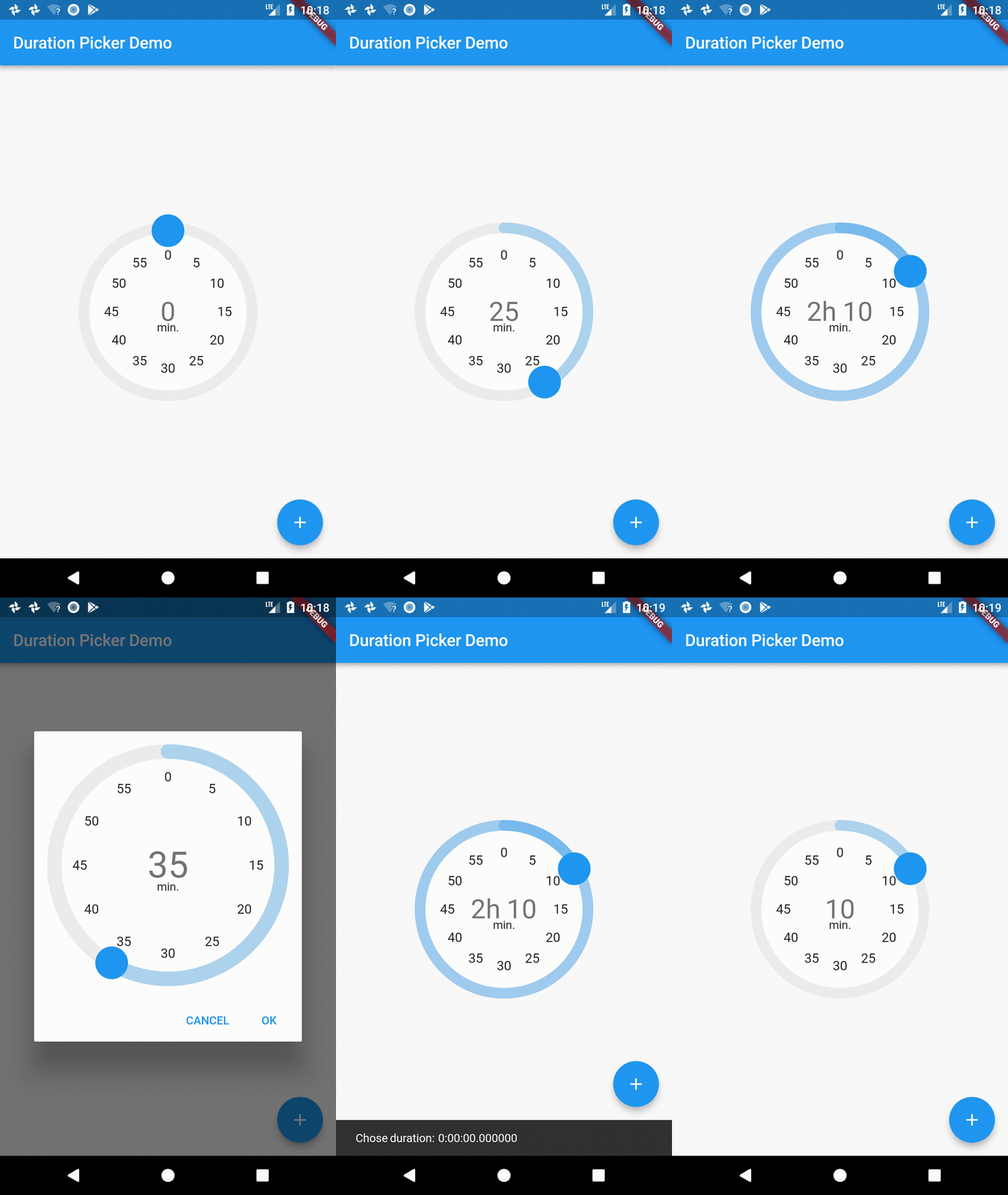
A widget for picking durations, inspired by Material Time Picker.
54Likes 6030-day downloads40Pub points
Platforms unavailable
A Flutter Widget for allowing a user to pick a duration (e.g. 5mins, 1h 30mins, etc)

English project snapshot. Visit GitHub for the latest content.
A little widget for picking durations. Heavily inspired from the Material Design time picker widget.
This repo is unmaintained, please check out the fork here: https://github.com/juliansteenbakker/duration_picker
dependencies:
  flutter_duration_picker: "^1.0.0"
import 'package:flutter/material.dart';
import 'package:flutter_duration_picker/flutter_duration_picker.dart';

void main() => runApp(new MyApp());

class MyApp extends StatelessWidget {
  @override
  Widget build(BuildContext context) {
    return new MaterialApp(
      title: 'Duration Picker Demo',
      theme: new ThemeData(
        primarySwatch: Colors.blue,
      ),
      home: new MyHomePage(title: 'Duration Picker Demo'),
    );
  }
}

class MyHomePage extends StatefulWidget {
  MyHomePage({Key key, this.title}) : super(key: key);

  final String title;

  @override
  _MyHomePageState createState() => new _MyHomePageState();
}

class _MyHomePageState extends State<MyHomePage> {
  Duration _duration = Duration(hours: 0, minutes: 0);
  @override
  Widget build(BuildContext context) {
    return new Scaffold(
      appBar: new AppBar(
        title: new Text(widget.title),
      ),
      body: new Center(
        child: new Column(
          mainAxisAlignment: MainAxisAlignment.center,
          children: <Widget>[
            new Expanded(
		// Use it from the context of a stateful widget, passing in
		// and saving the duration as a state variable.
                child: DurationPicker(
              duration: _duration,
              onChange: (val) {
                this.setState(() => _duration = val);
              },
              snapToMins: 5.0,
            ))
          ],
        ),
      ),
      floatingActionButton: Builder(
          builder: (BuildContext context) => new FloatingActionButton(
                onPressed: () async {
		  // Use it as a dialog, passing in an optional initial time
		  // and returning a promise that resolves to the duration
		  // chosen when the dialog is accepted. Null when cancelled.
                  Duration resultingDuration = await showDurationPicker(
                    context: context,
                    initialTime: new Duration(minutes: 30),
                  );
                  Scaffold.of(context).showSnackBar(new SnackBar(
                      content: new Text("Chose duration: $resultingDuration")));
                },
                tooltip: 'Popup Duration Picker',
                child: new Icon(Icons.add),
              )),
    );
  }
}
Dependency list 2 items
{"sdk":"flutter"}{"sdk":"flutter"}Start with your use case, compare repository activity, and check the original project before adopting it.
“A repository is the most basic element of GitHub.”
GitHub Docs — About repositories ↗