
time-duration-picker
A flutter package for picking duration of time
- Stars
- 8
- Forks
- 6
- Last push (UTC)
- Apr 10, 2024
- Project status
- Active
Original README
English project snapshot. Visit GitHub for the latest content.
Time Duration Picker
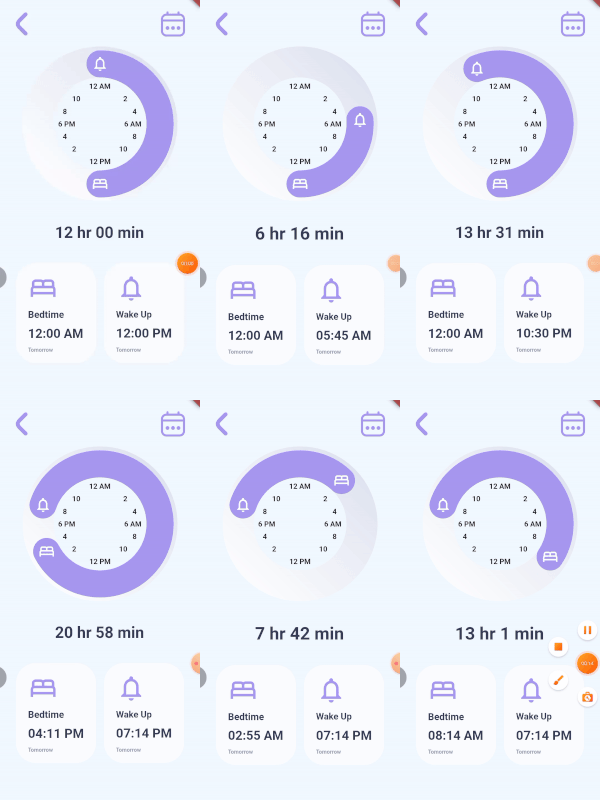
A time picker for paired consecutive tasks. It lets you specify the icons for each of your actions and callbacks when the user rotates each icon. You can optionally give callback for the time duration, decorations for the knob, the knob background, the clock and also color for your icons. The time and duration values are not displayed by the TimeDurationPicker widget, instead they are passed to the callbacks provided.
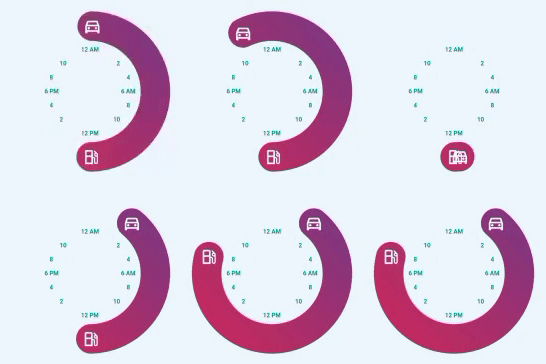
TimeDurationPicker(
      diameter: 300,
      icon1Data: Icons.directions_car_outlined,
      icon2Data: Icons.local_gas_station_outlined,
      knobDecoration: const BoxDecoration(
        gradient: LinearGradient(
          begin: Alignment.bottomLeft,
          end: Alignment.topRight,
          colors: [
            Color.fromRGBO(204, 43, 94, 1),
            Color.fromRGBO(117, 58, 136, 1),
          ],
        ),
      ),
      clockTextStyle: const TextStyle(
          color: Colors.teal, fontWeight: FontWeight.bold),
      onIcon1RotatedCallback: (value) {
        setState(() {
          goTime = value;
        });
      },
      onIcon2RotatedCallback: (value) {
        setState(() {
          gasTime = value;
        });
      },),
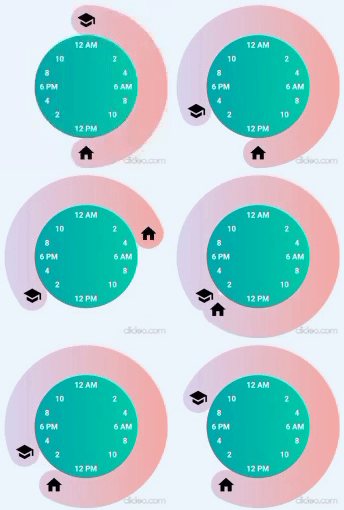
TimeDurationPicker(
  diameter: 305,
  icon1Data: Icons.school,
  icon2Data: Icons.home,
  clockTextStyle: const TextStyle(
      color: Colors.white, fontWeight: FontWeight.bold),
  iconColor: Colors.black,
  knobDecoration: const BoxDecoration(
    gradient: LinearGradient(
      colors: [
        Color.fromRGBO(221, 214, 243, 1),
        Color.fromRGBO(250, 172, 168, 1),
      ],
    ),
  ),
  clockDecoration: const BoxDecoration(
    gradient: LinearGradient(
      colors: [
        Color.fromRGBO(2, 170, 176, 1),
        Color.fromRGBO(0, 205, 172, 1),
      ],
    ),
  ),
  onIcon1RotatedCallback: (value) {
    setState(() {
      schoolTime = value;
    });
  },
  onIcon2RotatedCallback: (value) {
    setState(() {
      homeTime = value;
    });
  },
  setDurationCallback: (value) {
    setState(() {
      sleepDuration = value;
    });
  },
)
Inspired by Iphone Alarm UI Design by Ghulam Rasool

Surafel Tariku ↗
Categories
Dependencies used
Dependency list 3 items
- flutter
{"sdk":"flutter"} - flutter_testDevelopment
{"sdk":"flutter"} - flutter_lintsDevelopment
^1.0.0
How do I choose a repository?
Start with your use case, compare repository activity, and check the original project before adopting it.
- Search by repository name, owner or description, then narrow the results by topic.
- Compare stars, forks and recent pushes. Stars show community interest, not a guarantee of quality.
- Read the README, license and issues on GitHub before using a project.
Sources and maintenance
“A repository is the most basic element of GitHub.”
GitHub Docs — About repositories ↗