
expansion_widget
An edited version of Expansion Tile that allows you customize tile widget and animation.

- Stars
- 5
- Forks
- 4
- Last push (UTC)
- Apr 16, 2024
- Project status
- Active
Original README
English project snapshot. Visit GitHub for the latest content.
expansion_widget
An edited version of Expansion Tile that allows you customize tile widget and animation.
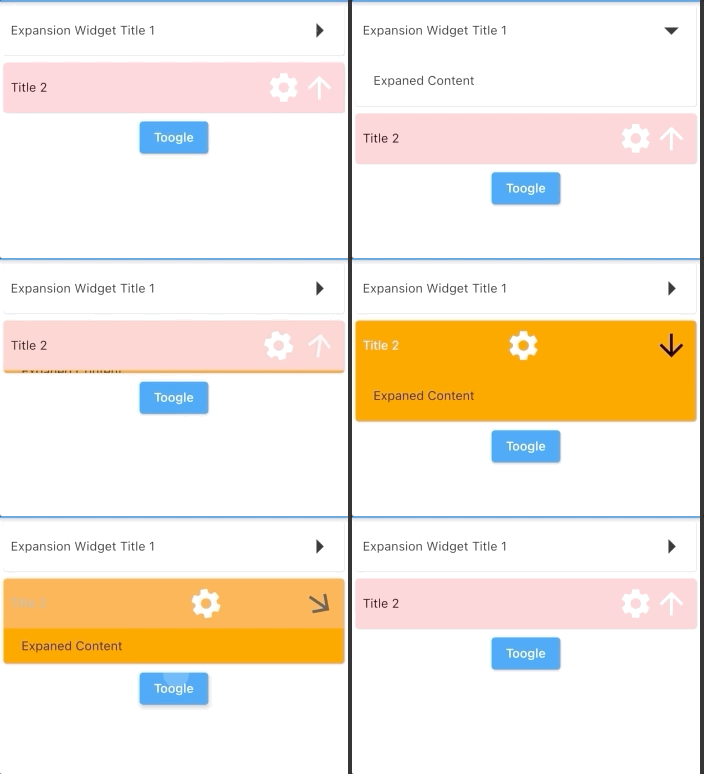
Parameters
| key | Key? | |
|---|---|---|
| titleBuilder | Widget Function( animationValue, easeInValue, isExpanded, toggleFunction) | required The builder of title. Typically a [Button] widget that call [toggleFunction] when pressed. |
| content | Widget | required The widget that are displayed when the expansionWidget expands. |
| initiallyExpanded | bool | default: false Specifies if the expansionWidget is initially expanded (true) or collapsed (false, the default). |
| maintainState | bool | default: false Specifies whether the state of the content is maintained when the expansionWidget expands and collapses. |
| expandedAlignment | Alignment? | default: Alignment.center Specifies the alignment of [content], which are arranged in a column when the expansionWidget is expanded. |
| onSaveState | Function (bool isExpanded)? | Function to save expansion state Called when expansion state changed |
| onRestoreState | bool? Function()? | default: null function to restore expansion state. Return null if there is no state to store, in this case, [initiallyExpanded] will be used |
| duration | Duration | default: 200 ms The length of time of animation |
| onExpansionWillChange | bool Function(bool)? | default: null Called when the widget will change expanded state. When the widget is going to start expanding/collapsing, this function is called with the value true/false. Return false to prevent expanded state to change. Return true(default) to allow expanded state changing. |
| onExpansionChanged | Function(bool)? | default: null Called when the widget expands or collapses. When the widget starts expanding, this function is called with the value true. When the tile starts collapsing, this function is called with the value false. |
Usage
import 'package:expansion_widget/expansion_widget.dart';
import 'dart:math' as math;

ExpansionWidget(
    initiallyExpanded: true,
    titleBuilder: (double animationValue, _, bool isExpaned, toogleFunction) {
      return InkWell(
          onTap: () => toogleFunction(animated: true),
          child: Padding(
            padding: EdgeInsets.all(8),
            child: Row(
              crossAxisAlignment: CrossAxisAlignment.center,
              children: [
                Expanded(child: Text('Expansion Widget Title 1')),
                Transform.rotate(
                  angle: math.pi * animationValue / 2,
                  child: Icon(Icons.arrow_right, size: 40),
                  alignment: Alignment.center,
                )
              ],
            ),
          ));
    },
    content: Container(
      width: double.infinity,
      color: Colors.grey.shade100,
      padding: EdgeInsets.all(20),
      child: Text('Expaned Content'),
    ))
Or using ExpansionWidget.autoSaveState() to auto save/restore expansion state.

GitHub author
datvu7 ↗
LanguagesC++CMakeDartHTMLSwiftCKotlinObjective-C
Categories
Dependencies used
Dependency list 2 items
- flutter
{"sdk":"flutter"} - flutter_testDevelopment
{"sdk":"flutter"}
How do I choose a repository?
Start with your use case, compare repository activity, and check the original project before adopting it.
- Search by repository name, owner or description, then narrow the results by topic.
- Compare stars, forks and recent pushes. Stars show community interest, not a guarantee of quality.
- Read the README, license and issues on GitHub before using a project.
Sources and maintenance
“A repository is the most basic element of GitHub.”
GitHub Docs — About repositories ↗
- datvu7/expansion_widget · GitHub ↗
- GitHub Docs — Saving repositories with stars ↗
- Directory maintained by Ducafecat ↗