

 v2.0.2
select_dialog
Package designed to select an item from a list, with the option to filter and even search the items online.
97Likes 3K30-day downloads150Pub points
AndroidiOSWebmacOSWindowsLinux
Flutter package designed to select an item from a list, with the option to filter and even search the items online.

English project snapshot. Visit GitHub for the latest content.
Package designed to select an item from a list, with the option to filter and even search the items online.


Non Null Safety Version: 1.2.3 or less
Null Safety Version: 2.0.0 or more
select_dialog: <last version>
import 'package:select_dialog/select_dialog.dart';
String ex1 = "No value selected";

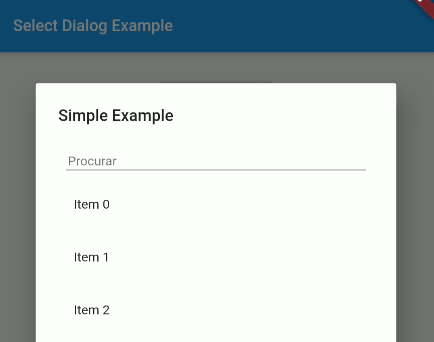
SelectDialog.showModal<String>(
  context,
  label: "Simple Example",
  selectedValue: ex1,
  items: List.generate(50, (index) => "Item $index"),
  onChange: (String selected) {
    setState(() {
      ex1 = selected;
    });
  },
);
List<String> ex5 = [];

SelectDialog.showModal<String>(
  context,
  label: "Multiple Items Example",
  multipleSelectedValues: ex5,
  items: List.generate(50, (index) => "Item $index"),
  onMultipleItemsChange: (List<String> selected) {
    setState(() {
      ex5 = selected;
    });
  },
);
To use a template as an item type, you need to implement toString, equals and hashcode, as shown below:
class UserModel {
  final String id;
  final DateTime createdAt;
  final String name;
  final String avatar;

  UserModel({this.id, this.createdAt, this.name, this.avatar});

  @override
  String toString() => name;

  @override
  operator ==(o) => o is UserModel && o.id == id;

  @override
  int get hashCode => id.hashCode^name.hashCode^createdAt.hashCode;

}
This project is a starting point for a Dart package, a library module containing code that can be shared easily across multiple Flutter or Dart projects.
For help getting started with Flutter, view our online documentation, which offers tutorials, samples, guidance on mobile development, and a full API reference.
Dependency list 2 items
{"sdk":"flutter"}^1.24.6Start with your use case, compare repository activity, and check the original project before adopting it.
“A repository is the most basic element of GitHub.”
GitHub Docs — About repositories ↗