

v1.8.0
highlight_text
With this package you can highlight words and create specific styles and actions.
133Likes 11K30-day downloads150Pub points
AndroidiOSWebmacOSWindowsLinux
A flutter plugin to highlight words from a text

English project snapshot. Visit GitHub for the latest content.
A flutter package to highlight words from a text.
To use this package, add highlight_text as a dependency in your pubspec.yaml file.
With this package you can highlight words and create specific actions for each highlighted word, you can customize the style of each word separately or create a unique style for all of them, you can also customize the style of the rest of the text.
Import the highlight library
import 'package:highlight_text/highlight_text.dart';
You should use the HighlightedWord class to specify the dictionary words in a Map object
Map<String, HighlightedWord> words = {
    "Flutter": HighlightedWord(
        onTap: () {
            print("Flutter");
        },
        textStyle: textStyle,
    ),
    "open-source": HighlightedWord(
        onTap: () {
            print("open-source");
        },
        textStyle: textStyle,
    ),
    "Android": HighlightedWord(
        onTap: () {
            print("Android");
        },
        textStyle: textStyle,
    ),
};
Now you can call the TextHighlight widget
TextHighlight(
    text: text, // You need to pass the string you want the highlights
    words: words, // Your dictionary words
    textStyle: TextStyle( // You can set the general style, like a Text()
        fontSize: 20.0,
        color: Colors.black,
    ),
    textAlign: TextAlign.justify, // You can use any attribute of the RichText widget
),
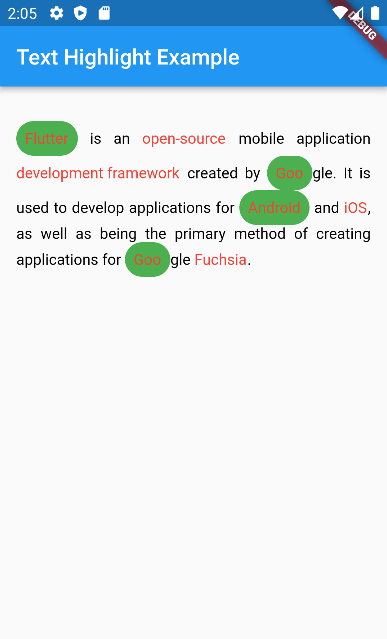
Now you can customize better the words you highlight, just like a Container.
It was added decoration and padding fields to HighlightedWord object, so you can do whatever you want to customize it.
HighlightedWord(
    onTap: () {},
    textStyle: textStyle,
    decoration: BoxDecoration(
        color: Colors.green,
        borderRadius: BorderRadius.circular(50),
    ),
    padding: EdgeInsets.all(8.0),
),
enableCaseSensitive renamed to matchCase to be clearer about what it does
TextHighlight(
    text: text,
    words: words,
    matchCase: true // will highlight only exactly the same string
),
Dependency list 2 items
{"sdk":"flutter"}{"sdk":"flutter"}Start with your use case, compare repository activity, and check the original project before adopting it.
“A repository is the most basic element of GitHub.”
GitHub Docs — About repositories ↗