
 v1.3.0
smooth_sheets
Sheet widgets with smooth motion and great flexibility. Also supports nested navigation in both imperative and declarative ways.
657Likes 55.8K30-day downloads150Pub points
AndroidiOSWebmacOSWindowsLinux
Sheet widgets with smooth motion and great flexibility.

Dependency list 10 items
^1.17.1{"sdk":"flutter"}^1.9.1^3.1.0^11.1.0^2.4.9{"sdk":"flutter"}>=16.2.1 <19.0.0^5.4.4^1.23.0English project snapshot. Visit GitHub for the latest content.
GitHub Repo stars Pub Version Pub Likes Pub Points
smooth_sheets offers modal and persistent sheet widgets for Flutter apps. The key features are:
Navigator.push is supported and it works with Navigator 2.0 packages like go_router as well.| https://github.com/fujidaiti/smooth_sheets/assets/68946713/636d5ca8-2883-4447-ad75-47fcb210718c |
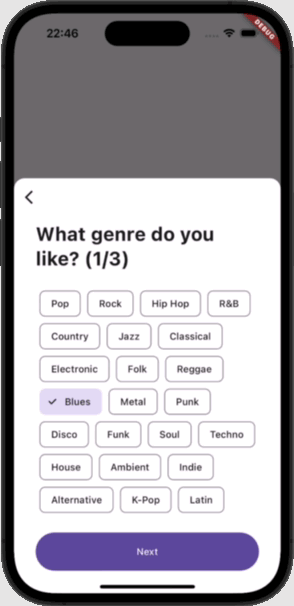
AI Playlist GeneratorAn AI assistant that helps create a music playlist based on the user's preferences. See the cookbook for more details. Key components:
|
| https://github.com/fujidaiti/smooth_sheets/assets/68946713/cfbc79d1-4290-4dec-88bd-a355a27726ea |
Safari appA practical example of ios-style modal sheets. See the cookbook for more details. Key components:
|
| https://github.com/fujidaiti/smooth_sheets/assets/68946713/1fb3f047-c993-42be-9a7e-b3efc89be635 |
Airbnb mobile app cloneA partial clone of the Airbnb mobile app. The user can drag the house list down to reveal the map behind it. See the cookbook for more details. Key components:
|
| https://github.com/fujidaiti/smooth_sheets/assets/68946713/b1e0f8d0-7037-48c5-ab4e-80a2c43df43b |
Todo ListA simple Todo app that shows how a sheet handles the on-screen keyboard. See the cookbook for more details. Used components:
|
There are few packages on pub.dev that supports nested navigation with motion animation for page transitions. One of the great choices for this usecase is wolt_modal_sheet, which this package is inspired by. Although smooth_sheet has similar features with wolt_modal_sheet, it is not intended to be a replacement of that package. Here is some differences between those 2 packages:
| wolt_modal_sheet | smooth_sheets | |
|---|---|---|
| Design | Based on Wolt's design guideline | Not restricted to a specific design, fully customizable |
| Navigation mechanism | Manage the page index in ValueNotifier | Works with built-in Navigator API (both of imperative and declarative) |
| Scrollable content | Supported | Supported |
| Persistent sheets | Not supported | Supported |
| Screen size adaptation | The sheet appears as a dialog on large screens | Not supported |
Several resources are available for learning the functionalities of this package.
This section provides descriptions for each core component and links to related resources for further learning.
SheetOffset represents a position of the sheet within the SheetViewport where the sheet is rendered. It's used in various situations, e.g., specifing the initial position of the sheet or defining a set of positions to which the sheet should snap.
The basic sheet widget that can be dragged and scrollled. It can also size itself based on its content or stretched to fill available space.
See also:
That navigation is built on navigator_resizable. Use that package directly if you want the same paged or dialog navigation without a sheet.
See also:
A sheet can be displayed as a modal sheet using ModalSheetRoute for imperative navigation, or ModalSheetPage for declarative navigation.
Furthermore, the modal sheets in the style of iOS 15 are also supported. For imperative navigation, use CupertinoModalSheetRoute, and for declarative navigation, use CupertinoModalSheetPage, respectively.
See also:
A physics determines how the sheet will behave when over-dragged or under-dragged, or when the user stops dragging. This is independent of the snapping behavior, which is configured via SheetSnapGrid. There are 2 predefined physics:
See also:
Determines how the sheet snaps to certain offsets when the user stops dragging or when an animation completes.
There are several predefined snap grid types:
See also:
Like ScrollController for scrollable widget, the SheetController can be used to animate or observe the offset (position) of a sheet.
See also:
Simillar to the Scaffold, it offers the slots for a topBar (like AppBar) and a bottomBar (like BottomNavigationBar).
See also:
bottomBarVisibility property.Formerly SheetPositionDrivenAnimation, this allows creating animations driven by the sheet's offset. It's a special kind of Animation whose value changes (typically from 0 to 1) as the sheet's offset moves between specified startOffset and endOffset values (defined using SheetOffset). This is useful for synchronizing UI changes (like fades, slides, or color changes) with the sheet's movement.
See also:
SheetOffsetDrivenAnimation can be used to hide/show UI elements based on the sheet's drag position.A sheet dispatches a SheetNotification when its offset changes. This can be used to observe the offset and other metrics (like min/max offset, viewport size) of a descendant sheet from an ancestor widget using a NotificationListener.
NotificationListener<SheetNotification>(
  onNotification: (notification) {
    // Access sheet metrics via notification.metrics (e.g., offset, minOffset, maxOffset)
    debugPrint('Current offset: ${notification.metrics.offset}');
    return false; // Return true to stop the notification from bubbling up
  },
  child: SheetViewport( // Required for non-modal sheets
    child: Sheet(
      // ... sheet configuration
    ),
  ),
),
See also:
SheetKeyboardDismissBehavior determines when the sheet should dismiss the on-screen keyboard when dragged. This feature is similar to ScrollViewKeyboardDismissBehavior for scrollable widgets. This behavior is configured via the Sheet.keyboardDismissBehavior property.
Although it is easy to create custom behaviors by implementing the SheetKeyboardDismissBehavior interface, there are predefined behaviors available as static constants for convenience:
See also: